EasyManua.ls Logo

Casio TK-2300 - Closing a Check Memory

Casio TK-2300
129 pages
Print Icon
To Next Page IconTo Next Page
To Previous Page IconTo Previous Page
Loading...
TK-2300/TK-2700
Operation
Manual
Closing
a
Check
Memory
New/Old
Check
Key
Operation
70
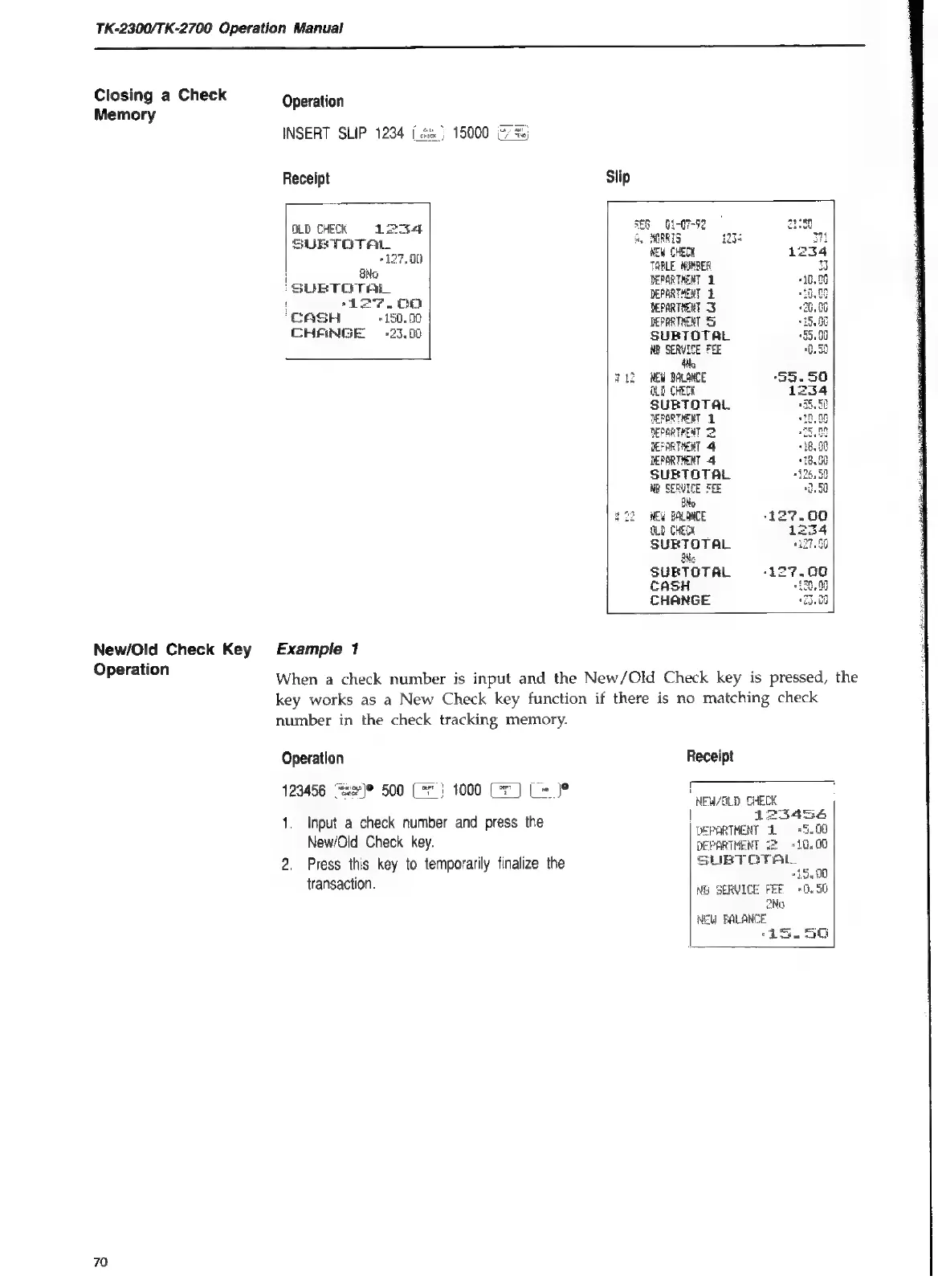
Operation
INSERT
SLIP
1234
[
Receipt
Slip
3E6
G1-07-72
ay
MORRTS
NEW
CHECK
TABLE
NUMBER
DEPGRTHENT
1
DEPARTHENT
2
DEPARTHENT
DEPARTMENT
S
SUBTOTAL
NB
SERVICE
FEE
Ne
BLD
NEW
BALANCE
ALD
CHECK
SUBTOTAL
DEPORTHENT
2
RepaRTHEAT
>
TEFARTHERT
4
DEPARTHENT
4
SUBTOTAL
NB
SERVICE
FEE
oo
222
WEW
BALANCE
127.60
SLD
CHECK
254
SUBTOTAL
17.0
WNe
SUBTOTAL
CASH
CHANGE
OLD
CHECK
ins4
SUBTOTAL
eS
ro)
rh
OO
H
No
SUE
TOTAL
'
-t27.00
CASH
“0.
00
THANGE
=
+25,.00
Example
1
When
a
check
number
is
input
and
the
New/Old
Check
key
is
pressed,
the
key
works
as
a
New
Check
key
function
if
there
is
no
matching
check
number
in
the
check
tracking
memory.
Operation
Receipt
“Rse)0
*}
1000
(=)
[= Je
a
129456
se?
500
Cr}
1000
CF}
C=}
NEW/CLD
CHECK
|
123456
DEPARTMENT
2
+5.00
1.
Input
a
check
number
and
press
the
New/Old
Check
key.
2.
Press
this
key
to
temporarily
finalize
the
transaction.

Table of Contents

Related product manuals