EasyManua.ls Logo

Casio VZ-10M - Page 27

Casio VZ-10M
113 pages
Print Icon
To Next Page IconTo Next Page
To Previous Page IconTo Previous Page
Loading...
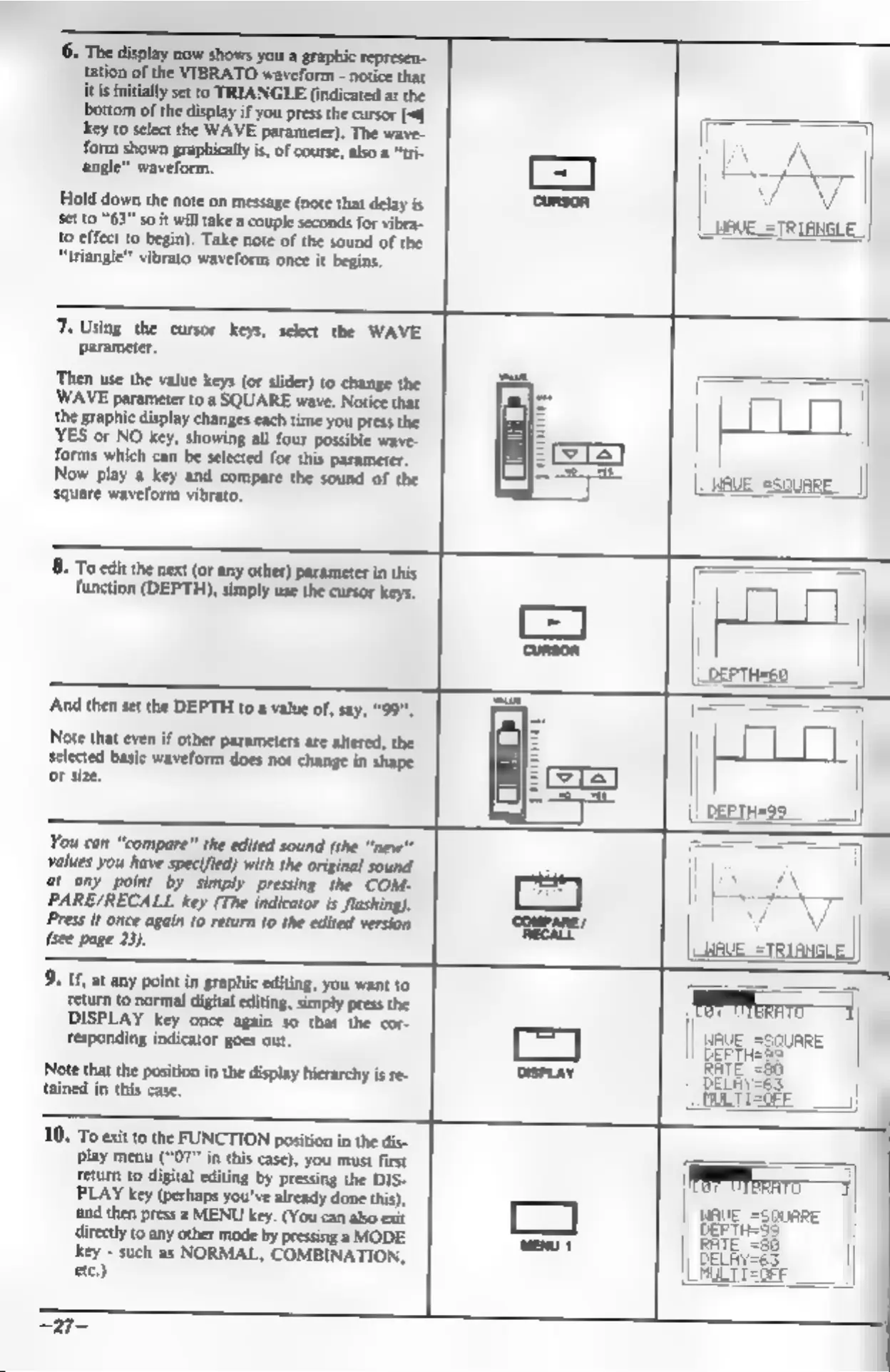
6.
The
display
now
shows
you
a
graphic
represen-
tation
of
the
VIBRATO
waveform
-
notice
that
it
is
initially
set
to
TRIANGLE
(indicated
at
the
bottom
of
the
display
if
you
press
the
cursor
[-f]
key
to
select
the
WAVE
parameter).
The
wave-
form
shown
graphically
is,
of
course,
also
a
“tri-
angle”
waveform,
Hold
down
the
note
on
message
(note
that
delay
is
Set
0
“63”
so
it
will
take
a
couple
seconds
for
vibra-
{0
effect
to
begin).
Take
note
of
the
sound
of
the
“triangle”
vibrato
waveform
once
it
begins.
7.
Using
the
cursor
keys,
select
the
WAVE
parameter,
‘Then
use the
value
keys
(or
slider)
to
change
the
WAVE
parameter
to
a
SQUARE
wave.
Notice
that
the
graphic
display
changes
each
time
you
press
the
YES
or
NO
key,
showing
all
four
possible
wave-
forms
which
can
be
selected
for
this
parameter.
Now
play
a
key
and
compare
the
sound
of
the
square
waveform
vibrato,
8,
To
edit
the
next
(or
any
other)
parameter
in
this
function
(DEPTH),
simply
use
the
cursor
keys.
‘And
then
set
the
DEPTH
to
a
value
of,
say,
Note
that
other
parameters
are
altered,
the
selected
basic
waveform
does
not
change
in
shape
aa
=
or
size,
L
You
can
“compare”
the
edited
sound
(the
“"new"*
Values
You
have
specified)
with
the
original
sound
‘at
any
point
by
simply
pressing
the
COM-
PARE/RECALL
key
(The
indicator
is
flashing).
Press
it
once
again
10
return
to
the
edited
version
COMPARE!
RECALL
(s¢e
page
23).
|
9.
If,
at
any
point
in
graphic
editing,
you
want
to
‘return
to
normal
digital
editing,
simply
press
the
DISPLAY
key
once
again
so
that
the
cor-
responding
indicator
goes
out.
Note
that
the
position
in
the
display
hierarchy
is
re-
tained
in
this
case.
|)
eve
DEPTH:
RATE,
10.
To
exit
tothe
FUNCTION
position
ine
ais
|
play
menu
(“07"
in
this
case),
you
must
first
Feturn
to
digital
editing
by
pressing
the
DIS-
PLAY
key
(perhaps
you've
already
done
this),
and
then
press
a
MENU
key.
(You
can
also
exit
directly
to
any
other
mode
by
pressing
a
MODE
key
~
such
as
NORMAL,
COMBINATION,
etc.)
a