EasyManua.ls Logo

Casio VZ-10M - Page 28

Casio VZ-10M
113 pages
Print Icon
To Next Page IconTo Next Page
To Previous Page IconTo Previous Page
Loading...
E
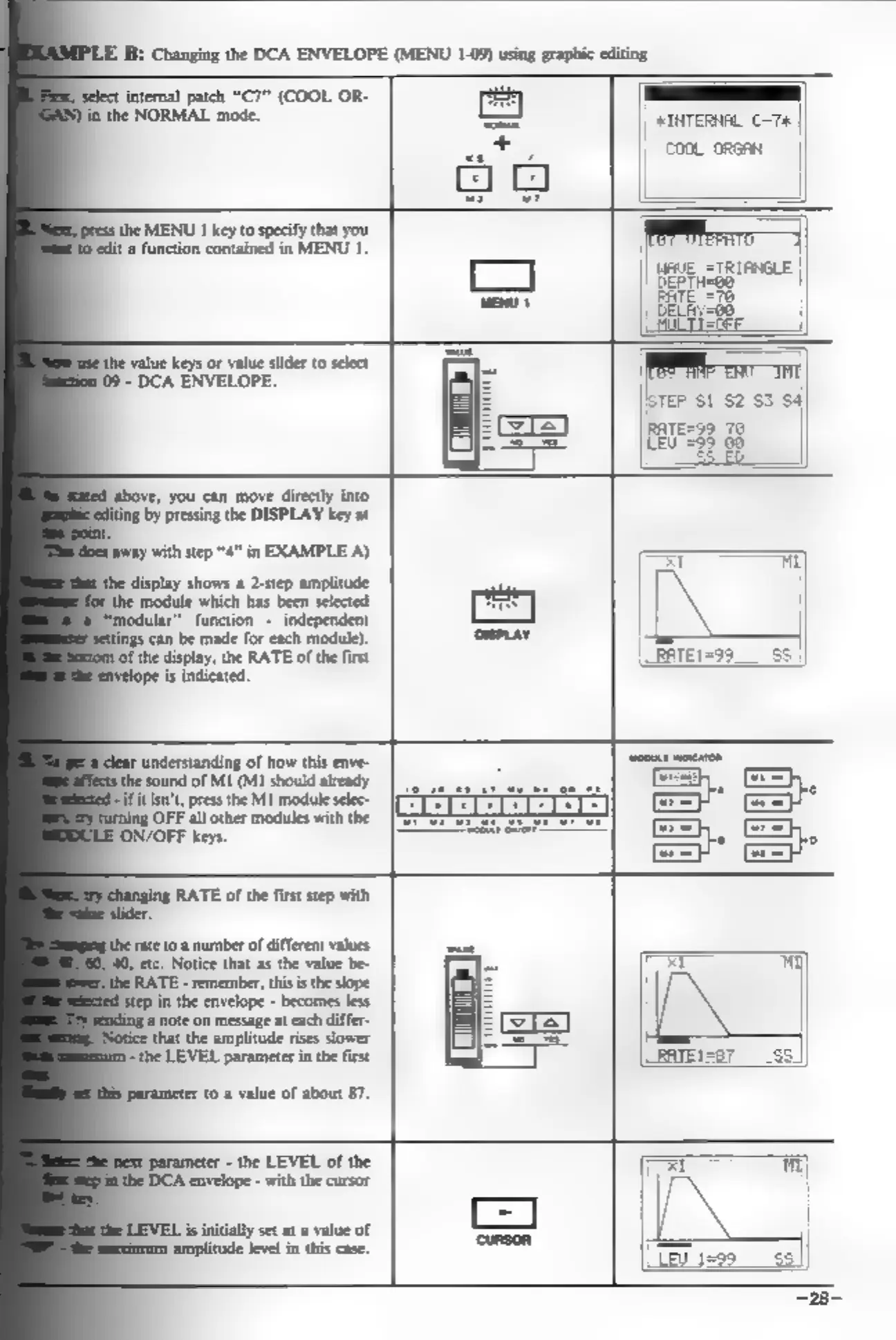
B:
Changing
the
DCA
ENVELOPE
(MENU
1-09)
using
graphic
editing
_
select
internal
patch
“C7”
(COOL
OR-
INTERNAL
C-7#
|
||
CooL
orsRA
ithe
MENU
I
key
to
specify
that
you
‘edit
a
function
contained
in
MENU
1.
FR
CELA
WE
———
the
value
keys
or
value
slider
to
select
{
09
-
DCA
ENVELOPE.
TEP
S1
$2 $3
$4]
RATE=3
70
Leu"=38
00
fabove,
you
can
move
directly
into
by
pressing
the
DISPLAY
key
at
‘away
with
step
“4”
in
EXAMPLE
A)
display
shows
a
2-step
amplitude
the
module
which
has
been
selected
“modular”
function
-
independent
tings
can
be
made
for
each
module).
‘of
the
display,
the
RATE
of
the
first
is
indicated
understanding
of
how
this
enve-
the
sound
of MI
(MI
should
already
if
itisn',
press
the
MI
module
selec-
ng
OFF
all
other
modules
with
the
LE
ON/OFF
keys.
RATE
of
the
first
step
with
rate
to
a
number
of
different
values
40,
etc.
Notice
that
as
the
value
be-
RATE
-
remember,
this
is
the
slope
Step
in
the
envelope
-
becomes
less
‘@
note
on
message
at
each
differ-
that
the
amplitude
rises
slower
the
LEVEL
parameter
in
the
first
fe
t0
a
value
of
about
87.
parameter
-
the
LEVEL
of
the
‘DCA
envelope
-
with
the
cursor
EL
is
initially
set
at
a
value
of
amplitude
level
in
this
case.