EasyManua.ls Logo

Casio VZ-10M - Page 31

Casio VZ-10M
113 pages
Print Icon
To Next Page IconTo Next Page
To Previous Page IconTo Previous Page
Loading...
by
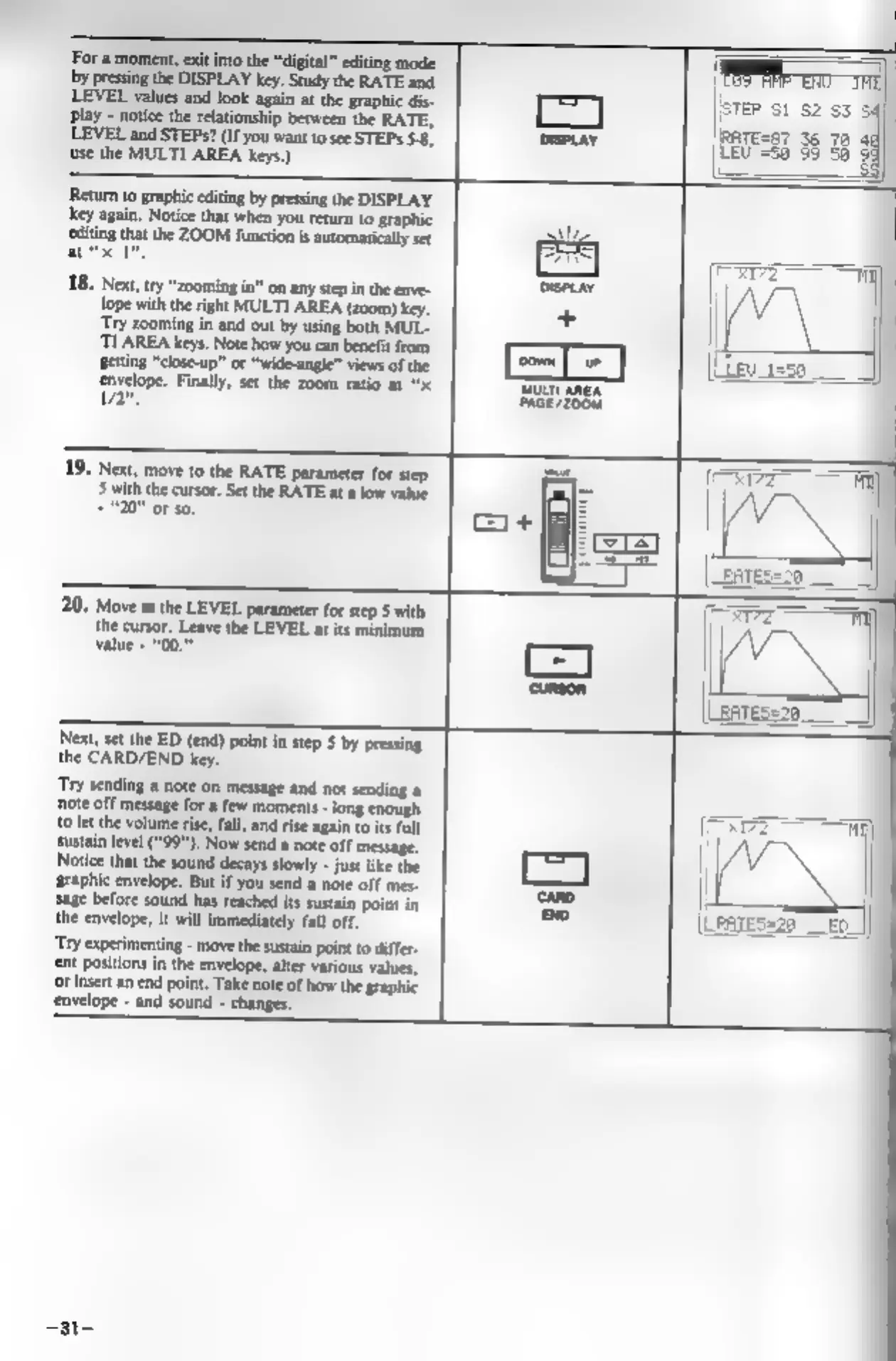
pressing
the
DISPLAY
key.
Study
the
RATE
and
LEVEL
values
and
look
again
at
the
graphic
dis-
play
-
notice
the
relationship
between
the
RATE,
LEVEL
and
STEP?
(If
you
want
to
see
STEPs
5.8,
use
the
MULTI
AREA
keys.)
I
For
a
moment,
exit into
the
“digital”
editing
mode
li
‘Return
to
graphic
editing
by
pressing
the
DISPLAY
key
again.
Notice
that
when
you
return
to
graphic
editing
that
the
ZOOM
function
is
automaticaly
set
atc",
Next,
try
“zooming
in”
on
any
step
in
the
enve-
lope
with
the
right
MULTI
AREA
(200m)
key.
‘Try
zooming
in
and
out
by
using
both
MUL-
‘TLAREA
keys.
Note
how
you
can
benefit
from
Betting
“close-up”
or
“wide-angle”
views
of
the
envelope.
Finally,
set
the
zoom
ratio
at
“x
2",
19,
Next,
move
to
the
RATE
parameter
for
step
5
with
the
cursor.
Set
the
RATE
at
a
low
value
+20"
oF
so,
20.
Move
to
the
LEVEL
parameter
for
step
5
with
the
cursor.
Leave
the
LEVEL
at
its
minimum
value
-
“00.”
=I
Next,
set
the
ED
(end) point
in
step
S
by
pressing
the
CARD/END
key.
‘Try
sending
a
note
on
message
and not
sending
a
note
off
message
for
a
few
moments
-
long
enough
{0
let
the
volume
rise,
fall,
and
rise
again
to
its
full
sustain
level
(“99"),
Now
send
a
note
off
message.
Notice
that
the
sound
decays
slowly
-
just
like
the
‘graphic
envelope.
But
if
you
send
a
note
off
mes-
sage
before
sound
has
reached
its
sustain
point
in
the
envelope,
it
will
immediately
fall
off.
‘Try
experimenting
-
move
the
sustain
point
to
differ-
ent
positions
in
the
envelope,
alter
various
values,
or
insert
an
end
point.
Take
note
of
how
the
graphic
envelope
-
and
sound
-
changes.
fe)
=|
(LRATES=20
_
-31-