EasyManua.ls Logo

Casio VZ-10M - Page 45

Casio VZ-10M
113 pages
Print Icon
To Next Page IconTo Next Page
To Previous Page IconTo Previous Page
Loading...
12
VELOCITY
LEVEL
(DCA)
Parameters
|
O/S_|
MENU
1
—
VALUE
—
MENU
1
—
VALUE
iia
i
Pages
|
1
|
Graphic
Editing
|
vEs
SENSITIVITY
=00~3
I
si
a
CURVE=1~8
[Domain
|
MODULAR
|
Related
Functions
(MENU
1-09)
(MENU
1-10)
(MENU
1-11)
(MENU
2-12)
i
|
(Pod
|
sensirn
cove
|
creas
re
aunetion
features
2
basic
parameters
which
are
used
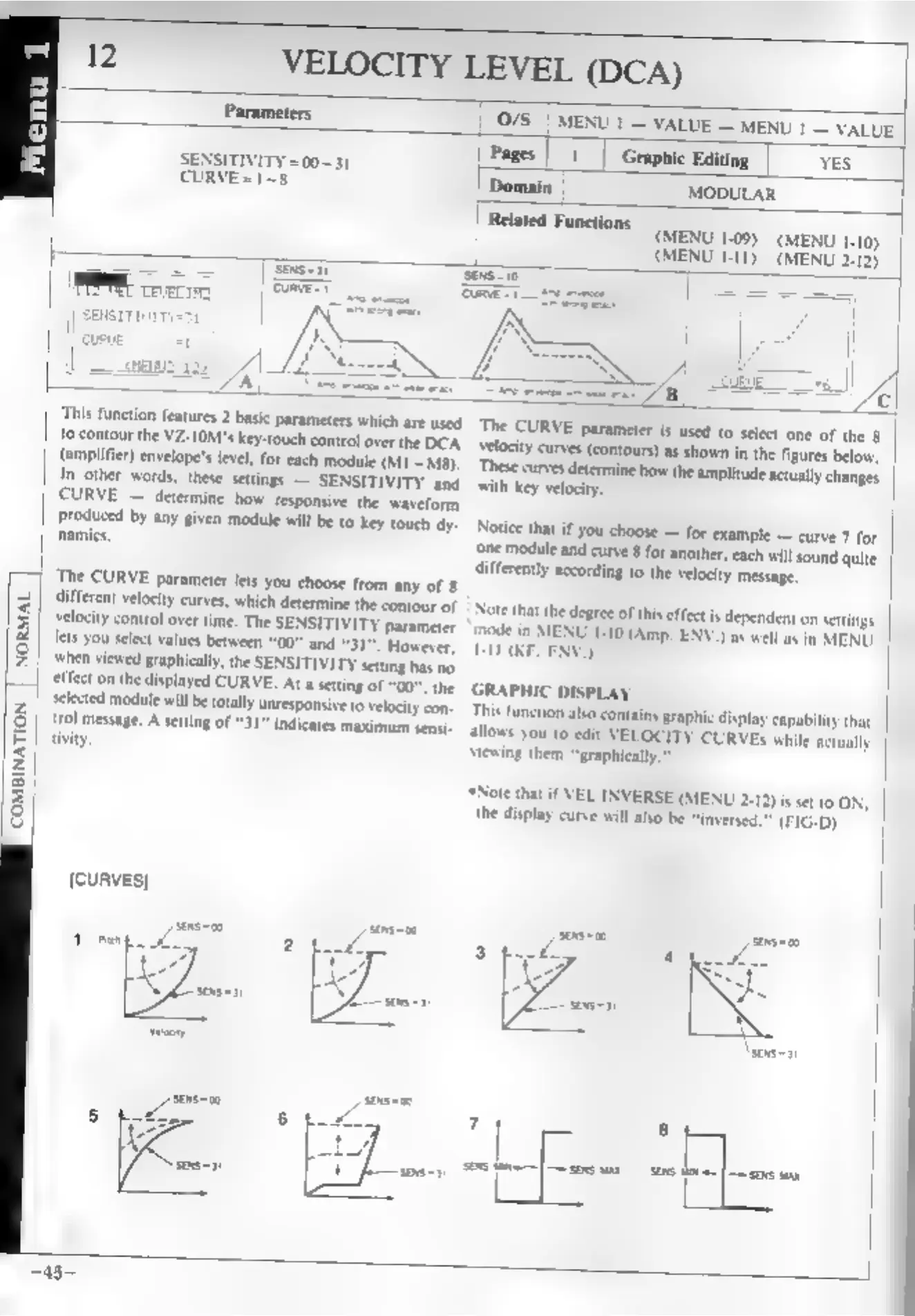
The
CURVE
parameter
is
used
to
select
one
of
the
8
femptins
the
V2-1OM's
key-touch
control
over
the
DCA.
velocity
curves
(contours)
as
shown
is
the
figures
below,
ameter
envelope's
level,
for
each
module
(M1~MB).
These
curves
determine
how
the
amplitude,
actually
changes
4m
ther
words,
these
settings
—
SENSITIVITY
and
with
key
velocity.
CURVE
—
determine
how
responsive
the
waveform
vomies
2
CY
SY
Biven
module
will
be
fo
key
touch
dy-
Notice
that
if
you
choose
—
for
example
—
curve
7
for
namics,
‘one
module
and
curve
8
for
another,
each
will
sound
quite
differently
according
to
the
velocity
message,
‘The
CURVE
parameter
lets
you
choose
from
any
of
§
different
velocity
curves,
which
determine
the
contour
of
|
Note
that
the
degree
of
this
effet.
dependent
on
settings
Jaity
control
over
time,
The
SENSITIVITY
parameter
mode
in
MENU
1-10
(Amp
ENV.)
ent,
in
MENU
lets
you
select
values
between
“00”
and
“31”.
However,
1-11
(KF.
ENV.)
when
viewed
graphically,
the
SENSITIVITY
setting
has
no
effect
on
the
displayed
CURVE.
At
a
setting
of
“00”,
the
GRAPHIC
DISPLAY
NORMAL
|
‘Skid
module
will
be
totally
unresponsive
to
velocity
con-
This
function
alo
contains
graphic
display
capability
that
Ayal
message,
A
setting
of
“31
indicates
maximum
sensi-
allows
you
to
edt
VELOCITY
CUR’)
while
actually
tivity
viewing
them
“graphically.”
‘*Note
that
if
VEL
INVERSE
(MENU
2-12)
is
set
to
ON,
(FIG-D)
the
display
curve
will
also
be
“inversed.
COMBINATION
[CURVES]
Tae:
5