EasyManua.ls Logo

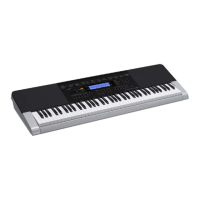
Casio WK-245 - User Manual

Casio WK-245
76 pages
Print Icon
To Next Page IconTo Next Page
Loading...
GUÍA DEL USUARIO
USER’S GUIDE
EN/ES
WK240/CTK4400-ES1A
Guarde toda la información para futuras consultas.
Please keep all information for future reference.
Precauciones de seguridad
Antes de intentar usar el teclado digital, asegúrese de
leer las “Precauciones de seguridad” separadas.
Safety Precautions
Before trying to use the Digital Keyboard, be sure to
read the separate “Safety Precautions”.
CTK
-
4400
WK
-
240
WK
-
245
EnglishEspañol
This recycle mark indicates that the packaging conforms to
the environmental protection legislation in Germany.
Esta marca de reciclaje indica que el empaquetado se
ajusta a la legislación de protección ambiental en Alemania.
MA1402-A Printed in China
K
CTK4400_A5_x1a_EN_ES.indd 1 2014/02/19 10:25:10


Table of Contents

Questions and Answers

  • M
    Morgan NormanSep 10, 2025
    Why are notes stuck on the screen of my Casio WK-245?
    • L
      Laurie CollinsSep 10, 2025
      If keyboard keys or notes remain on the display of your Casio Synthesizer, a Step Up Lesson might be in progress, and the keyboard is waiting for you to play the next note. Cancel the lesson to stop this.
  • M
    Mark SmithAug 22, 2025
    What to do if no sound comes out when I press the keys on my Casio WK-245?
    • J
      Jamie ThompsonAug 22, 2025
      If nothing happens when you press a key on your Casio Synthesizer, first adjust the volume. Check if something is plugged into the back of the keyboard. If a tone in the range of 601 to 608 is selected and there is no sampled sound in memory, nothing will play. You can also turn the power off and then back on to initialize all keyboard settings.
  • T
    Theresa MyersAug 25, 2025
    What to do if my Casio WK-245 display lights up but won't power on?
    • J
      John PorterAug 25, 2025
      If the display lights up briefly but the power doesn't stay on when you press the power button on your Casio Synthesizer, make sure to press the power button firmly and completely.
  • D
    Donna ReynoldsAug 26, 2025
    Why does my Casio Synthesizer sound out of tune?
    • E
      Erica HillAug 27, 2025
      If the pitch of the notes on your Casio Synthesizer sounds strange, check and adjust the transpose and tuning settings. If problems persist, turn the power off and then back on to initialize all settings.
  • A
    Alan WhiteAug 27, 2025
    Why does my Casio WK-245 make a loud sound and then turn off?
    • J
      John WilliamsAug 28, 2025
      If your Casio Synthesizer emits a loud sound and then suddenly powers down, try replacing the batteries with new ones or switch over to AC adapter power.
  • S
    Scott AllenAug 29, 2025
    Why is the display flashing on my Casio Synthesizer?
    • M
      Matthew MillerAug 29, 2025
      If the display on your Casio Synthesizer keeps going out or is flashing, replace the batteries with new ones or switch over to AC adapter power.
  • B
    Brandy OconnorSep 18, 2025
    What to do if something is missing from my Casio Synthesizer box?
    • W
      william36Sep 18, 2025
      If you can’t find something that should be included with your Casio Synthesizer, carefully check inside all of the packing materials.
  • J
    Jose BullockSep 12, 2025
    Why does the reverb change suddenly on my Casio WK-245?
    • K
      Karen McleanSep 12, 2025
      If the reverb of notes on your Casio Synthesizer changes suddenly, check and adjust the VIRTUAL HALL setting and the reverb setting. If that doesn't solve the problem, turn the power off and then back on to initialize all settings.
  • R
    Rhonda EdwardsSep 8, 2025
    Why can't I hear the metronome on my Casio WK-245?
    • K
      kimberly48Sep 8, 2025
      If the metronome on your Casio Synthesizer isn't working, check and adjust the accompaniment volume setting and the song volume. Also, try turning the power off and then back on to initialize all settings.
  • S
    Stephanie NelsonSep 5, 2025
    Why won't built-in songs play on my Casio WK-245 Synthesizer?
    • C
      Cory JenningsSep 5, 2025
      If nothing happens when you start playing a built-in song on your Casio Synthesizer, wait a moment after pressing the button for the song to start. Check and adjust the song volume. If there is no user song stored in memory, song playback will not start when you press while a song in the range of 153 to 162 is selected. You can also turn the power off and then back on to initialize all settings.

Summary

Safety Precautions

General Guide

Mastering Songs with Lessons

Step Up Lesson Flow

Overview of the lesson progression for mastering songs.

Using Auto Accompaniment

Playing All Parts

Enabling chord input for full accompaniment with bass and harmony.

Recording Your Keyboard Play

Recording and Playing Back

Basic steps for recording keyboard performances and playing them back.

Recording to Tracks

Dividing songs into parts and recording each to separate tracks.

Reference

Troubleshooting

Common issues and their solutions for keyboard operation.

Casio WK-245 Specifications

General IconGeneral
Keyboard76 keys
Polyphony48 notes
DisplayLCD
Speakers12cm x 2
Sound SourceAHL
Auto AccompanimentYes
Built-in Songs152
MetronomeYes
Sampling FunctionYes
Music ChallengeYes
Voice PadYes
MIDIYes
Song BankYes
EffectsReverb, Chorus
Built-in SpeakersYes
Recording5 songs, 6 tracks
Digital EffectsReverb
Lesson FunctionYes
Tuning ControlA4 = 415.5 Hz ~ 465.9 Hz
Input/Output TerminalsUSB
Power RequirementsAC adaptor
Power SupplyAC adaptor: AD-E95100L
Transpose+/- 1 octave (-12 to +12 semitones)

Related product manuals