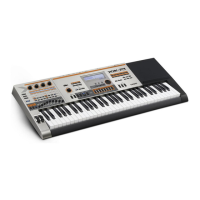
EasyManua.ls Logo

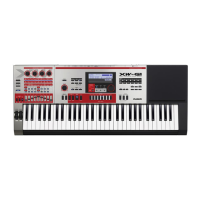
Casio XW-G1 - User Manual

Casio XW-G1
108 pages
Print Icon
To Next Page IconTo Next Page
Loading...
Safety Precautions
Before trying to use the instrument, be sure to read the
separate “Safety Precautions”.
E
XWG1-E-1B
USER’S GUIDE
Please keep all information for future reference.
XW
-
G1

Table of Contents

Questions and Answers

  • T
    Tracey GardnerAug 18, 2025
    Why won't my Casio XW-G1 power on?
    • K
      Kathy PhillipsAug 18, 2025
      If your Casio Synthesizer isn't turning on, ensure the AC adapter is correctly connected or that the batteries are properly installed. If using batteries, try replacing them with fresh ones or switch to AC adapter power.
  • J
    Jennifer VargasAug 20, 2025
    What to do if no sound from Casio XW-G1 when pressing keys?
    • H
      hrobbinsAug 20, 2025
      If pressing keys on your Casio Synthesizer produces no sound, first adjust the main volume. Also, remember that this synthesizer doesn't have built-in speakers, so you need to connect an external device for sound output.
  • T
    Timothy EdwardsAug 22, 2025
    What to do if Casio XW-G1 Synthesizer display lights up but won't turn on?
    • N
      Nicole GonzalezAug 23, 2025
      If the display of your Casio Synthesizer lights up briefly but the power doesn't turn on when you press the power button, make sure to press the power button firmly and completely.
  • M
    Madeline BrownAug 25, 2025
    How to fix data exchange issues between Casio XW-G1 Synthesizer and computer?
    • A
      Amanda AlvarezAug 26, 2025
      If you're having trouble exchanging data between your Casio Synthesizer and a computer: * Check that the USB cable is properly connected to both the synthesizer and the computer. * Ensure the device is correctly selected in your computer’s music software settings. * Try turning off the synthesizer, exiting the music software, then turning the synthesizer back on before restarting the software.
  • C
    christopher03Aug 27, 2025
    What to do if Casio XW-G1 Synthesizer display is flashing?
    • B
      Brittany CarrilloAug 28, 2025
      If the display on your Casio Synthesizer is flashing or going out, try replacing the batteries with new ones or switch to AC adapter power.
  • G
    gfryeAug 30, 2025
    Why do notes keep sounding on my Casio Synthesizer?
    • C
      Carl JohnsonAug 30, 2025
      If notes on your Casio Synthesizer continue to sound without stopping, try replacing the batteries with new ones or switch over to AC adapter power.
  • D
    Dr. Gary CookSep 1, 2025
    Why does my Casio Synthesizer turn off after a few minutes?
    • C
      Christopher HamiltonSep 1, 2025
      If your Casio Synthesizer suddenly powers down after a few minutes, this is likely due to the Auto Power Off feature being triggered.
  • L
    Leah StevensSep 4, 2025
    Why are notes cut off while playing on my Casio Synthesizer?
    • K
      Katherine RyanSep 4, 2025
      If some notes are cut off while playing on your Casio Synthesizer, it's because the number of notes being sounded exceeds the maximum polyphony value of 64 (or 1 to 32 for some tones). This is normal and not a malfunction.
  • K
    kelseygilbertSep 6, 2025
    Why does my Casio XW-G1 make a loud sound and power down?
    • B
      Barbara BraunSep 7, 2025
      If your Casio Synthesizer outputs a loud sound and then suddenly powers down, replace the batteries with new ones or switch over to AC adapter power.
  • T
    tammy05Sep 9, 2025
    Why no sound from Casio Synthesizer Step Sequencer?
    • J
      James GomezSep 9, 2025
      If no sound is produced when you start the Step Sequencer on your Casio Synthesizer, it's because when the arpeggio function is triggered by the Step Sequencer, the sequence won't start until you play something on the keyboard.

Summary

Getting Ready to Play

Connections and Power Supply

Covers connecting external devices, and powering the unit via AC or batteries.

Selecting and Creating Tones

Tone Editing and Saving

Explains how to edit tone parameters and save them as user tones.

Synthesizer Tone Block Parameters

Comprehensive guide to parameters for Synth OSC, PCM, Noise, Filter, Amp, LFO.

Using the Step Sequencer

Step Sequencer Editing and Controls

Covers editing steps, sliders, chains, and saving sequences.

Other Useful Functions

Mixer Settings and Instant Adjustments

Covers mixer operations, instant slider adjustments, and part settings.

Using a Memory Card

Memory Card Operations and Data Types

Covers supported data types, formatting, saving, loading, renaming, and deleting card data.

Reference

Troubleshooting and Error Messages

Lists error messages, troubleshooting symptoms, and solutions.

Casio XW-G1 Specifications

General IconGeneral
TypeSynthesizer
Number of Keys61
KeyboardVelocity-sensitive
Polyphony64 voices
ArpeggiatorYes
SamplingNo
DisplayLCD
Power SupplyAC adapter or batteries
Sound SourcePCM
Sound GeneratorHex Layer
User Memory100
EffectsReverb, Chorus
Sequencer16-track
ConnectivityUSB, MIDI, Audio Out
Weight5.3 kg

Related product manuals