-16-
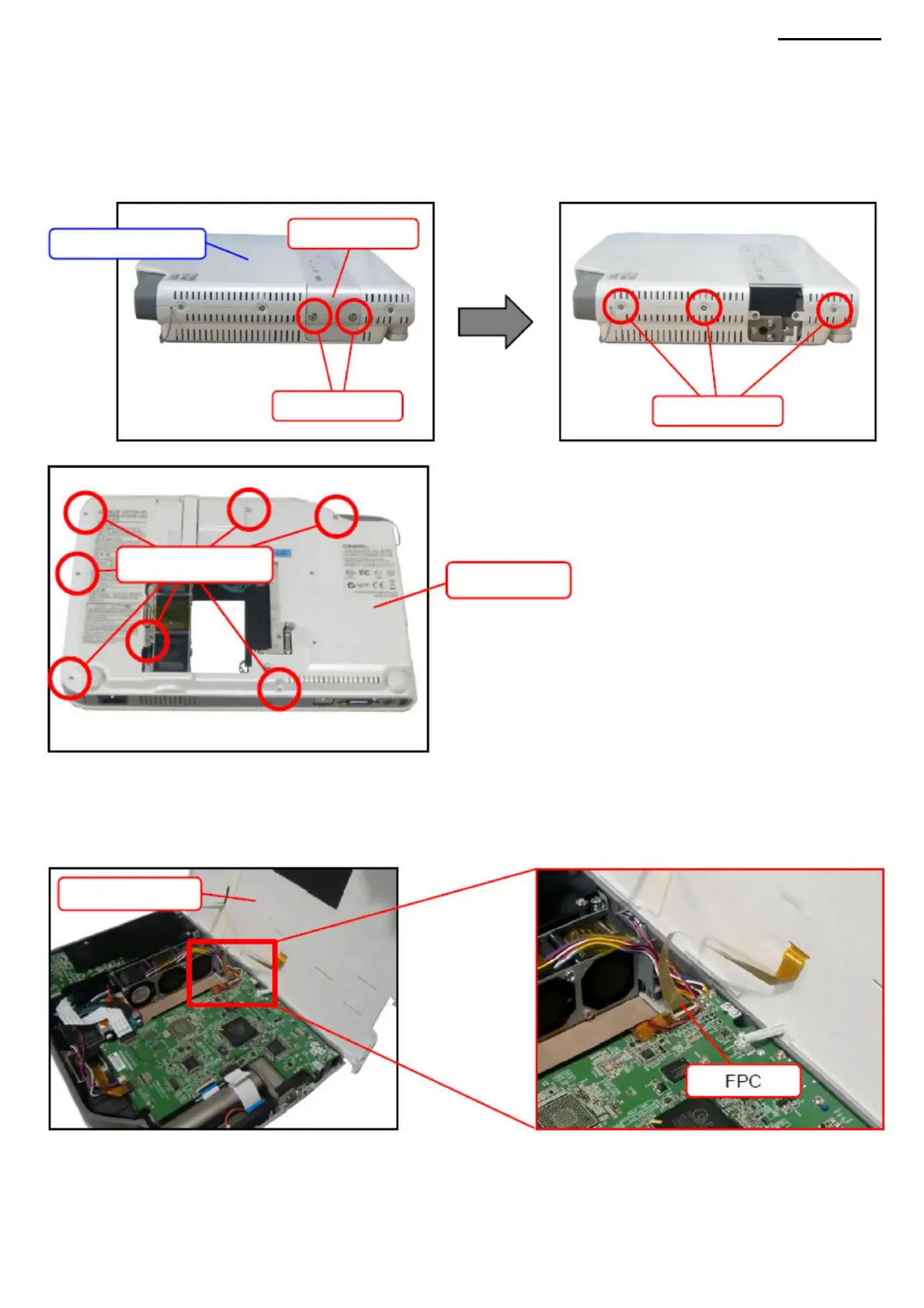
B. TOP BODY COVER B-1. Unscrew the
two screws (S3) and remove the USB cover. NOTE: If
necessary, remove the wireless adapter (YW-3). (Only for model XJ-A245). <ASSEMBLY NOTE: TOP COVER (XJ-
A245 only)>
Screws (S1)
• If the wireless adapter is installed during disassembly, be sure to reinstall it after reassembly. AT 2. Remove three screws
(S1).
TOP
COVER
AT 3. Remove seven screws (S5).
USB COVER
TOP COVER
BOTTOM
COVER
XJ-A240/A245
AT 4. Open the top cover. NOTE:
The top cover is connected to the main board via an FPC cable. Be careful when opening the device. AT 5. Release
the latch and remove the FPC cable.
Screws (S3)
NOTE: The connector lock is very fragile. Be careful when removing the FPC cable. AT 6. Remove the top cover.
Machine Translated by Google



 To Next Page