Section C. ACS Operations Overview
Operates table cylinder (up/down)
Operates can push cyl. #1
Operates can push cyl. #2
Turns washer (post-rinse) on
For testing 1st roll seam thickness
Move seaming roll #1 in and out
Move seaming roll #2 in and out
Table 4 HMI Screen – Seamer – Button Functions
C.2.4 Below Touchscreen
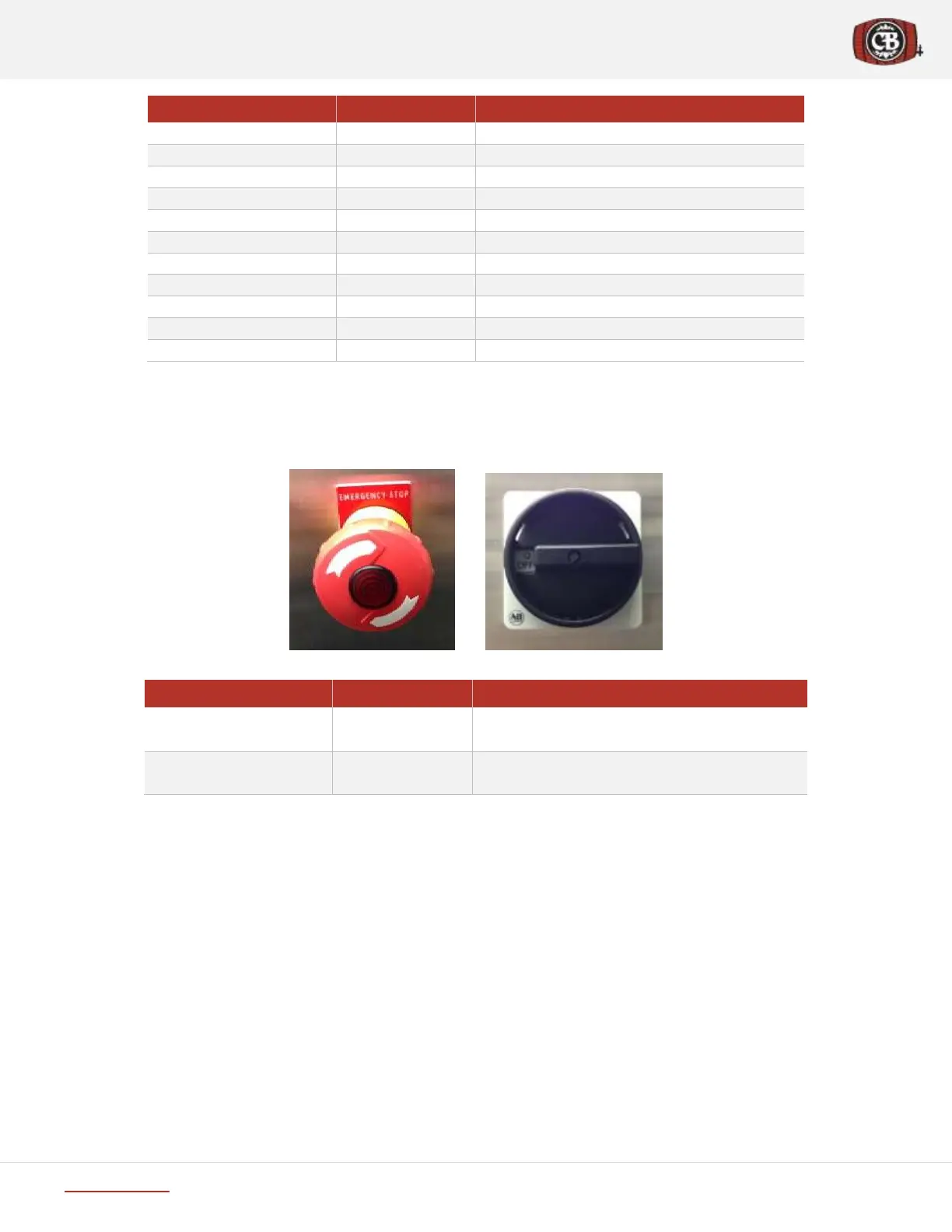
The emergency stop button is located under the touch screen for easy access.
Figure 10 Emergency Stop and Power Buttons
Immediately stops the system from operating,
and pneumatics return to their rest positions
Main Switch (behind
machine)
Table 5 Manual buttons located below the touchscreen
C.3 HMI Control Panel Operations
There are two different operating modes that the ACS can operate in and it is important to understand both of them, why
they both exist and when you should be in which mode.
C.3.1 Manual Mode
Manual mode is generally used for setup and troubleshooting purposes. Most of the buttons and controls you see on the
unit will only work while in manual mode. It allows for the discreet control of each individual operation and allows you to
perform step-by-step operation of the machine to see and evaluate each process individually.
You would typically use this mode when adjusting the seamer or troubleshooting individual system functions.


 To Next Page