1312
OPERATION
—
LINKING THE REMOTE TROUBLESHOOTING
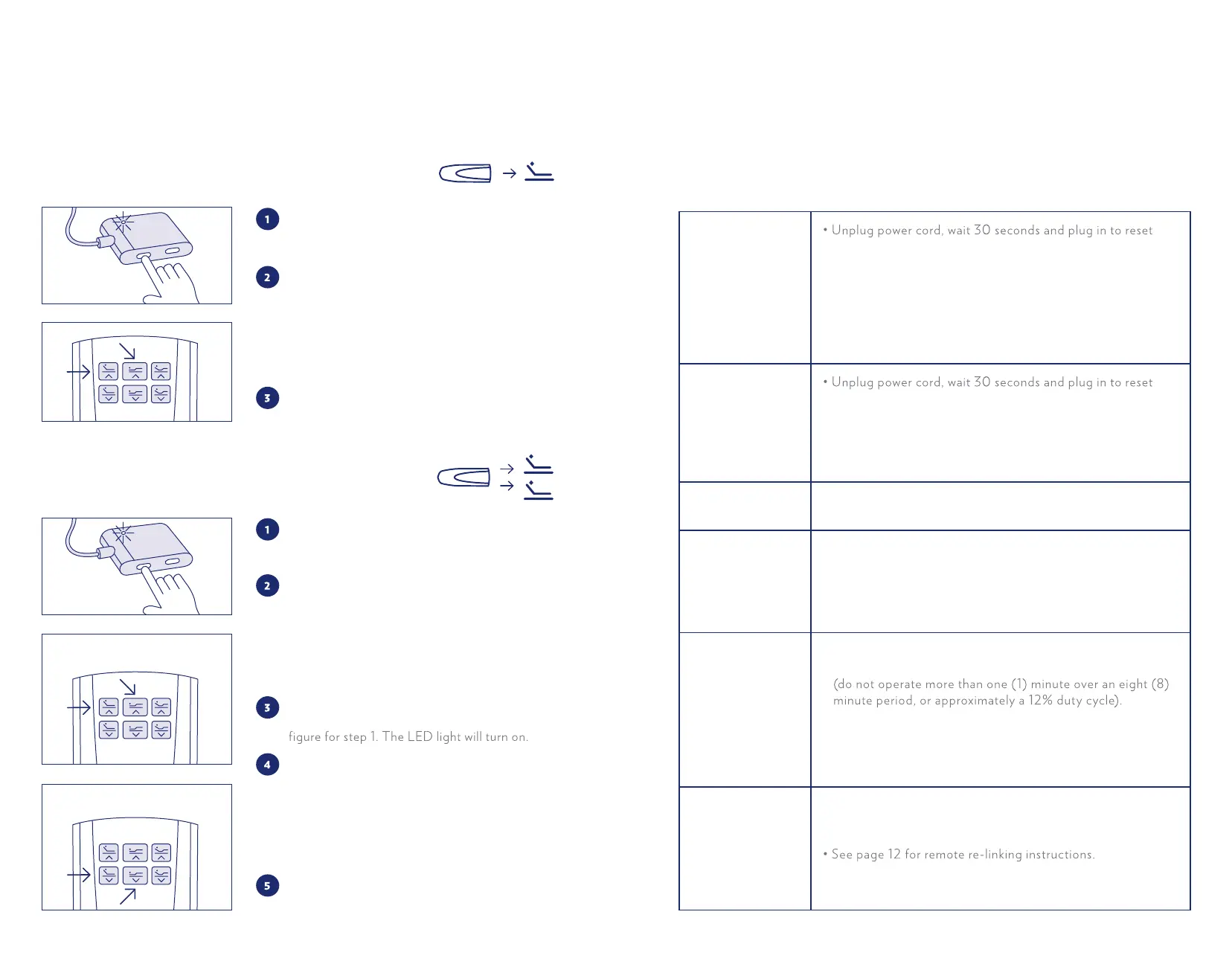
CONNECTING ONE REMOTE TO ONE BASE
CONNECTING ONE REMOTE TO TWO BASES
Double click the Link button as shown until the
LED light on the control box turns on. Release
the button and the LED light will turn on.
Simultaneously press and hold the
Head Up
and Foot Up buttons (the left button and
middle button located on the top row of the
remote) until the remote’s backlight starts
flashing. When the LED light on the control
box turns o and the remote backlight stops
flashing, release the two buttons.
Test the bed to make sure it is working, and
repeat
the steps if it is not.
Locate one of the control boxes. Double click
the Link button on the control box as shown.
The LED light will turn on.
Simultaneously press and hold the
Head Up
and
Foot Up buttons (the left button and the
middle button located on the top row of the
remote) until the remote’s backlight starts
flashing. When the LED light on the control
box turns o and the remote backlight stops
flashing, the linking is complete.
Locate the second control box. Double click the
Link
button on the control box as shown in the
Simultaneously press and hold the Head Down
and
Foot Down buttons (the left button and
the middle button located on the bottom row
of the remote) until the remote’s backlight starts
flashing. When the LED light on the control
box turns o and the remote backlight stops
flashing, the linking is complete.
Test the bed to make sure it is working, and
repeat the steps if it is not.
A
B
Remote control
illuminates and
appears to be
operable, but no
features of the
bed will activate.
electronic components.
• Defective surge protection device or electrical outlet. Test
outlet by plugging in another working appliance.
• Electrical circuit breaker may be tripped. Check electrical
service breaker box to verify.
• Re-link the remote control (see the Linking the Remote
section of this manual for programming procedures).
No features of the
bed will activate.
electronic components.
• Defective surge protection device or electrical outlet. Test
outlet by plugging in another working appliance.
• Electrical circuit breaker may be tripped. Check electrical
circuit breaker box to verify.
Remote control will
not illuminate.
• Replace batteries in the remote control.
Head section will
elevate, but will not
return to the
horizontal (flat)
position.
• Base mechanism may be obstructed. Elevate base and
check fo
r obstruction. Remove obstruction.
• Headboard may be too close to the edge of the mattress.
Verify that distance between headboard brackets and
mattress is sucient. Adjust if required.
Head or Foot Lift
Function has minor
interference during
operation.
• Check batteries in remote, replace if necessary.
• Make sure that you are following the duty cycle of the motor
• Press the lift buttons squarely and accurately.
• Control box may be experiencing common Radio Frequency
Interference from other radio transmitting devices (see
Linking the Remote).
The remote is
causing interference
with appliances,
TV, garage door
opener, another
bed in a dierent
room, etc.
• Lift the battery cover on remote and remove the yellow
sticker to expose the DIP switches. Slide the switches to
dierent positions.
• After re-linking, test the bed to make sure it is working,
and repeat steps if it is not.
In the event the Casper Adjustable Base fails to operate, investigate the symptoms and
possible solutions provided below:


 To Next Page
 Loading...