Catch Power GREEN – Installation manual - Page 6
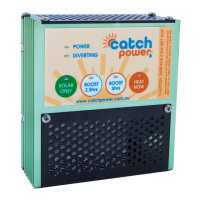
Understanding the CATCH buttons
Each button on the control console represents a different mode of operation. You change modes by
gently pressing on the round circle that represents each button. Catch will let you know if it has
changed modes by the green LED lighting up on the button you have just pressed.
3. Heat Now Button
The Heat Now mode is entered into by pressing the Heat now button.
The Heat Now mode is used to get your hot water heated as soon as you press the button. In this
mode the device will first check to see if it can you power from the Off Peak line. If the off peak is
not installed or is not available then it will use normal mains power.
Once the hot water service hits thermal cut off CATCH will move out of Heat now mode and go back
into Boost 5hrs mode.
Heat Now Lock mode can be entered by pressing the Heat Now button a second time. Catch will tell
you it is in Heat Now Lock mode by flashing the led on the Heat Now Button on and off.
When Catch is in Heat Now Lock mode CATCH stay in Heat Now mode until you manually change it
to another mode.
4. Boost 5 Button
The Boost 5Hrs mode means Catch will attempt to use 5hs of Off Peak energy each day as well as
the excess solar energy to heat hot water.
5. Boost 2.5 Button
The Boost 2.5Hrs mode means Catch will attempt to use 2.55hs of Off Peak energy each day as well
as the excess solar energy to heat hot water.
6. Solar Only Button
The Solar Only mode means Catch will not use any Off Peak energy to heat hot water. The only
energy that will be sent to the hot water service is solar energy that would have otherwise been
exported to the grid.


 To Previous Page