EasyManua.ls Logo

Cateye Air GPS - User Manual

Cateye Air GPS
46 pages
Print Icon
To Next Page IconTo Next Page
Loading...
Cover,
Introduction
Frequently
Asked
Questions
Appendix
5
SET
4
3
2
1
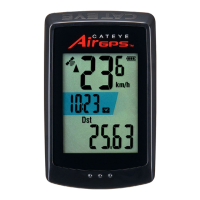
CATEYE
Air GPS
CYCLOCOMPUTER
CC-GPS100
The Bluetooth® word mark and logos are registered trademarks owned by
Bluetooth SIG, Inc. and any use of such marks by CATEYE Co., Ltd. is under
license. Any right relating to any trademark, emblem, logo or trade name
of any commodity or service included in this Document shall revert to the
Company or any other individual right-holder thereof.
1
This instruction manual is subject to be
changed without notice.
https://www.cateye.com/instruction/?id=CC-GPS100
Mounting on a bicycle
Setup
Cover, Introduction
Starting measurement
Viewing measurement data
Changing settings of the
Air GPS and sensors
Frequently Asked
Questions
Further use
Warning / Caution
Product Warranty, etc.
Cateye Cycling™ iOS version
Question and Answer IconNeed help?

Do you have a question about the Cateye Air GPS and is the answer not in the manual?

Summary

Setup

Smartphone

Pairing the Air GPS with the Cateye Cycling™ app on a smartphone.

Mounting on a bicycle

Mounting the bracket

Guidance on securing the mounting bracket to the bicycle's stem or handlebar.

Mounting the sensor

Instructions for installing sensors onto the bicycle.

Starting measurement

Measurement flowchart

Visual guide detailing the process from powering on to starting a measurement.

Changing settings of the Air GPS and sensors

Using sensors

Instructions for pairing various sensors with the Air GPS using the Cateye Cycling™ app.

How to pair sensors (including third party sensors) directly with the Air GPS unit

Directly pairing third-party sensors with the Air GPS unit without using the app.

Frequently Asked Questions

Measurement problem

Troubleshooting common problems encountered during ride measurements.

Sensor problem

Resolving issues with sensor signal icons not appearing or incorrect data.

Trip data problem

Addressing issues related to saving, finding, or deleting trip data.

Smartphone (Cateye Cycling) connection problem

Solutions for connection issues between the Air GPS and the smartphone app.

Cannot pair the Air GPS

Troubleshooting steps for when the Air GPS fails to pair with a smartphone.

Appendix

▲Warning (Risk of death; Prevention of accidents)

Critical safety warnings regarding the operation of the Air GPS while riding.

▲Caution (Prevention of injury, damage, or property damage)

Precautions to prevent injury, device damage, or property damage.

Cateye Air GPS Specifications

General IconGeneral
Water ResistanceIPX7
GPSYes
ConnectivityBluetooth
BatteryRechargeable lithium-ion
TypeBike Computer
DisplayLCD
MountingHandlebar mount

Related product manuals