
 Need help?
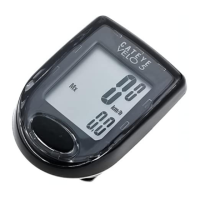
Do you have a question about the Cateye CC-PA100W and is the answer not in the manual?
Instructions for mounting the bracket on the stem or handlebar.
Guidance on positioning the speed sensor on the front fork.
Instructions for attaching the magnet to a bicycle spoke.
Ensuring correct clearance and alignment between sensor and magnet.
Entering the circumference of the front wheel for accurate speed.
Chart of tire sizes and their corresponding circumferences in mm.
Important safety warnings and precautions for computer use.
Solutions for common problems like speed not being displayed.
 General
| Model | CC-PA100W |
|---|---|
| Category | Bicycle Accessories |
| Display | LCD |
| Functions | Current Speed, Total Distance, Trip Distance, Elapsed Time, Average Speed, Maximum Speed, Clock |
| Current Speed | Yes |
| Total Distance | Yes |
| Trip Distance | Yes |
| Elapsed Time | Yes |
| Average Speed | Yes |
| Maximum Speed | Yes |
| Wireless Transmission | Yes |
| Clock | Yes |
| Battery | CR2032 |
| Battery Life | Approx. 1 year |
| Type | Cycle Computer |
| Sensor Battery | CR2032 |
| Sensor Battery Life | Approx. 1 year |
| Water Resistance | Yes |
| Mounting | Handlebar |
| Weight (computer only) | 22 grams |








 To Next Page