
 Need help?
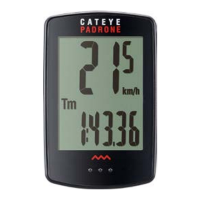
Do you have a question about the Cateye PADRONE+ CC-PA110W and is the answer not in the manual?
Instructions for mounting the bracket on the bicycle stem or handlebar.
Guidance on positioning the speed sensor on the front fork.
Steps for attaching the magnet to the wheel spoke.
Proper alignment and clearance for the speed sensor and magnet.
How to connect and disconnect the computer from its mount.
Procedure to verify correct installation and functionality.
Resets the computer to its factory default settings.
Choose between kilometer per hour (km/h) and mile per hour (mph).
Enter the circumference of the front wheel for accurate readings.
Configure the time display, including 12h/24h format.
Final step to confirm settings and enter measurement screen.
How to change the data displayed on the screen.
Instructions for utilizing the built-in stopwatch feature.
Automatic measurement start and stop based on bicycle movement.
How to reset all measured data except total distance.
Explanation of backlight activation and settings.
How the computer conserves power and returns to normal operation.
Set backlight illumination time and method.
Change the tire circumference value for accurate readings.
Set the clock and choose between 12h/24h display.
Manually enter the total distance traveled.
Select the preferred unit: km/h or mph.
Turn the stopwatch feature on or off.
Important safety precautions for using the device.
Details regarding the wireless sensor's operation and limitations.
Factors that may cause interference with the sensor signal.
FCC and IC compliance statements for the device.
Instructions for cleaning the computer and its accessories.
Procedure for replacing the batteries in the computer and sensor.
Solutions for problems like no speed display or blank screen.
Key technical specifications of the computer and sensor.
Details of the 2-year warranty for the product.
List of accessories provided with the computer.
List of accessories available for separate purchase.
 General
| Display Type | LCD |
|---|---|
| Current Speed | Yes |
| Total Distance | Yes |
| Trip Distance | Yes |
| Elapsed Time | Yes |
| Average Speed | Yes |
| Maximum Speed | Yes |
| Wireless Transmission | Yes |
| Clock | Yes |
| Pace Arrow | Yes |
| Auto Power Save | Yes |
| Auto Start/Stop | Yes |
| Odometer Manual Setting | Yes |
| Battery | CR2032 |
| Battery Life | Approx. 1 year |
| Water Resistance | IPX8 |
| Type | Wireless |
| Mounting | Handlebar |
| Functions | Speed, Distance, Time, Clock, Pace Arrow |










 To Next Page