
 Need help?
Do you have a question about the Cateye PADRONE SMART and is the answer not in the manual?
The smartphone's built-in GPS and Bluetooth enable data measurement, recording, and communication with sensors and smart computers.
Smart computers can operate in Mirror Mode or Sensor Direct Mode, displaying data and receiving notifications.
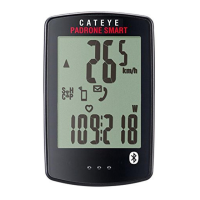
Explains smart computer display indicators, bottom row displays, and operational modes.
Guides users on downloading the Cateye Cycling app and pairing smart computers/sensors with their smartphone.
Details automatic configuration of clock, units, and sensor pairing for Sensor Direct Mode via the smartphone.
Guides users on connecting the smart computer to a smartphone and using Mirror Mode for measurements.
Details on switching to Sensor Direct Mode and performing measurements independently of the smartphone.
Addresses common questions about smartphone, smart computer, and sensor connectivity and pairing.
Explains how to view Sensor Direct Mode records and manage notification icons on the smart computer.
Covers GPS speed accuracy, map thumbnail issues, and ride data upload queries.
Lists common reasons and solutions for failing to connect the smart computer to the smartphone.
Provides troubleshooting for sensor connection problems and when measurements are not displayed properly.
 General
| Display | LCD |
|---|---|
| Connectivity | Bluetooth Smart |
| Battery | CR2032 |
| Current Speed | Yes |
| Total Distance | Yes |
| Trip Distance | Yes |
| Moving Time | Yes |
| Average Speed | Yes |
| Maximum Speed | Yes |
| Clock | Yes |
| Pace Arrow | Yes |
| Auto Power Save | Yes |
| Auto Start/Stop | Yes |
| Odometer Manual Setting | Yes |
| Functions | Speed, Distance, Time, Clock |
| Compatible Sensors | Cateye HR |
| Weight | 32g |










 To Next Page

