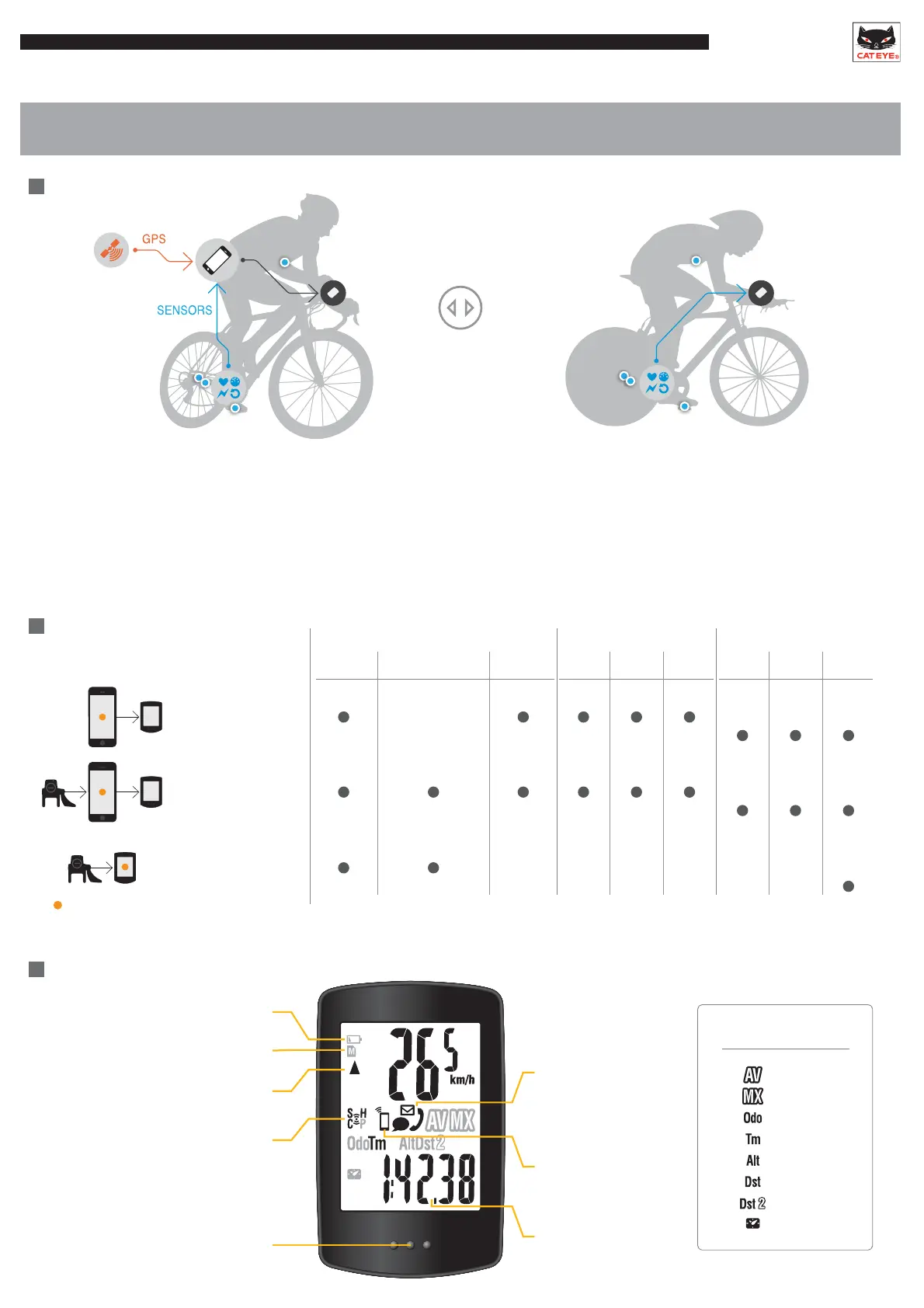
Capabilities with a Smart Computer
Sensor Direct ModeMirror Mode
-Display data measured by the smartphone on the smart computer.
-Use the smartphone’s built-in GPS for sensor-free operation.
-Use Bluetooth® SMART sensors for extended functionality.
-Display phone and mail notifications on the smart computer.
-Connect sensors directly to the smart computer for
measurement.
-Use a smartphone to manage measurement data saved
in the smart computer after completing a ride.
Two Modes
SMART COMPUTER
Introduction
Mode options
Device used for measurement
and recording
*Summary : Ride date and time, Elapsed time, Trip distance, Average and Maximum values of each measurement
*Smartphone
GPS
*Smartphone
GPS
*Padrone
only
*Padrone
only
*Smartphone
GPS
Measuring,Displayed
Speed Altitude
Cadence,Heart Rate,
Power
SMS
(Text)
Call Email Map Graph Summary
Notification Record
*
Mirror mode
Smartphone
Mirror mode
Smartphone + sensors
Sensor direct mode
Sensors
Display
Comparison between average speed
and current speed
Turns on when there is insufficient memory
for summary data
Bottom row display
Flashes when an incoming
call / email / SMS(Text) is
received
Turns on in mirroring mode
Flashes when smartphone
battery is low
Flashes when the computer battery is low
Sensor reception status
Speed: S
Cadence: C
Hear rate: H
Power: P
LED turns on when an incoming
call/email is received
Bottom row display
Average
Maximum
Total Distance
Elapsed Time
Altitude
Trip Distance 1
Trip Distance 2
Clock











 To Next Page