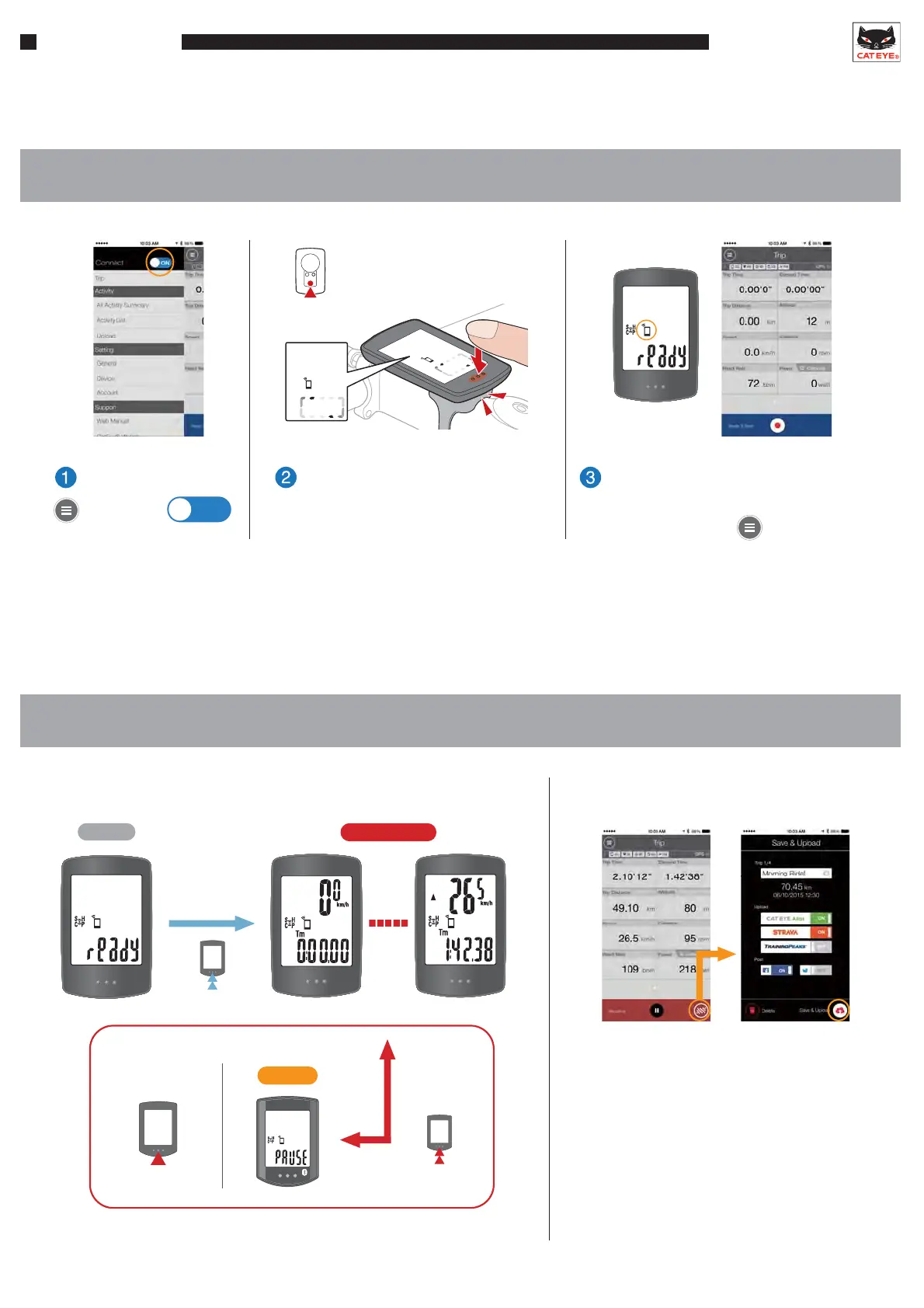
● Using in Mirror Mode
1. Connecting the smartphone and smart computer
2. Measuring and uploading
Operation
SMART COMPUTER
Operation
RECORDING
1sec.
READY
PAUSE
1sec.
Press
After a trip is completed, the measured
data can be saved and uploaded.
*Measurement can also be started and paused from the app screen.
Switch bottom
row display
Save & Upload
*Heart rate sensors become connected when worn, and speed/cadence sensors become connected
when the wheel is rotated and a signal is transmitted.
Trip
*When the smart computer is mounted
on a bracket, pressing the surface of
the unit depresses the MODE button
on the back of the computer.
MODE
Search screen
Press and hold the MODE button
until the smartphone search screen is
displayed, then release.
The smartphone is connected once
the smartphone icon is displayed.
The app will return to .
Ensure that
.
Connect
ON
Refer to the sensor’s operation manual or online manual for sensor mounting instructions.











 To Next Page