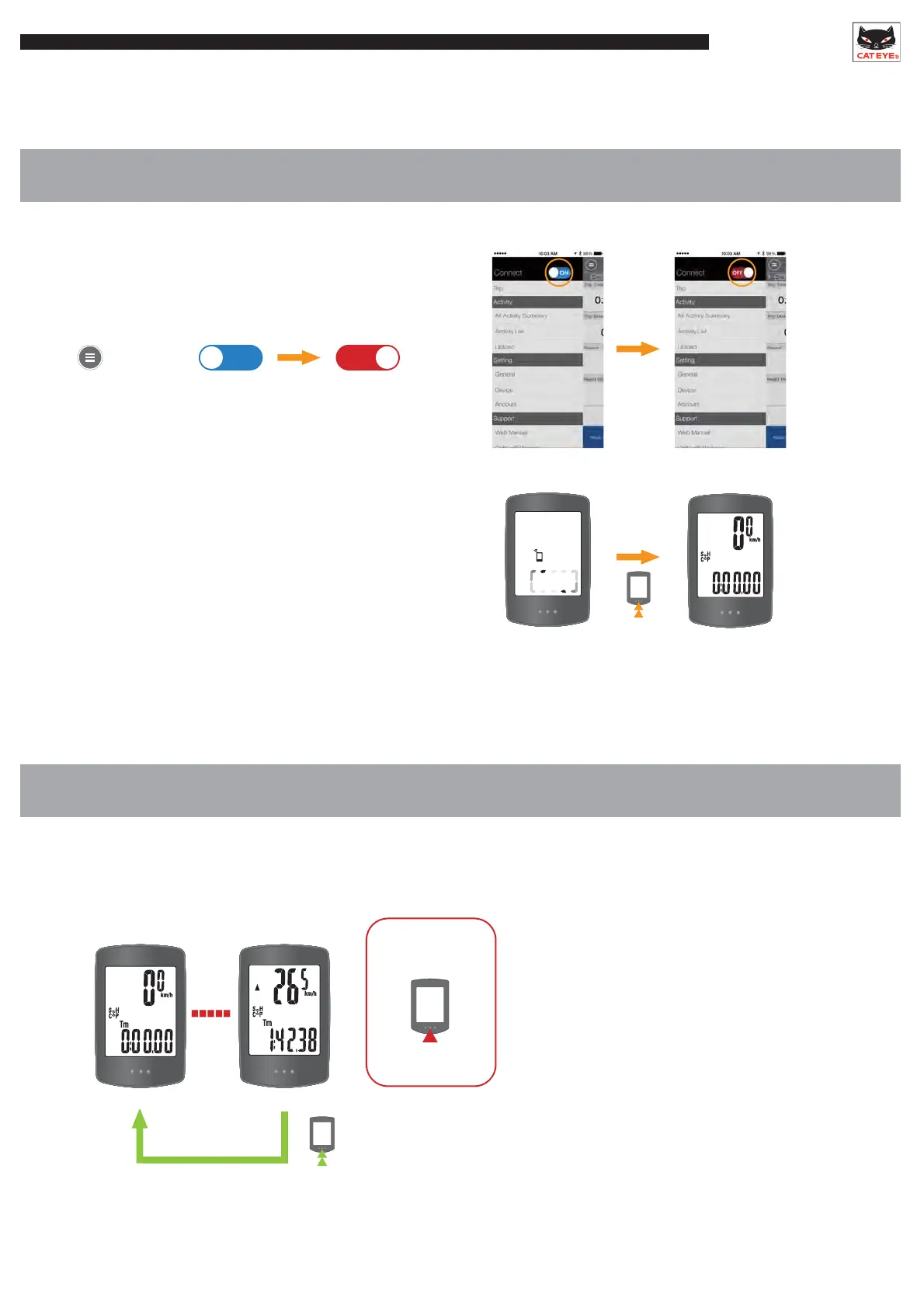
1. Switching to Sensor Direct Mode
• Using in Sensor Direct Mode
2. Measuring
SMART COMPUTER
Operation
ON OFF
1sec.
Disconnect the app on the smartphone
if Mirror Mode is enabled.
*When switching from Mirror Mode to Sensor Direct Mode,
it may take a moment for the sensors to switch connection to the smart computer.
In addition, if the smart computer is currently
searching for a smartphone, press and hold the
MODE button until the search is canceled.
The smart computer is in Sensor Direct Mode
when the smartphone icon is not displayed.
Connect
3sec.
Measurement begins directly after the speed signal is detected.
Data readings will return to 0.
Ride data up to that point will be saved in the smart computer.
Saved data can be moved to the app and viewed there.
*The smart computer will switch to the smartphone
search screen after 1 second. Keep pressing the
MODE button until the data is reset.
Switch bottom
row display
RESET
Press











 To Next Page