EasyManua.ls Logo

Cateye Micro CC-6000 - Button Functions; Select Button Function; Mode Button Function; Start;Stop Button Function

Cateye Micro CC-6000
21 pages
Print Icon
To Next Page IconTo Next Page
To Previous Page IconTo Previous Page
Loading...
EL
Button
Functions
n
u
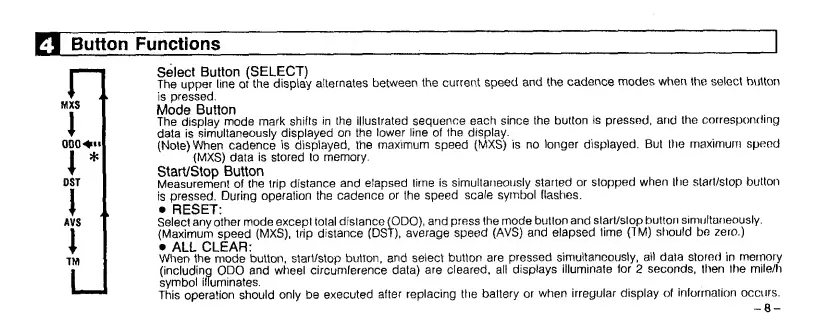
Select
Button
(SELECT)
The
upper
line
ot
the
display
alternates
between
the
current
speed
and
the
cadence
modes
when
the
select
button
is
pressed.
Mode
Button
The
display
mode
mark
shifts
in
the
illustrated
sequence
each
since
the
button
is
pressed,
and
the
corresponding
data
is
simultaneously
displayed
on
the
lower
line
of
the
display.
(Note)
When
cadence
is
displayed,
the
maximum
speed
(MXS)
is
no
longer
displayed.
But
the
maximum
speed
(MXS)
data
is
stored
to
memory.
StarVStop
Button
Measurement
of
the
trip
distance
and
elapsed
time
is
simultaneously
started
or
stopped
when
the
start/stop
button
is
pressed.
During
operation
the
cadence
or
the
speed
scale
symbol
flashes.
RESET:
Select
any
other
mode
except
total
distance
(ODO),
and
press
the
mode
button
and
start/stop
button
simultaneously.
{Maximum
speed
(MXS),
trip
distance
(DST),
average
speed
(AVS)
and
elapsed
time
(TM)
should
be
zero.)
ALL
CLEAR:
t
1(
When
the
mode
button,
start/stop
button,
and
select
button
are
pressed
simultaneously,
ail
data
stored
in
memory
(including
ODO
and
wheel
circumference
data)
are
cleared,
alt
displays
illuminate
for
2
seconds,
then
the
mile/h
symbol
illuminates.
This
operation
should
only
be
executed
after
replacing
the
battery
or
when
irregular
display
of
information
occurs.
-8-

Related product manuals