EasyManua.ls Logo

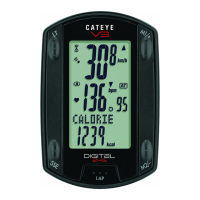
Cateye V3 - User Manual

Cateye V3
23 pages
Print Icon
To Next Page IconTo Next Page
Loading...
ENG-1
ENG
Introduction
Thank you for purchasing the CATEYE V3.
The V3 is a high-performance computer for riders who wish to train extensively and
analyze their data.
2.4GHz-frequency digital wireless technology, which is the same technology used for
wireless LAN, is used for both the speed/cadence integrated speed sensor and the heart
rate sensor. This technology practically eliminates interference from external noise and
cross-talk with other wireless computer users, providing you with stress-free riding.
Read this instruction manual thoroughly and understand the functions of the computer
before using it.
Keep it in a safe place for future reference.
About the manuals
Basic installation and operation
Please go here for installation of the unit on the bicycle, use of the heart rate measure-
ment function, preparing the computer, and the basic operation of the product.
1. How to install the unit on your bicycle ............... See page 6-8
2. Heart rate sensor ............................................... See page 9
3. Preparing the computer ..................................... See page 10-15
4. Basic operation of the computer ........................ See page 16-17
Measurement screen
Please go here to learn how to operate the computer functions.
Measurement screen .......................................... See page 18-22
Ride data review
Please go here to check and manage recorded data.
File view ............................................................. See page 24-27
Changing computer configuration
Please go here for changing and checking each menu items.
Changing the computer configuration ................ See page 23-34
Advanced use
Recording lap and split time data ....................... See page 20 “Lap function”
Training with target heart rate zones .................. See page 37
“Use of the target zone”
Important
Always follow the sections that are marked with “ Warning!!!”.
No part of this manual may be reproduced or transmitted without the prior written
permission of CatEye Co., Ltd.
The contents and illustrations in this manual are subject to change without notice.
If you have any questions or concerns about this manual, please contact CatEye at
www.cateye.com.

Table of Contents

Other manuals for Cateye V3

Questions and Answers

Summary

Introduction

Important Usage Notes

Contains critical safety and usage notes for the manual, marked with warnings.

Manual Section Overview

Provides an overview of the manual's sections for installation, operation, and advanced features.

Proper Use and Safety Guidelines

Device Icons and Safety Cautions

Explains icons used for warnings and tips, and provides essential safety precautions for device use.

2.4 GHz Wireless System Explanation

Explains the wireless technology and potential sources of interference.

Computer Components and Display

Computer Unit Parts Identification

Identifies the physical components on the front and back of the computer unit.

Included Accessories

Lists the standard accessories that come with the computer, such as sensors and bands.

Screen Display Indicators

Details the various icons and indicators shown on the computer's screen.

Bicycle Installation Guide

Bracket Mounting

Instructions for securely attaching the bracket to the bicycle's stem or handlebar.

Sensor and Magnet Mounting

Guidance on positioning and securing the speed and cadence sensors and magnets.

Sensor Installation Adjustments

Adjusting Sensor-to-Magnet Distance

Specifies the correct gap between the speed/cadence sensor and the magnets for optimal function.

Securing Mounted Parts

Instructions for firmly tightening all installed sensors, magnets, and brackets.

Computer Unit Attachment;Removal

Steps for safely attaching and detaching the main computer unit from its mount.

Initial Computer Setup

Battery Insulation Sheet Removal

First-time setup step to remove the battery insulation sheet before use.

Formatting and Restarting Operations

Procedure for initial setup or after battery replacement to reset device settings.

Date and Clock Configuration

Guide to setting the device's date and time format, year, month, and day.

Tire and Sensor Configuration

Tire Circumference Measurement and Input

Instructions on how to determine and enter tire size for accurate measurement.

Sensor ID Synchronization (HR)

Steps to pair the heart rate sensor with the computer by synchronizing their IDs.

Sensor ID and Unit Settings

Speed;Cadence Sensor ID Synchronization

Ensures the speed/cadence sensor is mounted properly and synchronizes its ID.

Speed Unit Selection

How to choose between kilometers (km) and miles (mile) for speed measurement.

Operation Test Procedure

Verifies the correct functioning of the speed and cadence sensors after installation.

Basic Computer Operation

Measurement Screen Data Switching

Explains how to switch between different data displays on the main measurement screen.

Starting and Stopping Measurements

Details auto-mode and manual start/stop functions for measurement recording.

Backlight and Measurement Data Reset

How to activate the screen backlight and reset measurement data.

Power-Saving Mode Function

Explains how the device enters and exits low-power mode to conserve battery.

Measurement Screen Data Fields

Upper and Middle Display Data

Details current speed, heart rate, cadence, and their average/maximum values.

Lower Display Data Fields

Explains elapsed time, trip distance, countdown, lap data, date, clock, and calorie consumption.

Advanced Measurement Features

Pace Indicator Functionality

Describes pace arrow icons indicating speed/heart rate relative to average.

Lap Data Recording and Review

How to record lap data, including lap time, split time, and trip distance.

Countdown Distance Setting and Use

Setting and using a countdown for predetermined target trip distances.

Target Heart Rate Zone Setup

Heart Rate Zone Status Display

How the screen shows if the target zone is active or if the heart rate is outside it.

Computer Configuration Menu Overview

Navigating the menu to view and change various computer settings.

File Management and Data Recording

Data Recording to Files

Explains what measurement data is automatically saved into files after each ride.

Reviewing Saved Ride Data

How to access and review past ride data files saved in the computer.

File Data Review and Deletion

Viewing Lap Data within Files

How to review specific lap data, including averages and maximums, within a saved file.

Deleting Saved Data Files

Procedures for removing unwanted ride data files from the computer.

Clock and Wheel Settings

Clock and Date Format Configuration

Setting the clock display format (12/24h) and date display formats.

Wheel Size and Tire Circumference Setup

Selecting wheel size (A/B) and entering tire circumference for accurate measurement.

Sensor and Unit Configuration

Sensor ID Synchronization Procedure

Process to ensure the computer correctly communicates with sensors by synchronizing IDs.

Measurement Unit (km;mile) Selection

How to switch between metric (km) and imperial (mile) units for speed and distance.

Manual Total Distance Entry

Manually entering the total accumulated distance, typically after formatting.

Mode and Sound Settings

Auto-Mode Function Control

Enabling or disabling the auto-mode for automatic start/stop of measurement.

Countdown Distance Setup

Setting a specific target distance for the countdown feature.

Sound Alert Configuration

Controlling audible alerts for heart rate zones and button presses.

Target Heart Rate Zone Setup

Selecting Target Heart Rate Zone

Choosing a target heart rate zone (OFF, 1, 2, 3, or 4) for training.

Defining Upper and Lower Heart Rate Limits

Setting custom upper and lower heart rate boundaries for a selected zone.

Heart Rate Training Strategies

Training for Competition Goals

Setting target zones for different competition goals like endurance or anaerobic capacity.

Utilizing Target Heart Rate Zones

How the computer alerts and records data when heart rate is in or out of the target zone.

Troubleshooting Display Issues

Display Motion and Response Problems

Diagnosing and resolving issues related to slow screen response or no display.

Heart Rate Signal Reception Issues

Steps to fix problems with the heart rate sensor connection and signal reception.

Troubleshooting Operations and Batteries

Operational and Measurement Errors

Resolving issues with starting/stopping measurement, lap data, or settings changes.

Battery Replacement Procedures

Instructions for replacing batteries in the computer, heart rate sensor, and speed sensor.

Maintenance and Accessories

Daily Care and Cleaning

Routine cleaning and checks for the computer, sensors, and magnets.

Spare Parts and Kits

List of available replacement parts and accessory kits for the device.

Product Specifications and Registration

Display, Control, and Communication Specs

Details on display functions, control system, and communication specifications.

Power, Dimensions, and Environment Specs

Information on battery life, dimensions, weight, and operating/storage temperature ranges.

Product Registration Information

Instructions on how to register the product online or via mail for warranty service.

Limited Warranty Details

Information regarding the two-year warranty coverage for the computer, sensors, and strap.

Cateye V3 Specifications

General IconGeneral
WirelessYes
CadenceYes
Battery TypeCR2032
Water ResistanceYes
TypeCycle Computer
Battery LifeApproximately 1 year
Mounting TypeHandlebar
ModesSpeed, Distance, Time, Cadence

Related product manuals