Rev 6 – Feb 2022
Page 20 of 44
Survey
After setup is complete, the user is ready to begin the survey. Tap the SURVEY tab to access the
main survey tab.
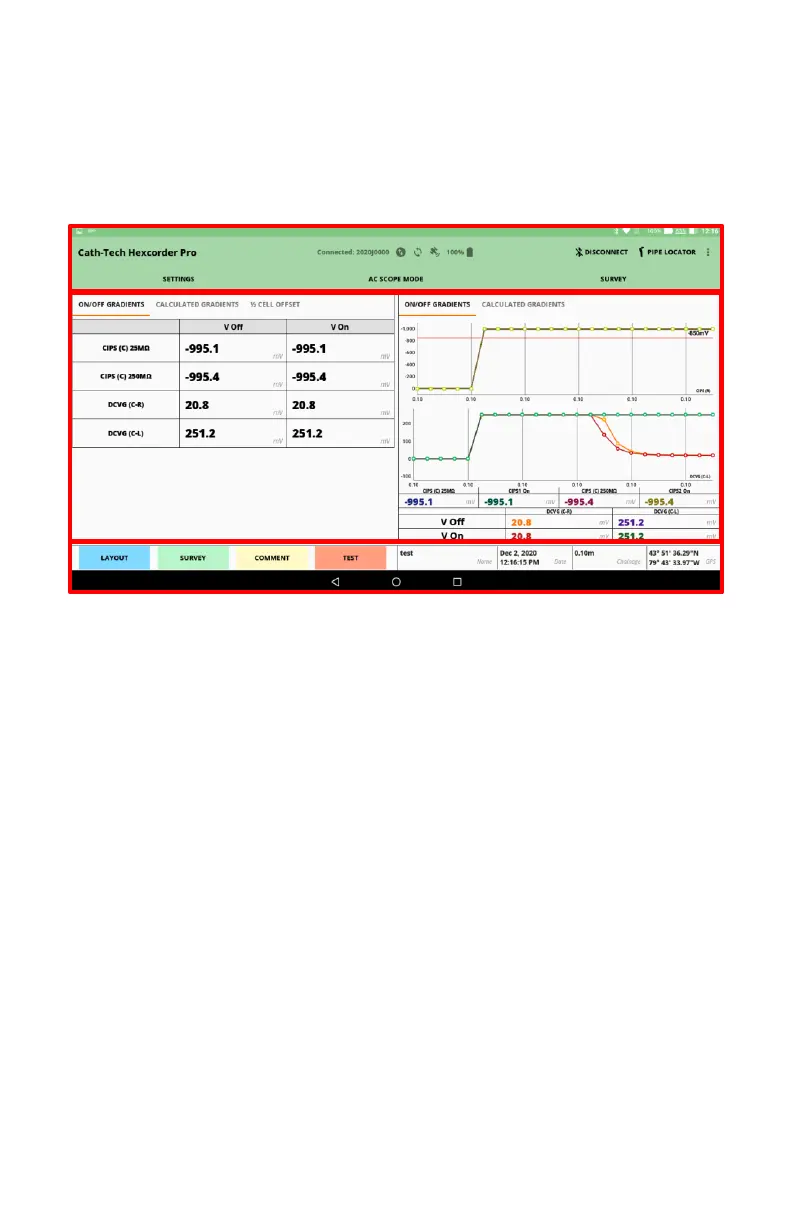
There are 3 main areas to this screen. The middle largest area is for the widgets chosen by the
surveyor to display data.
1. Information Bar – Buttons for connecting/disconnecting the Hexcorder Pro from the
tablet, as well as for connecting a pipe locator
2. Survey Widgets – the survey widgets selected by the user appear in this area. Two can
be used at a time
3. Survey Information – this bar contains the survey start/pause button, access to the
survey layout widget screen, as well as survey name, date and time, chainage, and GPS
location information
Calculated Gradients
In DCVG modes, the user can select to view the DCVG values as separate ON/OFF values or as a
calculated gradient value, which automatically subtracts the ON value from the OFF value and
displays the difference as well as an estimated %IR. This difference is often more useful to the
surveyor.


 To Next Page