Rev 6 – Feb 2022
Page 30 of 44
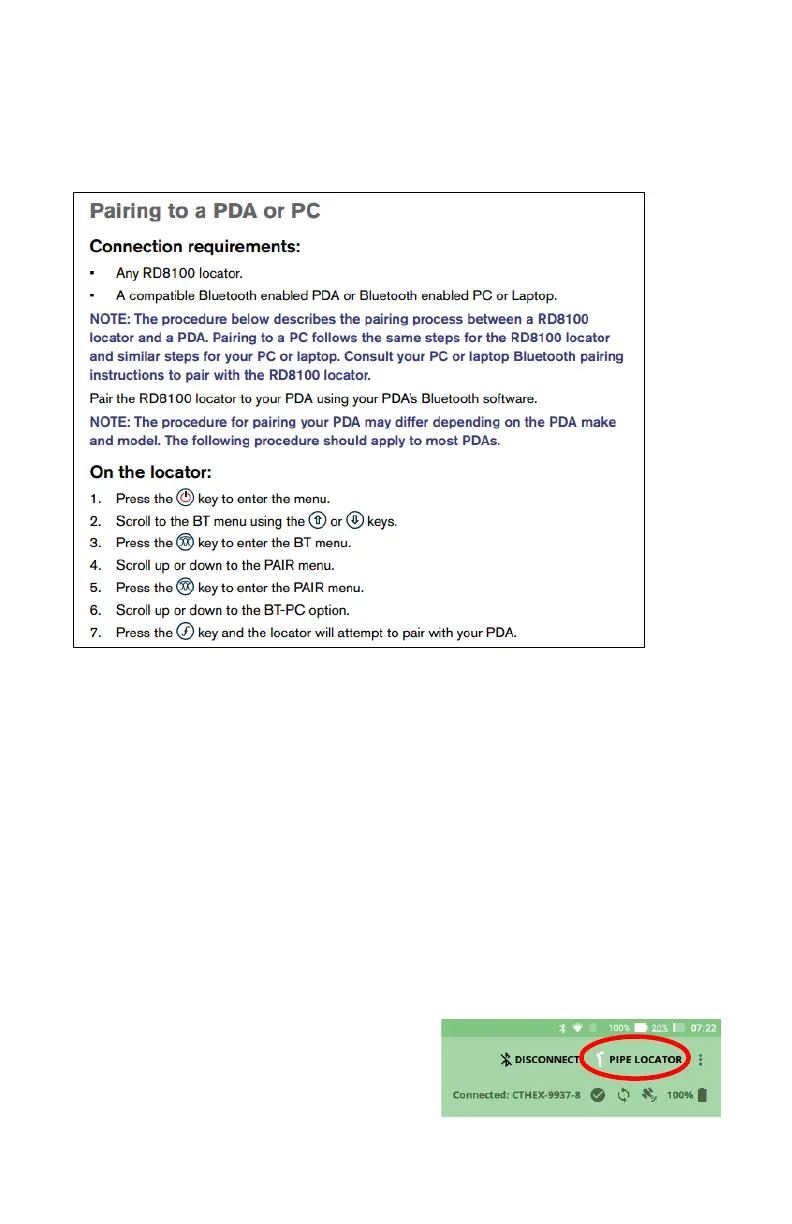
RadioDetection Pairing
Preparing the RD8000/8100 pipe locator to pair
*These steps should be performed quickly, with minimal delay between steps*
First time pairing
1. Power on the tablet
2. Follow the instructions above to ready the locator, the Bluetooth icon on the locator
screen will be blinking
3. Open the tablet Bluetooth menu
4. Wait for the locator to be detected. The name will be something like “RD8K” followed
by a 4 digit number
5. Select the pipe locator to pair, when prompted enter the passkey “1234”
6. The locator is now paired and known to the tablet
Pairing for Use
1. Prepare the Hexcorder Pro and tablet for survey as usual
2. Ensure the above “First time pairing” steps have been completed to prepare the locator for
Bluetooth connection
3. Select the Pipe Locator button in the top
right corner of the app
4. Perform these steps again on the locator:


 To Next Page