Rev 6 – Feb 2022
Page 22 of 44
Comments
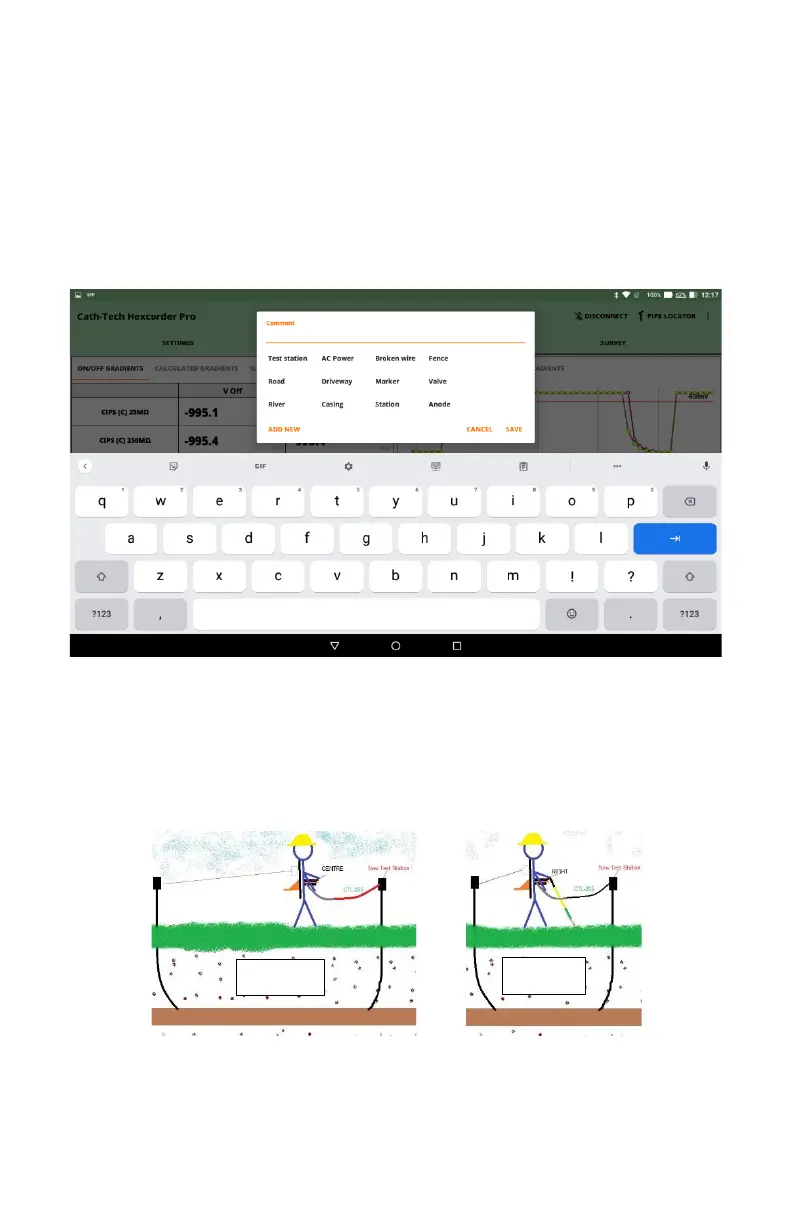
If the user wants to add a comment to the data file to indicate a note or location information, they can
press the COMMENT button. The survey will pause while the user enters the comment via the tablet
keyboard. There is a selection of quick comments available, preloaded with common comment
types. The user can add custom comments by typing the comment they want and click “ADD NEW”
to add it to the list. The preloaded comments can be edited and deleted by pressing and holding the
desired comment.
Test
When surveying, it is often desired to test the pipe-to-soil potential of a new test point, as well as the
voltage potential between the current and previous test station. This is used to prove that both test
points are properly connected and to determine whether there are any issues between the two. Both
these readings can be taken, without stopping the current survey, by pressing the TEST button and
using our CTL-205 cable (sold separately). The surveyor can choose whether to save the readings
(stored as a comment) or to simply observe the value on the screen.
The survey pole cable is disconnected from the survey pole and the CTL-205 cable is connected
instead. To measure the voltage test point to test point, the CENTRE channel is used. To measure
the new test station to half cell without disconnecting the trailing wire, the RIGHT channel is used.


 To Next Page