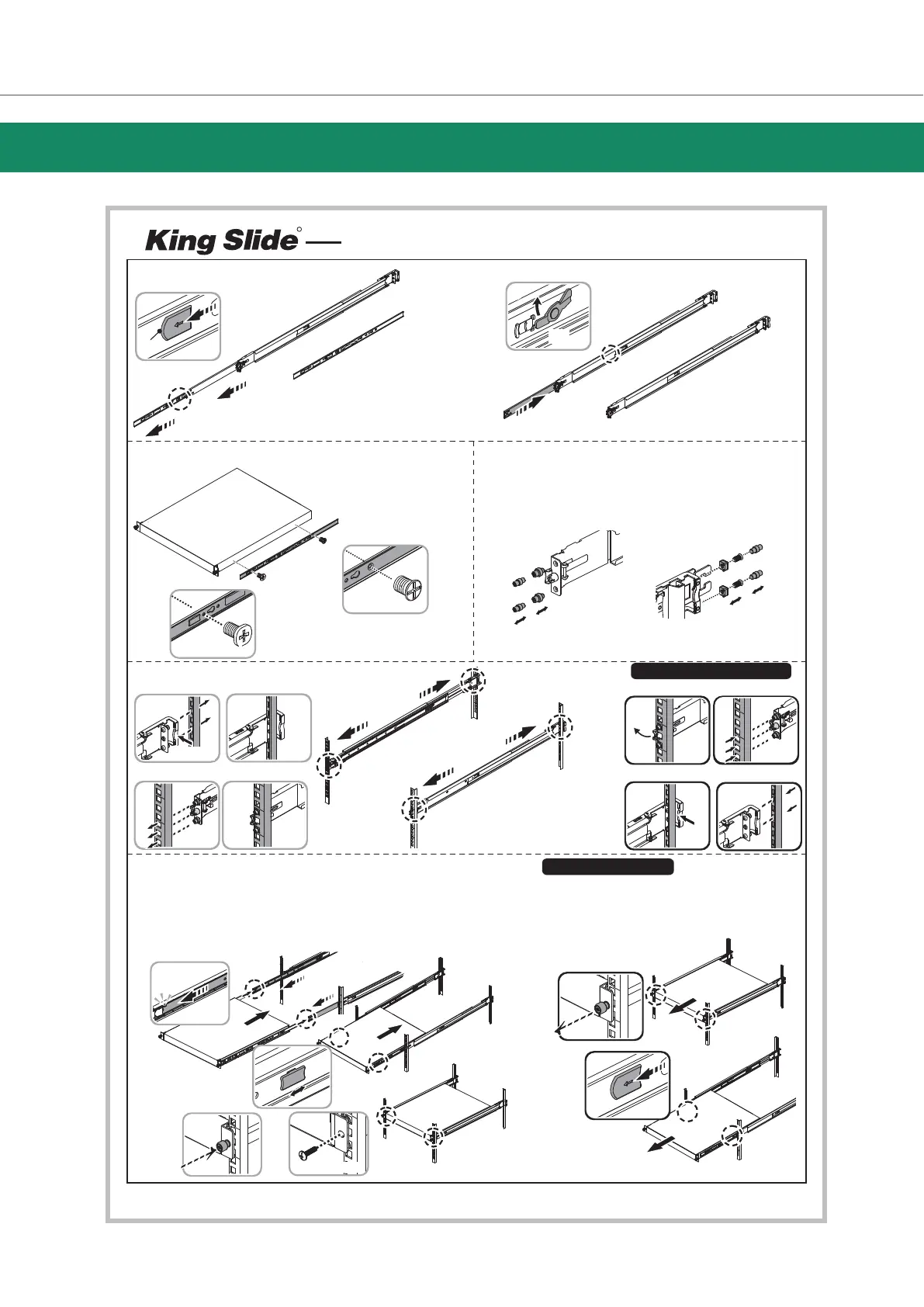
AA612 Instruction
R
2) Install the inner rail onto the chassis.
1-1)
1-2)
Remove the inner rail.
Push (a) and slide middle rail back.
Pull
Click!
Click!
Click!
Click!
inner rail
middle rail
outer rail
➊
➌
➎
➏
➋
➍
Pull tab forward and
take out inner rail.
Push tab to slide the
middle rail.
White
⒜
3) Check hole type on rack post. Choose suitable pin of bracket to
install if needed.
Ⓑ
Ⓐ
Front Bracket
Front Bracket
Front Bracket
Front Bracket
Ⓐ
Ⓑ
9.5 ( )
7.1
Square Hole
Round Hole
Pre-installedⒶ
Ⓑ
Rear Bracket
Rear Bracket
Rear Bracket
Rear Bracket
4) Fix the outer rail/bracket assembly to the frame.
Push
Note:
L,R side of rail are symmetrical.
Please repeat installation step for
the other side.
➊
➊
➍
➌
③
④
⑤
➌
Copyright © 2021 King Slide. All Rights Reserved
5) Insert the to complete the installation.chassis
Click!
➋
➎
①
Remove the chassis from rack.
①②
③④
Loosen shipping screw to pull out chassis.
Press the disconnect tab forward to remove
chassis.
①②
③④
Click!
➋
Push
④
Locking
②
Pull
①
②
Detach Bracket From Rack Post
Blue
➍
➊➋
➌
➍
➎
Pull the middle rail fully extended in lock position, ensure ball bearing
retainer is located at the front of the middle rail.
Insert the chassis into middle-outer rails.
When hit a stop, please pull/push the blue release tab on the inner rails.
Using rackmount ear to screw on the chassis.The screw type chosen by the
type of rackmount ear accordingly
OR
Ⓐ
Ⓑ
Ⓒ
Ⓓ
I-M3x4L-P0.5
Base on the chassis hole to assemble.
F-M3x4L-P0.5
M5x20L-0.8P
IYAR3I070AA6-C01



 To Previous Page