NVE902 H.264 HD Network Encoder User Manual
1.3 Main Features
HD/SD-SDI, HDMI and CVBS HD and SD video input;
IP output, support FLV Over RTMP, R2TP(Reliable Real time Transport
Protocol), TS Over UDP, TS Over HTTP,FLV Over HTTP;
H.264 High profile video encoding and AAC audio encoding with low bit rate;
Seamlessly connecting to Streaming Media Server for FLASH video applications;
Using DSP encoding chip and Linux operating system;
Aluminum magnesium alloy portable enclosure, small and convenient to carry;
OLED screen and touch slide button, support web browser control;
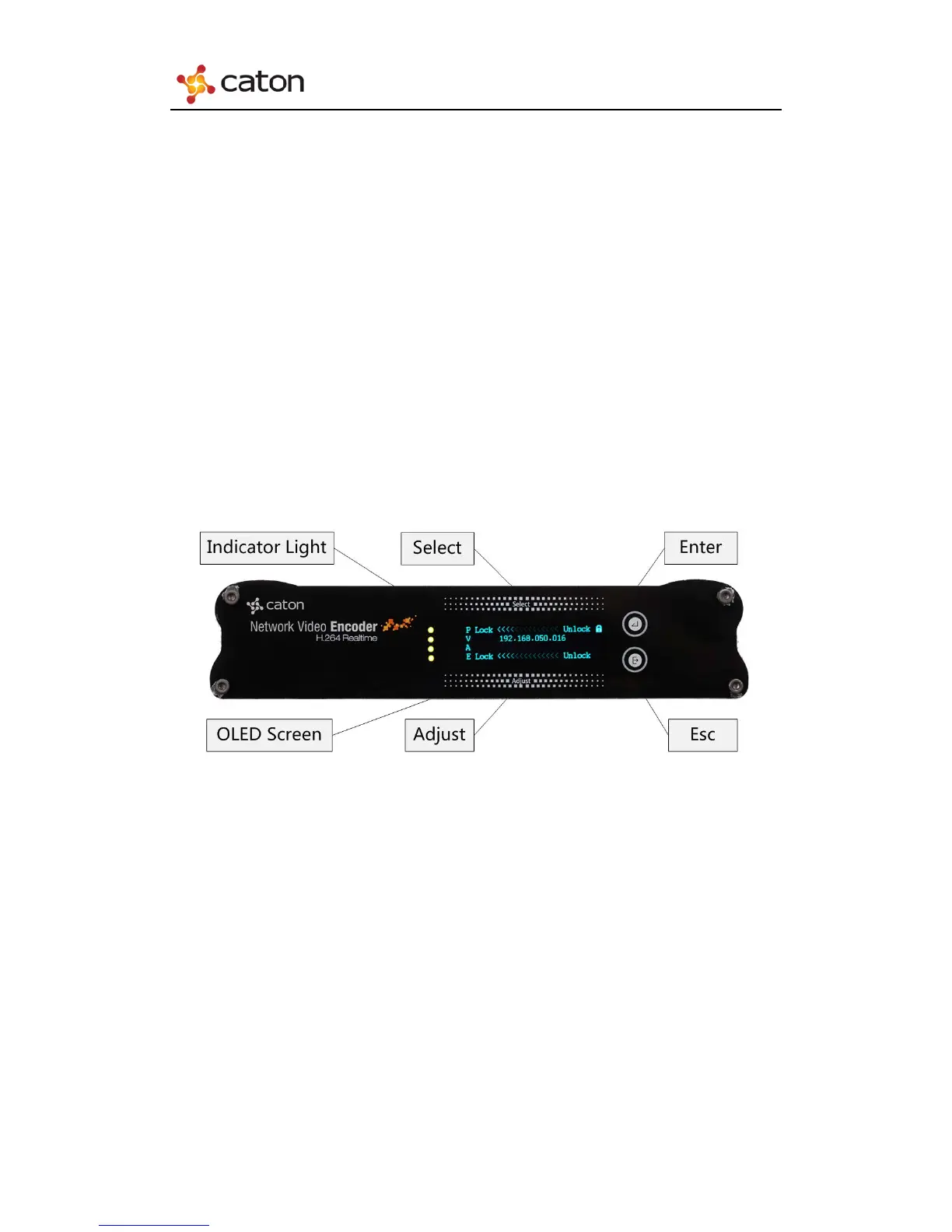
1.4 Panel design
1.4.1 Front Panel
(1) Indicator Light: Indicate the current device status. The 4 lights represent (from
top to bottom):
i. Power Light: Green represent right power status, Red represent abnormal
power status.
ii. Encoding Light: Green represent right encoding status, Red represent
abnormal encoding status.
iii. Video Input Light: Green represent right video input status, Red represent
abnormal video input status.
iv. Audio Input Light: Green represent right audio input status, Red represent
abnormal audio input status.
(2) OLED Screen: Display the basic configuration & parameters of the device.
(3) Control Buttons: Include “Select”, “Adjust”, “Enter” and “Esc”.
3



 To Next Page