16
simultaneously holding the Purge and Turbo buttons for a
period of approximately 5 seconds. The two buttons will blink
approximately 6 times to confirm Tap-On
TM
has been enabled.
Using Foot Pedal without Tap-On
T M
Mode
For scaling operation, the first position activates both the
ultrasonic energy and lavage at the insert tip. The second
position activates the Boost Mode. The Boost Mode (fully
depressed Tap-On
TM
Foot Pedal) increases the ultrasonic
power level for quick removal of tenacious deposits without
adjusting the power level knob. To deactivate Boost Mode,
release Tap-On
TM
Foot Pedal to first position.
For prophy operation, the first position activates Rinse
Mode. The second position activates Air Polishing Mode.
(Boost Indicator will not illuminate.)
8.7.1
1. AC Power Cord
2. Tap-On
TM
Technology Wireless Foot Pedal
3. Auxiliary Tap-On
TM
Foot Pedal Power Cable
4. Cavitron JET-Mate Sterilizable Handpiece
5. Prophy Handpiece Cleaning Wire
6. Cavitron 30K Ultrasonic Inserts
7. Cavitron DualSelect
Dispensing system
8. Cavitron JET Air Polishing Insert
9. Cavitron JET Nozzle Cleaning Tool
8.7.2
1. Powder Bowl Cap O-Ring, Part Number 628052001
2. Powder Bowl Cap, Part Number 81728
3. Cavitron Insert Replacement O-ring Kits, 12/packs
Part Number 62351 (black) for plastic and soft grips
Part Number 62605 (green) for metal grips and air
polishing insert
4. Handpiece Cable O-Ring, Part Number 79357
5. JET-Mate Handpiece Nozzle Grip, 81717
6. Lavage (Water) Filter, 10/Pack, Part Number 90158
For detailed information, contact your local DENTSPLY
Professional Representative or authorized DENTSPLY
Professional Distributor.
™
Using Foot Pedal in Tap-On
T M
Mode
For scaling procedures,Tap-On
TM
Technology eliminates the
need to hold the pedal down. Tapping the foot pedal once
activates ultrasonic power or rinse mode for approximately
4 minutes. Tapping the foot pedal while in Tap-On
TM
mode
disables the ultrasonic power and water flow. Boost is still
available while scaling in Tap-On
TM
mode. To use boost, simply
depress the foot pedal to the second position (all the way to
the floor) to activate and hold as long as boost is desired.
Release foot pedal to return to Tap-On
T M
mode.
For prophy procedures, Tap-On
T M
Technology and Prophy
Mode Auto Cycles eliminate the need to pump the pedal by
automatically cycling between rinse and polish. Tapping the
foot pedal once will enable an automatic air polishing/rinse
cycle that lasts for approximately 1 minute. Tapping the
pedal a second time disables the automatic air polishing/
rinse cycle. See Prophy Mode Auto Cycles in section 9.8 for
cycle details.
TIPS:
Tap-On
TM
Technology will not run water unless an
insert or air polishing insert is in the handpiece
A sensor in the handpiece holder will prevent
Tap-On
TM
Technology from operating when the
handpiece is in the holder.
If the foot pedal is not tapped quickly, it will
function in a conventional manner.
How to Disable and Enable Tap-On
TM
Technology
Tap-On
TM
Technology feature can be disabled by
simultaneously holding the Purge and Turbo buttons for a
period of approximately 5 seconds. The two buttons will blink
approximately 6 times. When the buttons are released, they
will blink an additional 6 times to confirm Tap-On
TM
has been
disabled.
Tap-On
TM
Technology feature can be enabled by
NON-DEPRESSED
DEPRESSED
1st POSITION
DEPRESSED
2nd POSITION
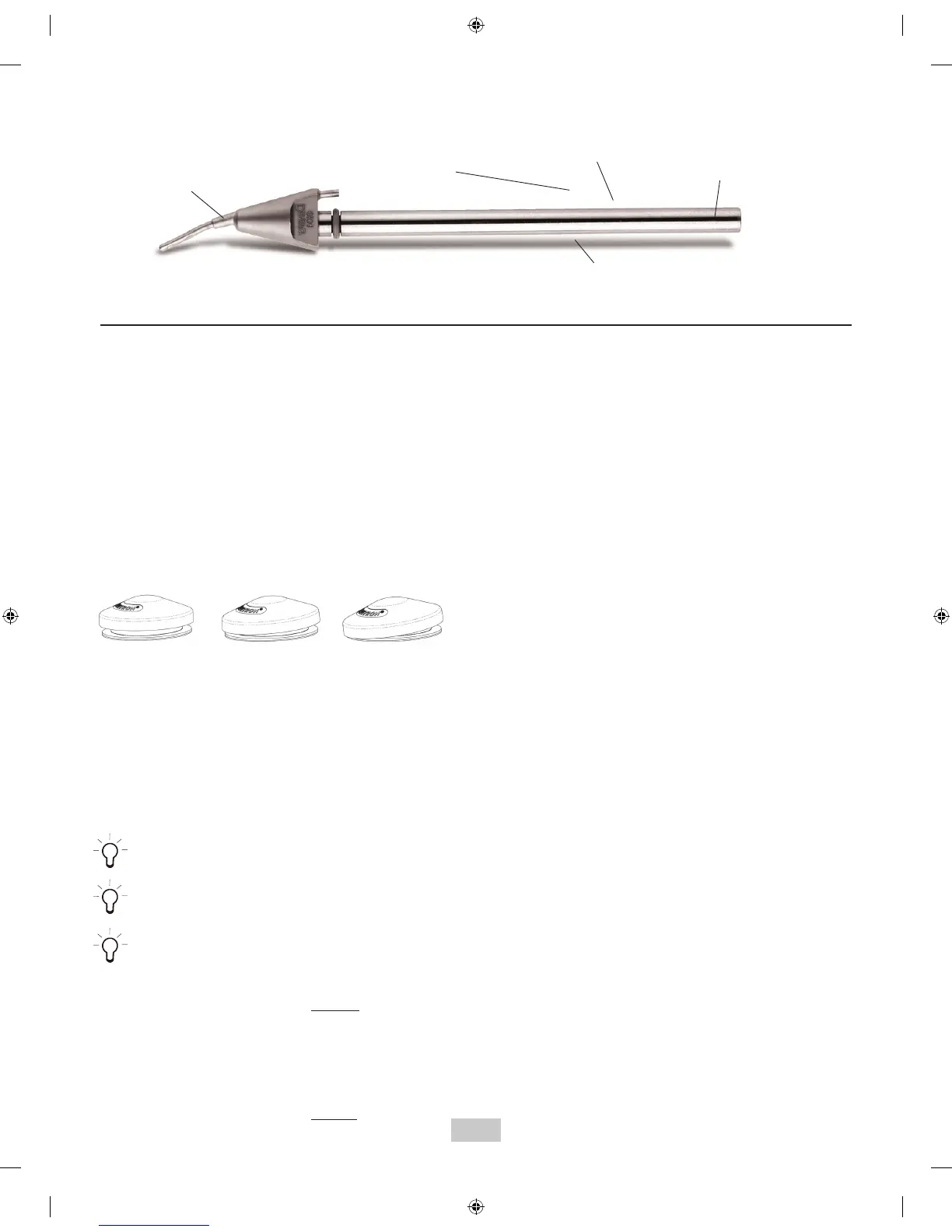
Prophy Powder Delivery Tube: Directs
air/powder flow to insert tip.
O-Ring:
Seals water when Insert is fully seated in
Handpiece. O-ring should be replaced when
worn.
Insert Heater Rod: Heats
the delivered water for patient
comfort.
Air Polishing Insert Nozzle:
Tube-in-a-tube design delivers
precise air/water/powder mixture
at point of delivery.
Insert Marking:
Manufacturer, Date (YDDD=Single digit
year and triple digit day of the year).


 To Next Page