11
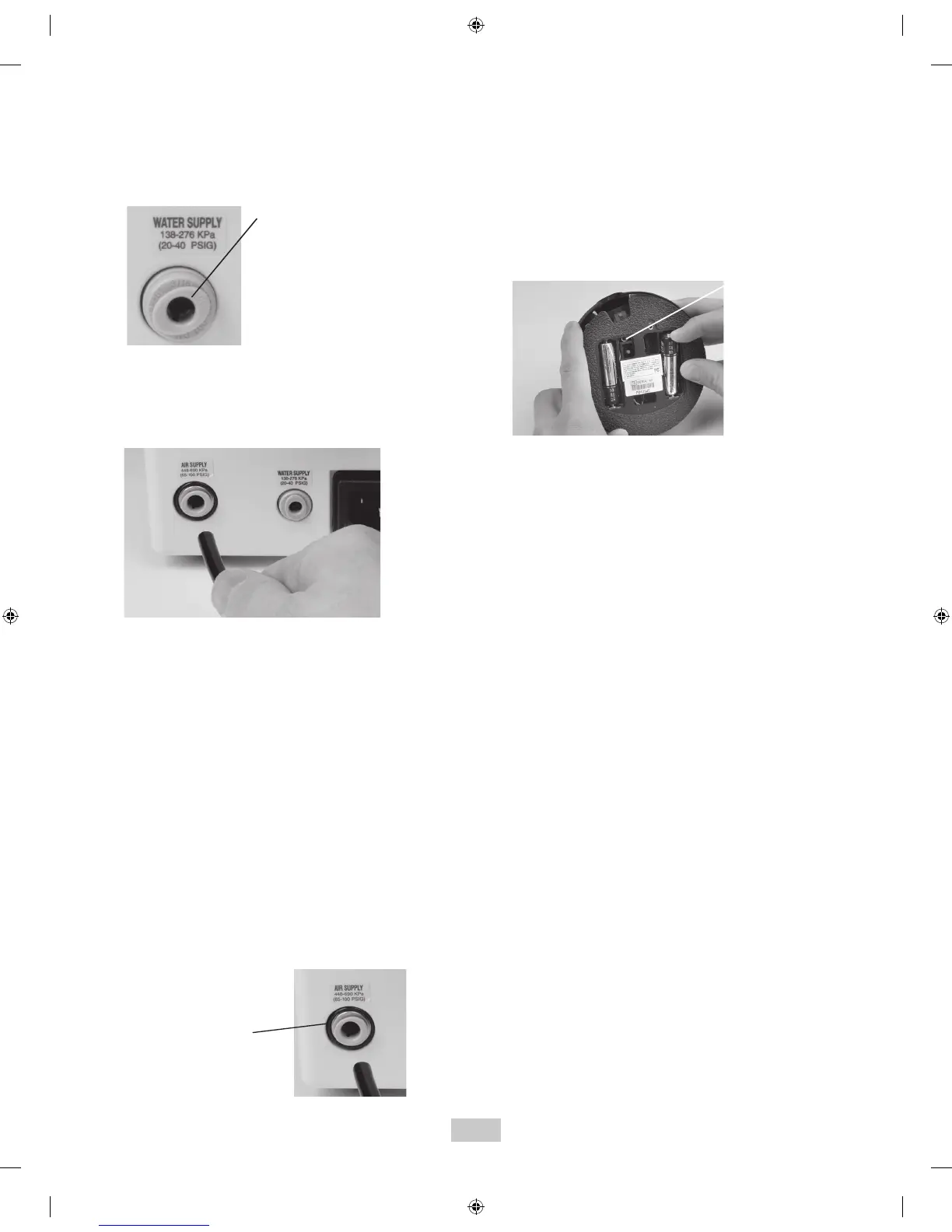
pressure by pressing the tip of the connector in an
appropriate container and allow water to drain. To
remove the hose from the system, push on the outer ring
of the system’s water inlet and gently pull out the water
line.
• Grasp the Air Supply Line (black hose) by the end
opposite the quick-disconnect and insert it into the air
inlet connector until fully seated.
• Connect the quick-disconnect to the dental office air
supply or a Cavitron DualSelect Dispensing System.
• Inspect all connections to make certain there are no
leaks.
• A filter mounting bracket is included for hanging the air
filter. Mount the bracket to a suitable vertical surface
and slide the filter onto the bracket. The clear bowl
should hang downward allowing for moisture separation
and drainage of water from the air filter. See Section 10
System Care for replacement instructions.
• To remove the air supply line from the Cavitron JET
Plus Combination System, turn off the dental office air
supply. Disconnect the air supply line from the dental
office air supply, then push on the outer ring of the
system’s air inlet and gently pull out the air line. If a
quick-disconnect connector is attached to the end of the
hose, relieve the air pressure by pressing the tip of the
connector and allowing the air to escape.
• Turn Tap-On
TM
Wireless Foot Pedal over and using a
Philips screwdriver carefully remove battery cover
screw and battery cover. If applicable, remove used
batteries and install two new “AA” batteries as shown.
Do not depress Tap-On
TM
Foot Pedal while installing
batteries.
• The communication light will blink for approximately
two seconds to indicate the Tap-On
TM
Foot Pedal’s ability
to communicate with the unit. If the light does not blink,
check the batteries. If the batteries are good and the
light doesn’t blink, a communications error may exist.
To re-establish communication with Tap-On
TM
Foot Pedal
review Synchronization procedure, section 7.10.
• The remote frequency communication can be bypassed
using the auxillary Tap-On
TM
Foot Pedal cable. Refer to
Section 11.2 Technical Support and Repair for further
action.
• Replace the battery cover and screw and hand tighten
cover with Philips screwdriver.
• Remove batteries if Tap-On
TM
Foot Pedal is to be stored
for an extended period of time.
TM
The Tap-On
TM
Wireless Foot Pedal supplied with your
system has been factory synchronized with the base unit.
Should a replacement Tap-On
TM
Foot Pedal be necessary,
synchronization will be required prior to system operation.
Perform the following steps to synchronize the Tap-On
TM
Foot
Pedal with the base unit.
1.Turn the MainPower switch located at the center front
underside of the system to the OFF (O) position.
Press ring to release
water supply tube.
Press ring to release
air supply tube.
Look for blinking
communications
light.


 To Next Page