Page.38.
IPC User Name: Enter IP camera’s user name.
IPC Password: Enter IP camera’s login password.
IPC Port :: When you select the IP camera type, it will default the camera’s port number and doesn’t
need to be changed.
After all settings are completed, click “Enter” to view the live video.
If IP address setting has error or IP camera is not connected.. The tester prompts “Network Error”
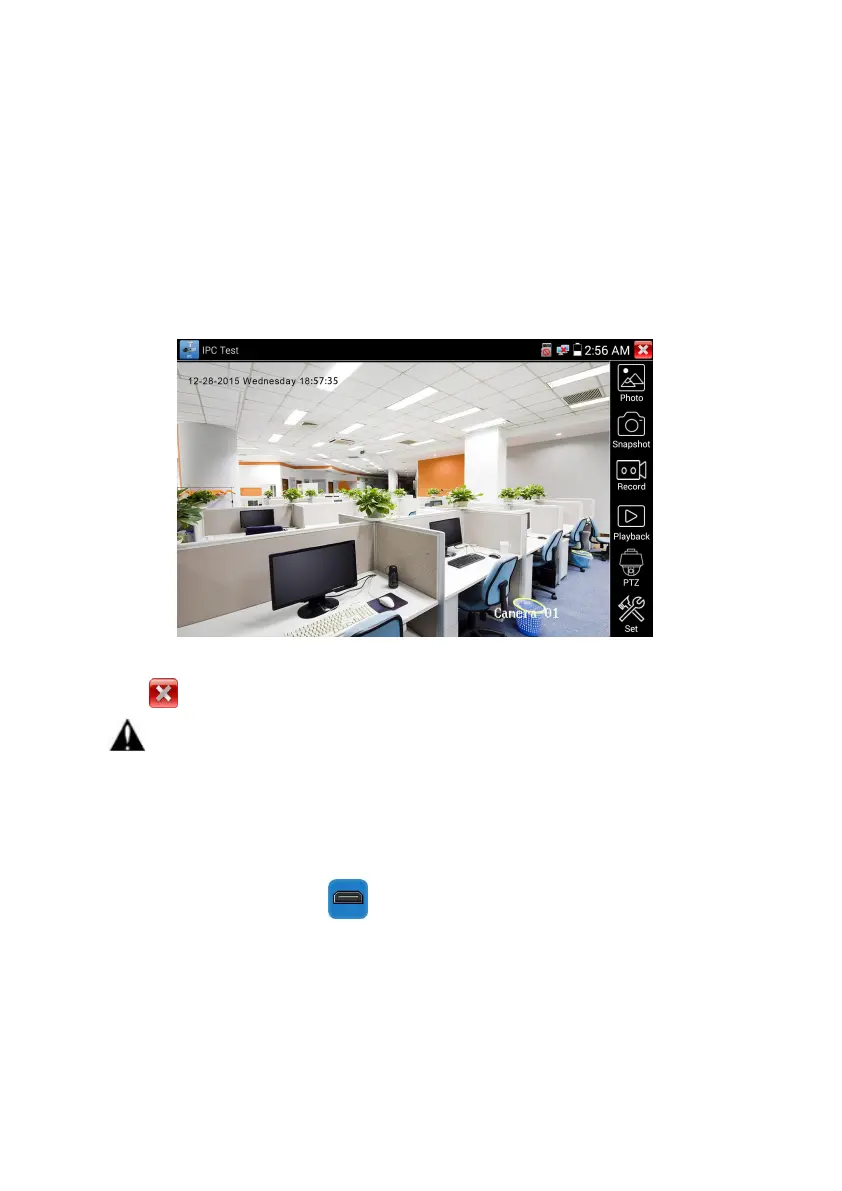
Click to quit from image display and return to IP camera test interface.
Once you are viewing video on the IPC Test app, you will see the “Video Menu” icon on the top
right. This button will give you access to Snapshot, Record, Photo, Playback, PTZ, and Set. Please refer
to the ONVIF section to use these functions.
3.3.10 HDMI IN ( *Optional )
HDMI in HD signal test, Tap icon “ ”to enter
When tester receives HDMI in image, the top tool bar shows the resolution of this image. You can
select “resolution ”to set resolution in the setting menu .Tap screen by twice, full image display.
Support resolution below
720×480p /720×576p /1280×720p /1920×1080p /1024×768p/1280×1024p /1280×900p /1440×900p


 To Next Page