2 EASY
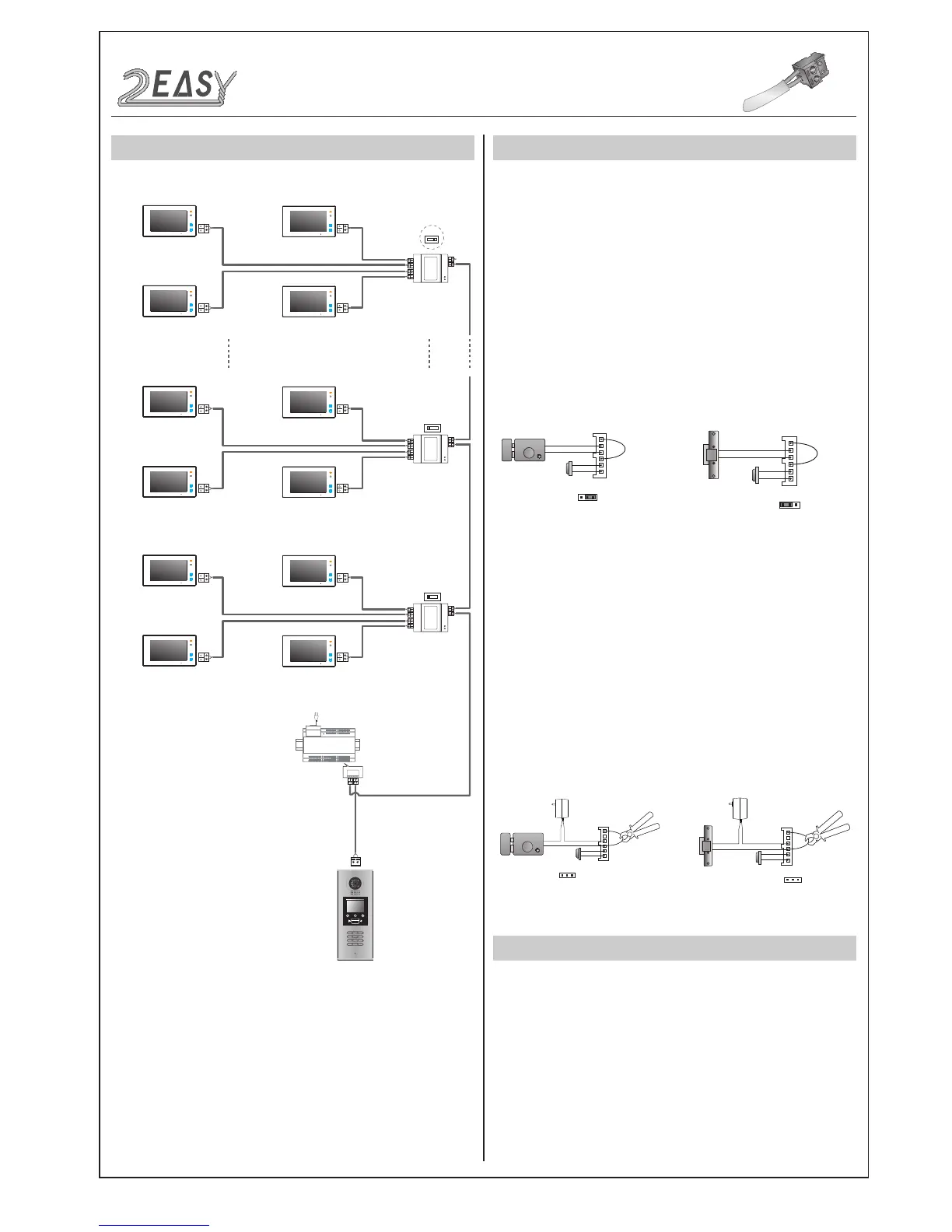
SYSTEM CONNECTION
OFF ON
OFF ON
DBC4A
A B C D
DBC4A
A B C D
Impedance
switch
Impedance
switch
100~240VAC
BUS(IM) BUS(DS)
PC6
AC~
OFF ON
DBC4A
A B C D
Impedance
switch
Code=28
Code=30
Code=29
Code=31
Code=4
Code=6
Code=5
Code=7
Code=0
Code=2
Code=1
Code=3
1 2 3
654
7 8 9
#0
*
RF CARD
ELECTRIC LOCK CONNECTION
1) Door Lock Controlled with Internal Power
1. The door lock is limited to 12Vdc, and holding current must be less
than 250mA when using internal power supply mode.
2) Door Lock Controlled with External Power
• Power-on-to-unlock type:Unlock Mode=0(by default)
• Power-off-to-unlock type:Unlock Mode=1
JP_LK
12V 300mA
Exit button
Jumper position in 2-3
+
-
+12V
LK -
LK+
N.O.
EB-
EB+
1 2 3
Power-on-to-Unlock type:
12V 300mA
Jumper position in 1-2
+12V
LK -
LK+
N.O.
EB-
EB+
+
-
1 2 3
Exit button
Power-off-to-Unlock type:
+
+
-
-
+12V
LK - (GND)
LK+(COM)
N.O.
EB-
EB+
JP_LK
Cut off the line
1 2 3
Exit button
+12V
LK - (GND)
LK+(COM)
N.O.
EB-
EB+
+
+
-
-
JP_LK
Cut off the line
1 2 3
Exit button
SPECIFICATION
• Power supply: DC24V
• Camera Lens: 1/4 ACS 4T image sensor
• Power consumption: Standby 33mA; Working status 157mA.
• Screen: 3.5 inch TFT
• Resolution: 320(R, G, B)X240 pixels
• Video signal: CCIR/EIA optional
• Wiring: 2 wires, non-polarity
• Dimension: 350(H)×128(W)×46(D)mm
• Note: The diagram take the monitor of DT47M for example.
DMR18S Technical Menu -3-
2. The Unlock Mode Parameter must be set to 0 (by default).
3. Jumper set to position 1 & 2 for power-off-to-unlock, fail safe
(Relay-no
rmally closed mode
); set to position 2 & 3 for
power-on-to-unlock type, fail secure (Relay n
ormally open mode
).
4. If a different unlocking time is required, change the unlock time
at the door station, for detailed information refer to the 2Easy
system technical guide.
1. The external power supply must be used in accordance to
lock current required.
2. The jumper JP_LK must be removed before connecting.
3. Setup of the
Unlock Mode Parameter
for different lock types
4. If different unlocking time is required, change the unlock time at
the door station, for detailed information refer to 2 Easy system
tech- nical guide .
Remove Jumper
Remove Jumper
Power-off-to-Unlock type - Mode 1:Power-on-to-Unlock type - Mode 0 (Default):
INTRODUCTION
Installation Guide



 To Next Page