EasyManua.ls Logo

CDVI PROMI E - Keypad Reset; Wiring Diagram; A. Reset

CDVI PROMI E
6 pages
Print Icon
To Next Page IconTo Next Page
To Previous Page IconTo Previous Page
Loading...
4
III. KEYPAD RESET
A. Reset
Place a short over ST1 (use supplied jumper). The green LED flashes during 5 seconds. One beep is emitted.
The master code is reset to the factory default value 12345.
The LED starts flashing red.
Remove the jumper to go back to the stand-by mode.
OR
Keep the jumper on to reset all the memory. The red LED flashes during 5 seconds then stops flashing and
becomes solid red during the rest of the reset.
The LED lights off. Remove the jumper to go back to the stand-by mode.
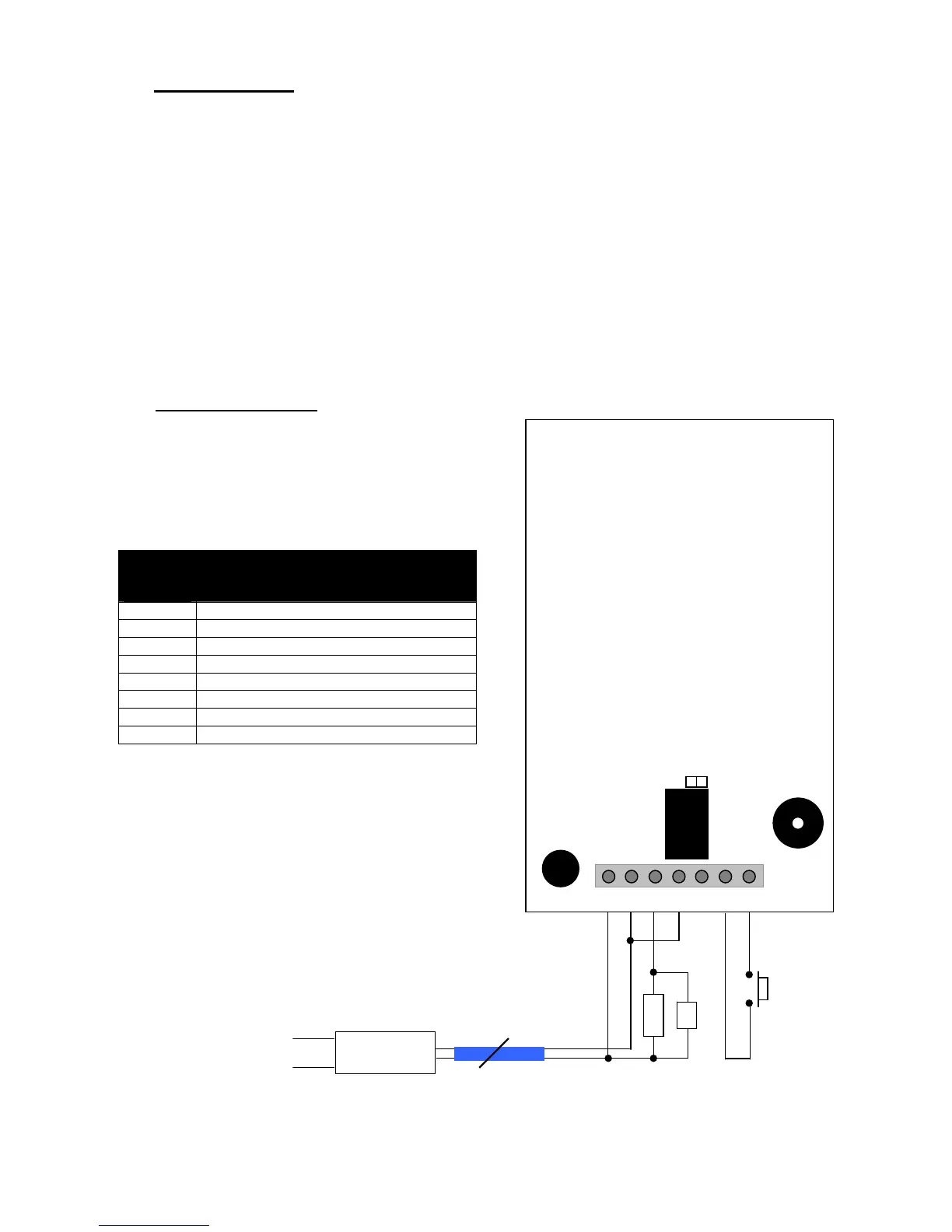
VI. WIRING DIAGRAM
ST1 on Reset
ST1 off stand-by mode
PROMI/E
description
12 Input voltage 12V AC/DC
V Input voltage 12V AC/DC
T N/O contact
C Common
R N/C contact
M Common PB
B Request-to-exit input
V: Varistor
ST1
2
V
PROMI/E
ST1
RL1
V 12 T C R M B
PB
Strike
Input voltage
230 V
12VAC /DC

Related product manuals