21
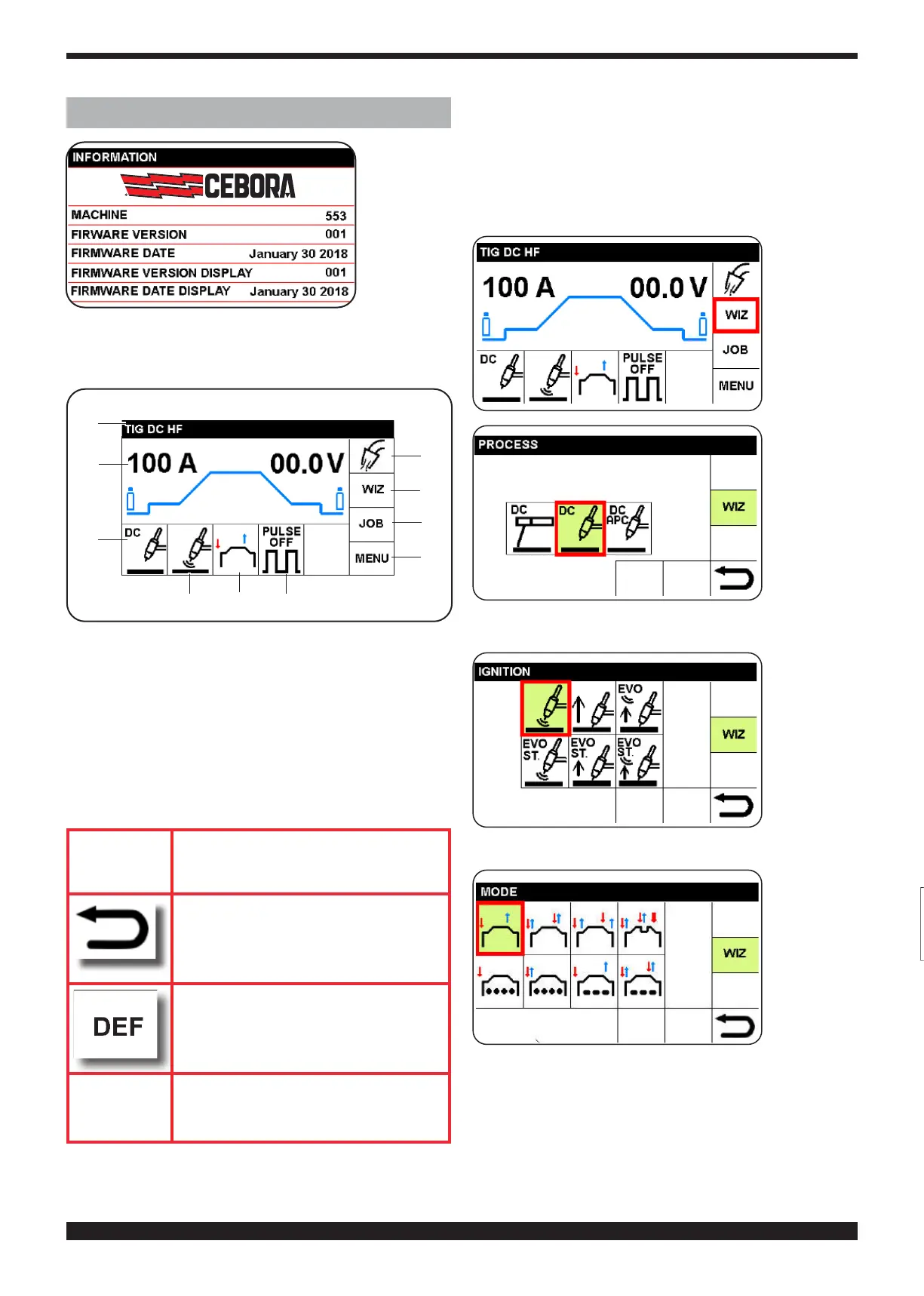
4 DESCRIPTION OF DISPLAY
During start-
up, for 5 sec-
onds the dis-
play presents
all the informa-
tion regarding
the welding
machine soft-
ware versions.
The display
then presents the main screen (factory setting). The operator
may start welding immediately and may adjust the current by
turning knob B.
S
R
Q
I
L
M
T
P O
N
Asseeninthegure,thedisplayisdividedintosectors.
In each sector, settings operations may be conducted.
• To select sectors, press and release knob B so that
a sector is highlighted in red.
Turn knob B to select the desired sector, and then
briey press knob B to access the settings of the se-
lected sector.
• The most recent setting is highlighted in green,
and boxed in red; with the new selection, the red box
moves to the new choice
IMPORTANT from now on, this procedure shall be
described indicating:
select and conrm
on conrmation, this symbol returns
to the screen previous to that in use
on selecting and conrming this
symbol, the factory parameters
shall be set
IMPORTANT to return to the main screen press
knob B (do not release immediately)
(> 0.7 sec.)
4.1 SECTORI (WIZ)
This function enables rapid setting of the welding ma-
chine.
4.1.1 SETTING THE WELDING PROCESS (PARA-
GRAPH 5)
Select and
conrm the
WIZ sector.
The next
choice is au-
tomatically
displayed
Select and
conrm the
welding pro-
c e s s . T h e
next choice
is automat-
ically dis-
played.
4.1.2 SETTING ARC IGNITION (PARAGRAPH 6 )
Select and
conrmtype
of ignition.
The next
choice is au-
tomatically
displayed.
4.1.3 SET START-UP MODE (PARAGRAPH 7)
Select and
conrm the
s t a r t - u p
mode.
The next
choice is au-
tomatically
displayed.




 To Next Page