EasyManua.ls Logo

cec BD-3200 - Turntable Height and 3-3 Stylus Point Height; Adjustments; Tools Required

cec BD-3200
12 pages
Print Icon
To Next Page IconTo Next Page
To Previous Page IconTo Previous Page
Loading...
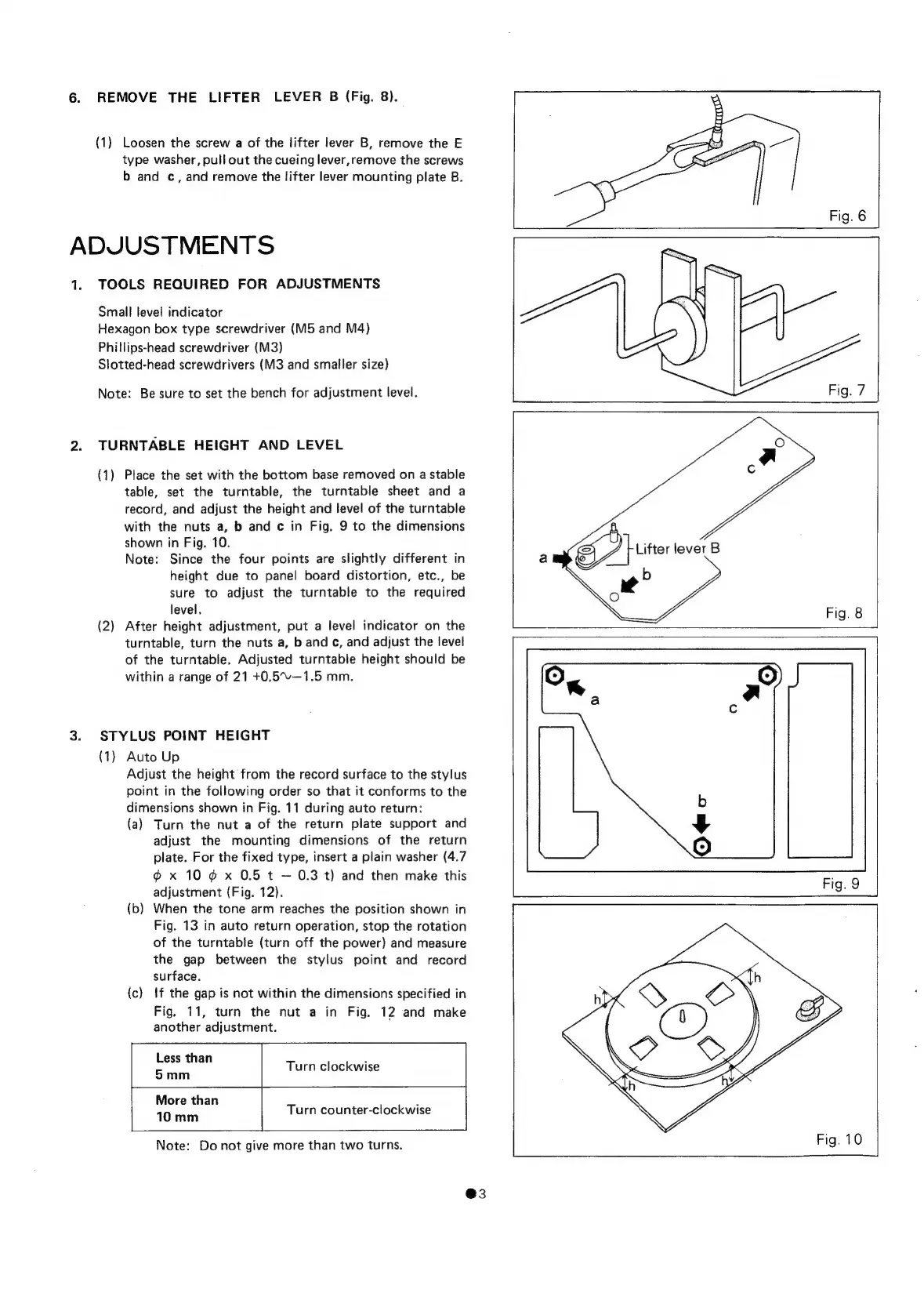
6.
REMOVE
THE
LIFTER
LEVER
B
(Fig.
8).
(1)
Loosen
the
screw
a
of
the
lifter
lever
B,
remove
the
E
type
washer,
pull
out
the
cueing
lever,remove
the
screws
b
and
c,
and
remove
the
lifter
lever
mounting
plate
B.
ADJUSTMENTS
1.
TOOLS
REQUIRED
FOR
ADJUSTMENTS
Small
level
indicator
Hexagon
box
type
screwdriver
(M5
and
M4)
Phillips-head
screwdriver
(M3)
Slotted-head
screwdrivers
(M3
and
smaller
size)
Note:
Be
sure
to
set
the
bench
for
adjustment
level.
2.
TURNTABLE
HEIGHT
AND
LEVEL
(1)
Place
the
set
with
the
bottom
base
removed
on
a
stable
table,
set
the
turntable,
the
turntable
sheet
and
a
record,
and
adjust
the
height
and
level
of
the
turntable
with
the
nuts
a,
b
and
c
in
Fig.
9
to
the
dimensions
shown
in
Fig.
10.
Note:
Since
the
four
points
are
slightly
different
in
height
due
to
panel
board
distortion,
etc.,
be
sure
to
adjust
the
turntable
to
the
required
level.
(2)
After
height
adjustment,
put
a
level
indicator
on
the
turntable,
turn
the
nuts
a,
b
and
¢,
and
adjust
the
level
of
the
turntable.
Adjusted
turntable
height
should
be
within
a
range
of
21
+0.5~%—1.5
mm.
3.
STYLUS
POINT
HEIGHT
(1)
Auto
Up
Adjust
the
height
from
the
record
surface
to
the
stylus
point
in
the
following
order
so
that
it
conforms
to
the
dimensions
shown
in
Fig.
11
during
auto
return:
(a)
Turn
the
nut
a
of
the
return
plate
support
and
adjust
the
mounting
dimensions
of
the
return
plate.
For
the
fixed type,
insert
a
plain
washer
(4.7
@
x
10
@
x
0.5
t
0.3
t)
and
then
make
this
adjustment
(Fig.
12).
(b)
When
the
tone
arm
reaches
the
position
shown
in
Fig.
13
in
auto
return
operation,
stop
the
rotation
of
the
turntable
(turn
off
the
power)
and
measure
the
gap
between
the
stylus
point
and
record
surface.
(c)
{f
the
gap
is
not
within
the
dimensions
specified
in
Fig.
11,
turn
the
nut
a
in
Fig.
12
and
make
another
adjustment.
Less
than
:
5mm
More
than
10
mm
Turn
counter-clockwise
Note:
Do
not
give
more
than
two
turns.
@3

Related product manuals