BOLERO SQUAD V 2001
51
ENGLISH
automatic heating process, the display of the corresponding power level will alternately
show “A” and “6”. The alternate display time is 2.5 minutes.
6.2. Press the increase icon to adjust the power to level 9, then press the icon again until
the power level alternately displays “A” and “9”. The pre-set time has started. For example,
after “A” and “9” are displayed alternately for 10 seconds, press the icon to set the
power level to level 6. The “A” and “6” icons shall be displayed for 2 minutes and 20
seconds. After this time, the hob will switch to normal heating mode; the corresponding
power level display will show “6”.
When the automatic heating function is activated, the corresponding cooking zone will heat up
on level 9 for a period of time (the heating time depends on the subsequent reduction to several
levels, the heating time for each level is given below), after which it will continue to operate at
the set nal heating level. For example, set the heating level to 9 and activate the automatic
heating function by pressing the icon (“A” and “9” appear alternately). Then, set the
automatic heating mode level to level 6 using the icon. In this setting, the cooking zone
heats up on level 9 for 2.5 minutes. The cooking zone display will alternately show “A” and “6”.
Then, continue heating on level 6, the display will show “6”.
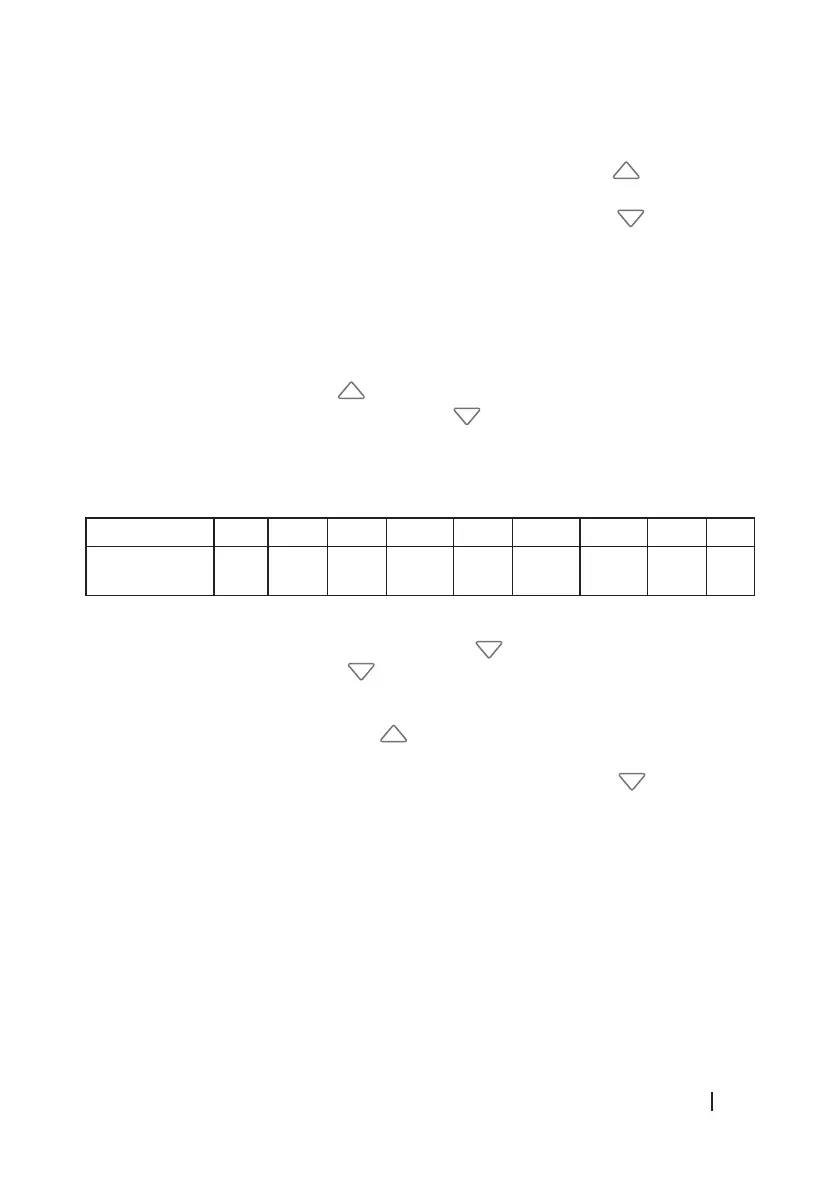
6.3. The tables with the data for the power level and the automatic heating time are as follows:
Power level 1 2 3 4 5 6 7 8 9
Automatic
heating time
1 3 4.8 6.5 8.5 2.5 3.5 4.5 5
6.4. Automatic heating level adjustment: When entering the automatic heating mode, you can
only reduce the maximum power by pressing the icon within 30 seconds. After more
than 30 seconds, pressing the icon will not reduce the automatic heating level and
will exit this mode.
- After more than 30 seconds, while still in the automatic heating mode and the value is
lower than level 9, you can press the icon to increase the automatic heating level, and
the system will remain in this mode.
- For example, after entering the automatic heating mode, press the icon within 30
seconds to set the value to level 8. The corresponding display shall show “A” and “8”. Then,
when reducing to level 7, the display will show “A” and “7”. The hob shall remain in
automatic heating mode. If more than 30 seconds elapse without level 7 being reduced to
level 6, you can exit automatic heating mode and the hob will switch to normal heating
mode. The display will show “6”.
6.5. When changing the power level of the automatic heating mode, the elapsed time will be
automatically calculated in the time corresponding to the new automatic heating level.
For example, you have selected the automatic heating level to be level 1 (1 minute), and after
30 seconds you change the power to level 4 (6.5 minutes). So, the automatic heating function
will work accurately for 6 minutes (6.5 minutes minus 30 seconds).






 To Next Page