12
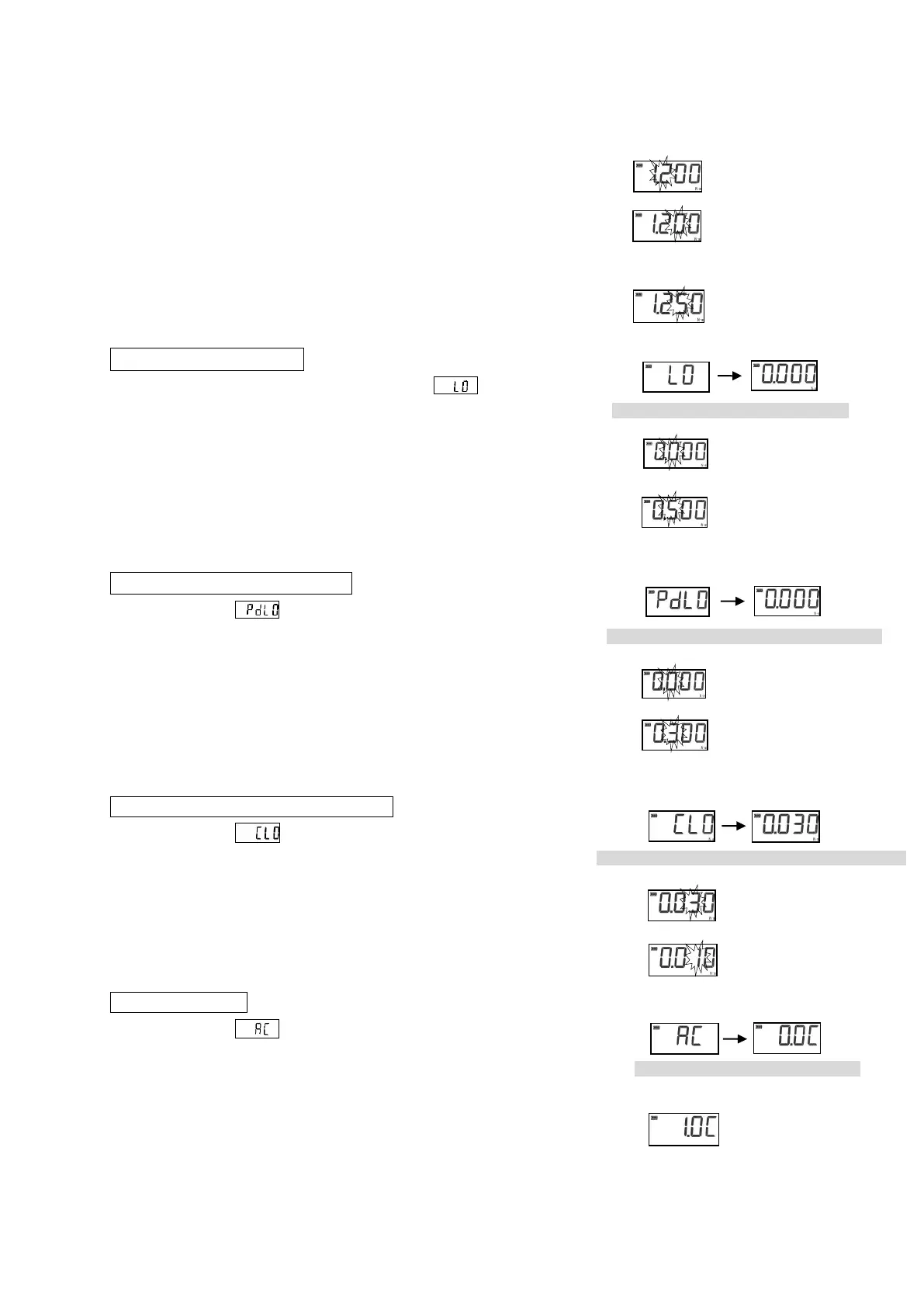
The second figures and the first figure are set up similarly.
It is a numerical increase at UP key. One figure falls by DOWN key.
If DOWN is pushed again after setting up the first figure,
since all figures will be displayed, check the set point.
When the setting is corrected, it sets it from the fourth digit again
pushing DOWN key. If a setup of a maximum value is completed,
the PRG key will be pressed again.
* When the PRG key is pressed while setting up, move to the next setting.
3. Setup of Minimum Value
A minimum value is displayed after displaying
The minimum value of torque measurement is set up by the ▲ key
and the ▼/▶ key like a maximum value.
The a minimum value cannot set a value bigger than
a maximum limit value.
If a setup is completed, the PRG/SET key will be pressed again.
4. Setup of Peak Down Start Value
After displaying , a peak down start value is displayed.
A peak down start value is set up by ▲key and ▼/▶key like a
maximum value.
(When it fell 15 digits ahead of this value, peak-down displays it)
If a setup is completed, the PRG/SET key will be pressed again.
5. Setup of Real-time Output Start Value
After displaying , a real-time output start value is displayed.
A value is set up similarly.
When this value is set to 0, the inside of real-time output mode
continues outputting data.
If a setup is completed, the PRG/SET key will be pressed again.
6. Auto Clear Setup
After displaying , a time of an auto clearance is displayed.
Time to carry out the zero clearance of the display is set up by ▲ or
▼/▶. (A setup the whole 0.5 is possible in 0.1 - 3.0 seconds) It
increases by ▲. It decreases by ▼ / ▶ . Setup-time selection
0.0C⇔0.1C⇔0.5C⇔1.0C⇔1.5C⇔2.0C⇔2.5C⇔3.0C⇔0.0C
If it sets up by 0.0C, it will become the zero clearance in manual
operation.
When a minimum value is set as 0.500
The third figure blinks by 5
When a peak down start value is set as 0.300
The third figure blinks by 3
When a real-time output start value is set as 0.010
The double figures blink by "1"
When auto clear time is set as 1
second
The treble figures blink by "2.
The second figures blink.
The second figures blink by "5."


 To Next Page