15
6.1 Measurement Data
6.1.1 Preservation of Measurement Data
Memory data are always saved, whenever it presses the CLEAR key or an auto clearance starts.
When a lot of data are treated, we recommend you to eliminate data before use.
* Begin the memory of data from the data number 001. When data are already memorized,
it saves from the following memory number. Preservation of a maximum of 800 data can be performed,
and if it exceeds 800 data, it will be overwritten from No. 001. Since front data will disappear,
when exceeding 800 data, save them in a personal computer etc.
6.1.2 Display and Elimination of Saved Measurement Data
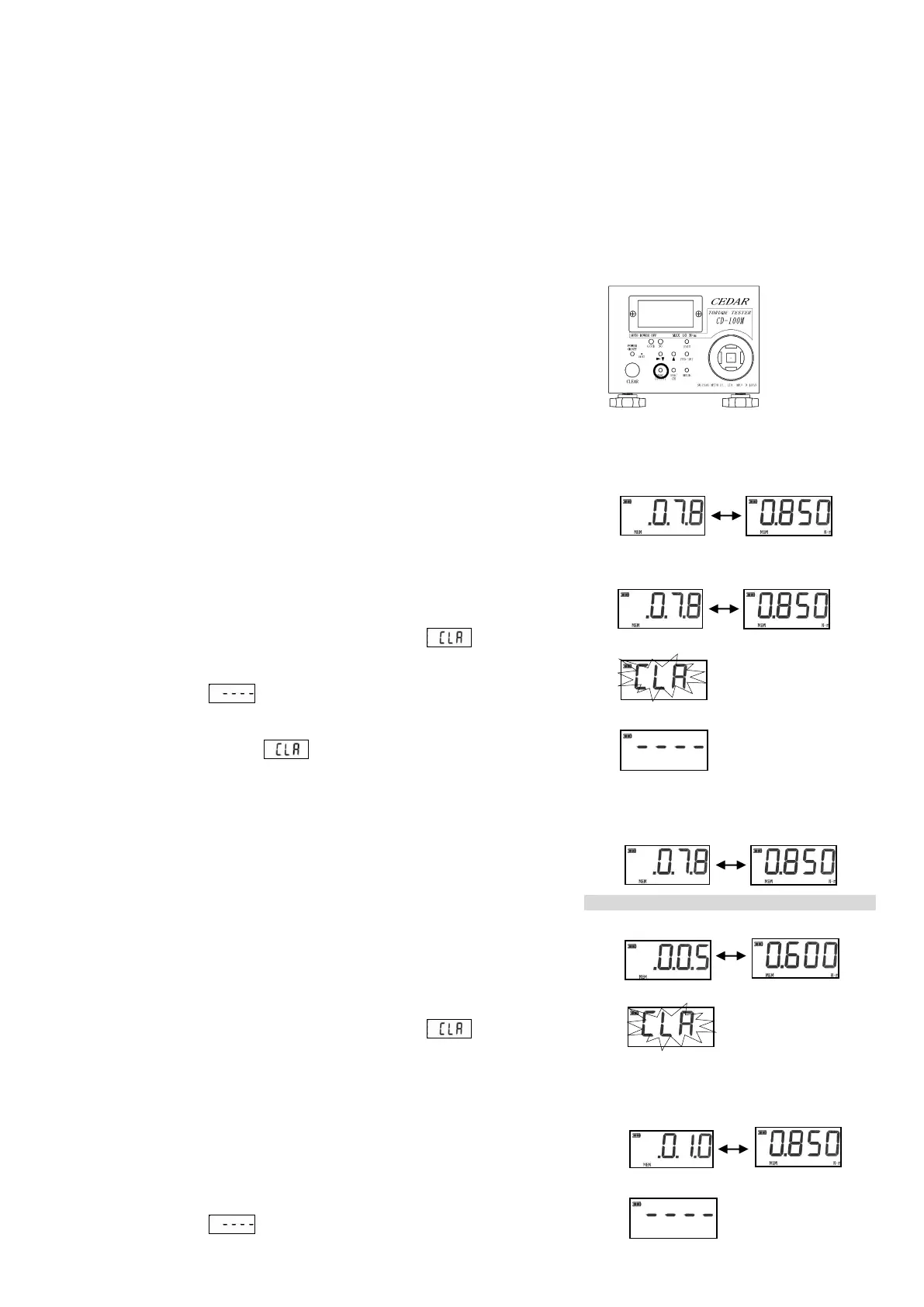
1. If the MEM/OUTPUT key is pressed, it will be displayed as
"MEM", and the data number and measured value which were saved
at the end will be displayed by turns.
2. If ▲key or ▼/▶key is pressed, a memory number is changed and
data can be searched.
If button operation is left for 6 seconds, the "MEM" display will
disappear and it will move to measurement mode.
* When memory data are eliminated individually
3. If the CLEAR key is pressed while displaying a memory number
and a torque value on alternation, it will blink .
4. If the CLEAR key is again pressed during blink, the data which
displayed as and were chosen will be eliminated.
(Subsequent data slide data to the eliminated portion)
5. If it is left during blink, it will be in the state which can
be measured. (Data are not eliminated)
* When the range is specified and memory data are eliminated
3. Press ▲key or ▼/▶key and display the data of the beginning of
data to erase.
4. If the CLEAR key is pressed while displaying a memory number
and a torque value on alternation, it will blink .
5. Since a data number will increase if ▲key is pressed,
display the data of the last of the range to erase.
⑥If the CLEAR key is pressed while displaying a memory number
and a torque value on alternation, the data of the range which
displayed as and was chosen will be eliminated. If no button
When the data numbers 005-010 are eliminated


 To Next Page