11
5 About a convenient function
This model carries various functions convenient to measure.
You can use the function appropriate for each management condition more efficiently because you use.
5.1 Kind of Convenient Function
1. The yes-no decision which sets up a maximum value and a minimum value.
The maximum value and minimum value of measured value can be set up respectively.
It is a success judging (Green GOOD lamp lighting) within the limits of an upper minimum value.
A failure judging (Red NG lamp blink) is carried out of the range.
2. The value which starts the measurement at the time of peak-down mode can be set up.
When measuring a torque driver/wrench etc., the unrelated torque change
at the time of a measurement start can be disregarded.
3. The value which starts the output at the time of real-time output mode can be set up.
4. Time to be automatic and clear the display of a measurement result can be set up.
5. How to sound buzzer sound can be chosen.
5.2 The setting method of a convenient functional numerical value
The numerical value for using a convenient function is set up.
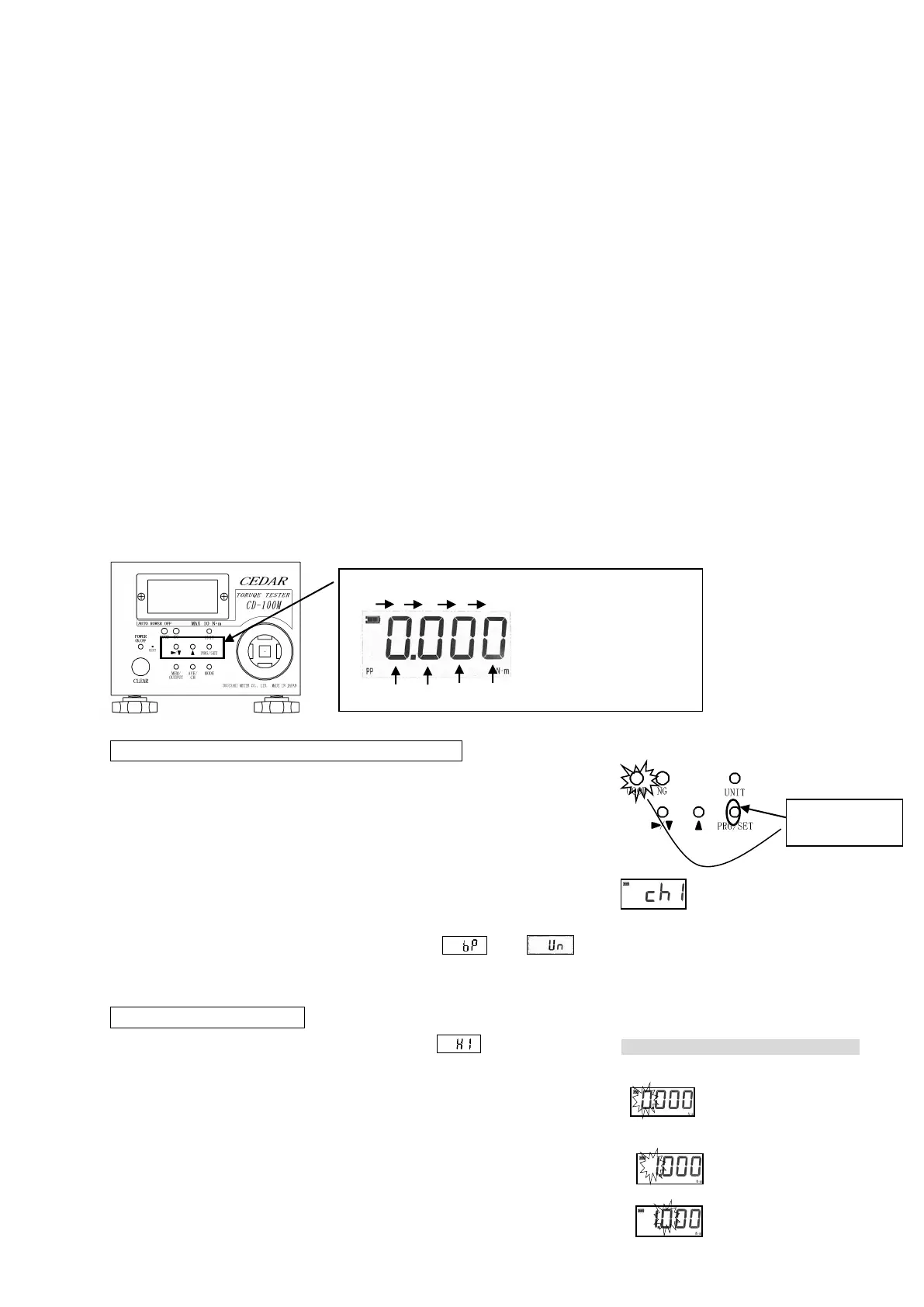
PRG/SET, and▲and▼/▶are used.
1. Change in Setting Mode, and Setup of Channel
If it continues pressing the PRG/SET key for about 1 second, green
LED (GOOD lamp) will stick, the channel set up now is displayed.
The channel which wants to change a channel or the contents to use
is set up by the UP key or the DOWN key. (ch1-ch4)
When you change the channel to be used, press the "CLR" key after
change. When changing the contents of a setting of a channel, the
PRG key is pressed again. * After-mentioned and
cannot do a setup for every channel.
2. Setup of Maximum Value
A maximum value is displayed after displaying will arrive.
The maximum value is set up by UP and DOWN key.
Since the fourth figure will blink if DOWN key is pressed first,
a numerical value is chosen by UP key.
If a setup of a numerical value of the fourth figure finishes,
DOWN key will be pressed again. Since the treble figures blink,
a numerical value is set up similarly.
▲ A numerical value is increased.
PRG/SET A numerical value
is determined.
The fourth figure blinks by
1.
The treble figures blink.
When a maximum value is set as 1.250
The fourth figure blinks.
Pushing for about 1
second, it is green
LED lighting


 To Next Page