Safe2+ / Safe4 Operation Manual
20 www.cedes.com © CEDES Safety & Automation AG / June 2008
8.3. Special configuration
All Safe2+ or Safe4 light curtains mentioned above
are also available with separated controllers or with
extension modules Naturally, all these versions are
provided with integrated self-monitoring and if re-
quired they also can be operate with external test,.
An extensive overview of all the possibilities that the
modularity of the Safe2+ or Safe4 systems offer are
shown in the "Configuration Tool" software. This
program can be obtained from any of your CEDES
partners and is also available from the CEDES
Homepage at www.cedes.com.
Your nearest CEDES sales office gives professional
support for the evaluation of a special configuration.
Due to safety reasons the special configuration has
to be assembled and tested at the manufacturing
site. You will receive a completed and tested system
with all safety relevant information on the type label
ready for installation.
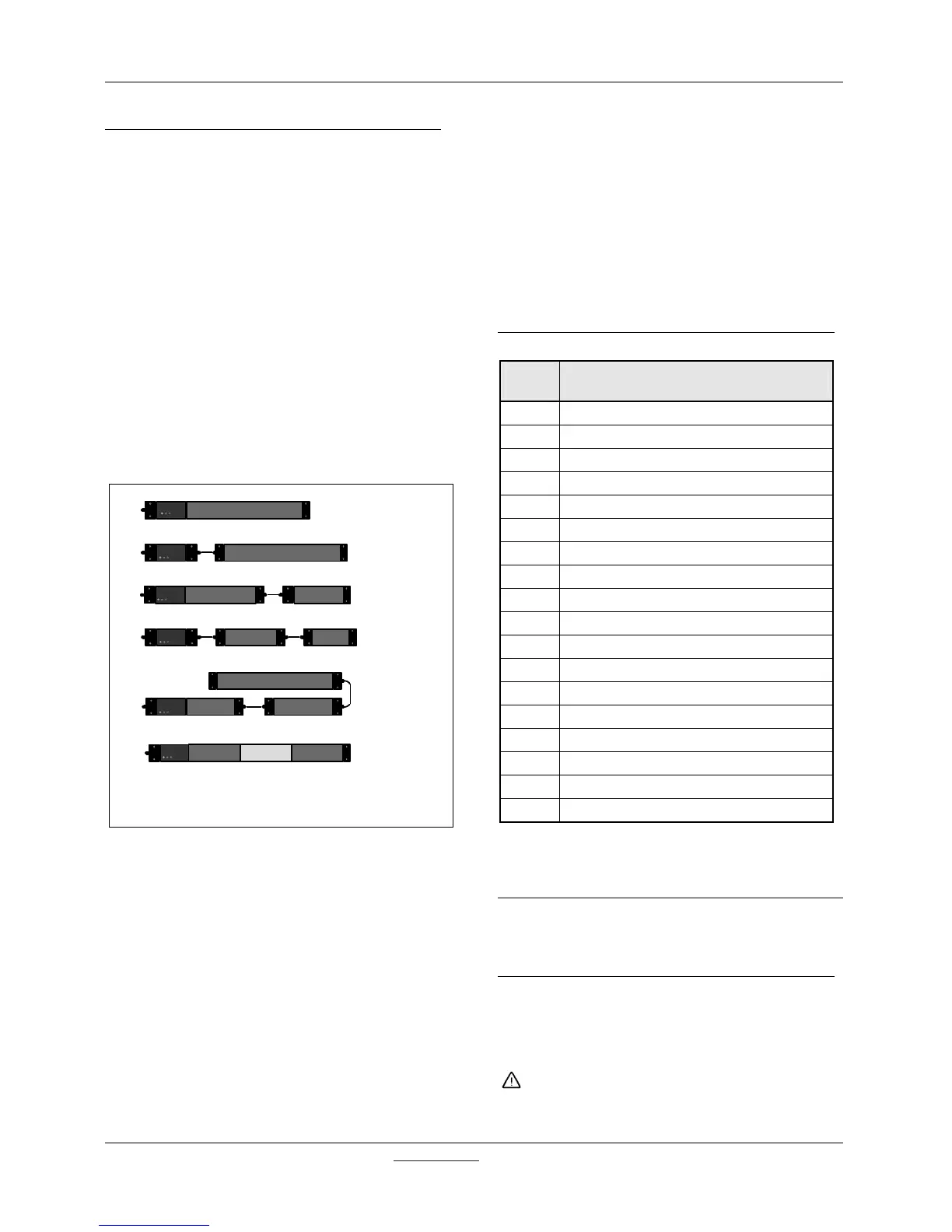
Standard configuration
System with separated controller
Two separated protective fields with separated controller
Two separated protective fields by a passive zone
(Perimeter, static blanking)
Two separated protective fields
Three separated protective fields
Figure 24: Possible configurations
For further information, dimensional drawings in
different file formats are available on our CEDES
homepage.
An accessory which shows clearly the whole flexibil-
ity and great variety of the Safe2+ or Safe4 family is
a computer program named "Configuration Tool with
OptiLink".
The user defines with the help of an easy working
graphical editor the configuration:
1. Length and number of protective fields
2. Resolution
3. Connecting type (cable gland or M12/5 pin)
4. Length of the connection cables
5. System with or without ILAS
6. Safety category 2 or 4
The results given to the user are the
• exact designation of system for a clear identify-
ing of the customer design,
• response time and
• safety distance.
All data in the software "Configuration Tool" with
regards to safety, is checked and certified by TÜV
Rheinland. Calculations of the safety distances can
be printed out and become a part of the safety
evaluation documentation for the corresponding
application.
8.4. Accessories / Components
Table 5
CEDES
Part No.
Description
106 427 Connection Cap A (Cable Gland) Tx / Rx
102 862 Connection Cap B (M12/5 Pin) Tx / Rx
106 429 Connection Cap C (Double M12/5 Pin) Tx
301 347 Cable, 5m, M12-M12, 5pol, M-F
102 792 Cable, 1m, MiniDin-MiniDin, 8pol, M-F
102 793 Cable, 3m, MiniDin-MiniDin, 8pol, M-F
106 500 Mounting kit 30mm (2 brackets)
106 502 Mounting kit vertical 30mm (2 brackets)
106 503 Mounting kit FGS 30mm (2 brackets)
106 497 Mounting kit 180° adj. 30mm (2 brackets)
106 501 Mounting kit silent block (2 pcs.)
103 006 Mirror 30
103 652 Mirror 60 with mounting column
102 965 ZCH Drawing opto edges Safe4/Safe2+
103 282 CD Configuration Tool / Optilink
104 565 OptiLink USB
103 105 Safety relay SafeC S
104 794 Safety relay SafeCIS3-2P-4IO
Edges up to a length of 1800mm are fixed using two
brackets. Longer edges with 3 brackets.
9. Inspection and service
All light curtains contain only electronics and there-
fore need no preventive maintenance.
9.1. Cleaning
The optical windows are to be cleaned with non-
aggressive materials only. The interval between
cleaning is dependant on the air pollution at the
installation.
Do not use aggressive solvents or abrasive sub-
stances. Otherwise range reduction and false
switching could arise


 To Next Page