11
Using the Antenna Position Test
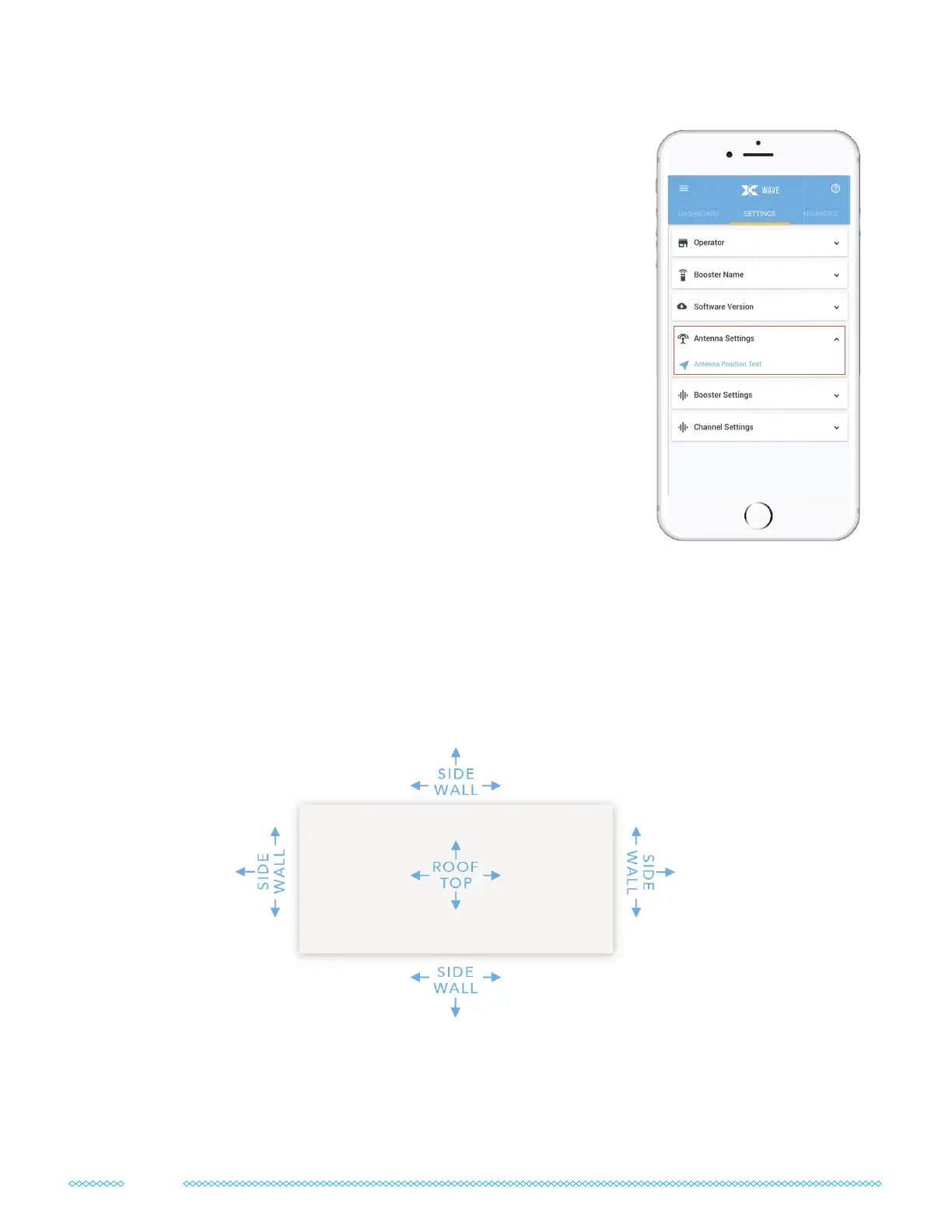
The Wave app has a special “Antenna Position Test” that you
can nd under the “Settings” tab in the “Antenna Settings”
dropdown.
With each location and direction you try, you can “Capture”
results. Tests take about a minute each.
Ideally, we want to nd a location with a score of 115 or higher.
If you have very weak or low-quality signal outdoors, then it may
be hard to get over 100 or even 90. It’s okay if that’s the case, just
nd the best score you can.
Alternatively, you might nd that the rst location you try is over
115. That’s great! It’s still worth trying more locations to optimize
for the very best signal.
How to Position & Aim
Finding the right outdoor antenna location and direction takes some patience, but it’s
absolutely worth it. Spending time to get it right will have a big impact on your system’s
performance.
Here are all the locations and directions we recommend testing your outdoor antenna:
How come we don’t recommend just using the highest point on the roof? It’s simple: while
signal strength is generally higher on the roof, signal quality is often better on the side of
the building.


 To Next Page