DE
ES
FR
18
IT
EN
3. Installing the ear speaker and microphone
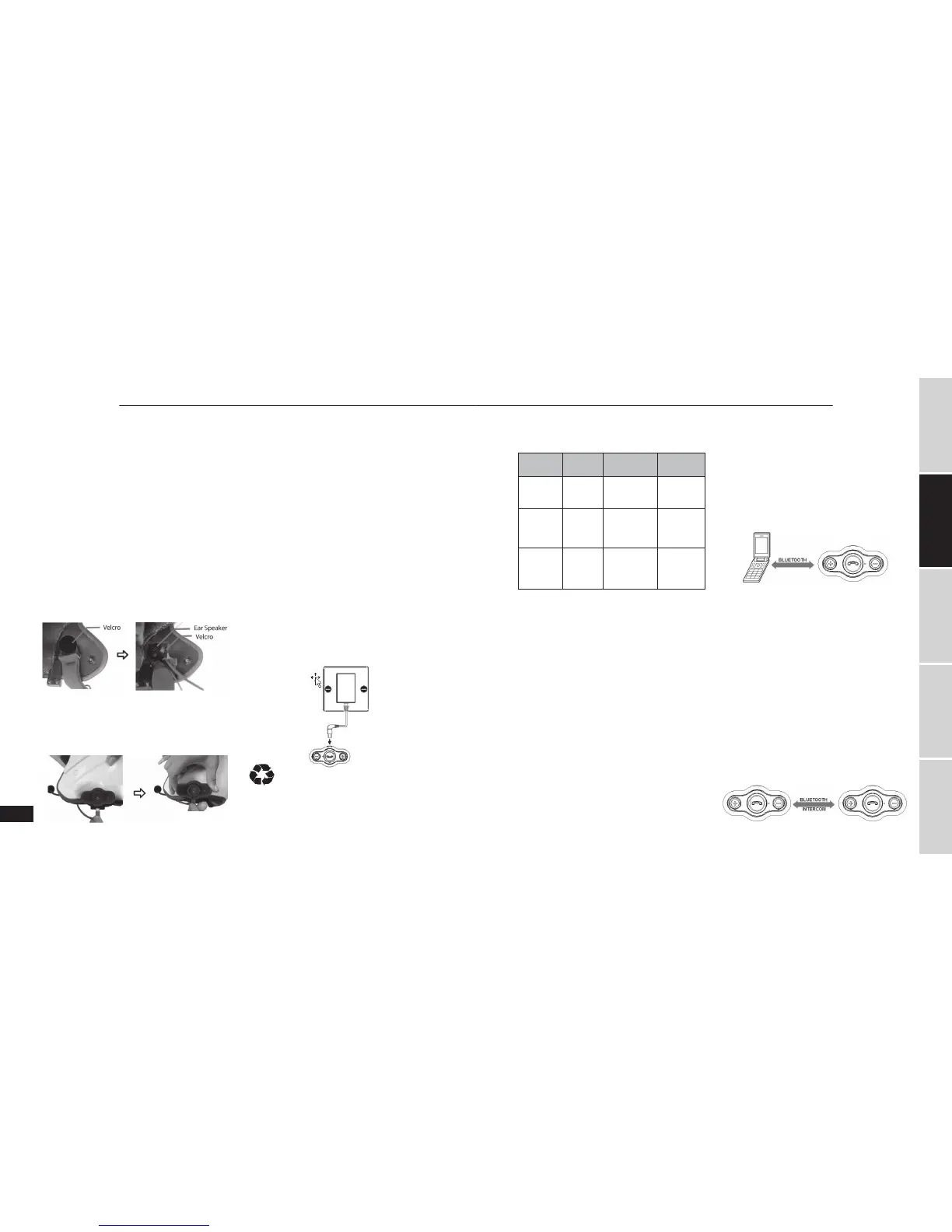
Now you need to attach the ear speaker and micro-
phone arm to the inside of the helmet. Take the velcro
which the ear speaker will attach to, and test for the best
position to fix it. The velcro should be fixed at the height
of your ear. You will need to put the helmet on a few
times to find the optimum position. When the correct
positioning is found, remove the protective strip and
apply the velcro.
Next, take the ear speaker and attach it to the velcro.
Run the microphone arm down along down to where
your mouth will be. As the microphone arm is flexible,
you can adjust it so it sits in the optimum position in
front of your mouth.
Note: There are two types of velcro, thin and thick.
Please use based on the actual situation.
4. Connecting the ear speaker and microphone to
interphone headset
Take care to connect USB cable to the USB port of inter-
phone headset, now you have successfully installed the
interphone.
GETTING STARTED
1. Charging the interphone headset
The Bluetooth® interphones have built-in rechargeable
batteries, prior to using them, it is recommendable to
charge their batteries fully for the first time.
Connect one end of USB cable to a standard power out-
let and the USB plug to the USB port of the interphone
headset. The red LED will be on while charging. It takes
about 2 hours to charge the battery fully. When charg-
ing has completed, the red LED will be off.
When the Bluetooth® interphone is on and the battery
becomes low, the red LED flashes and the Bluetooth®
interphone emits 3 “DU” tones every 30 seconds. Please
recharge the battery fully as described above.
Notes:
1) When you can’t turn off the Bluetooth® interphone,
you can turn it off as soon as you charge it.
2) There is USB charging cable.
Warning:
1) The battery is recyclable.
2) Batteries (battery pack or batteries installed) shall not
be exposed to excessive heat place such as sunshine,
fire or the like.
2. Turning on/off BTEASY
Function Operation LED indicator
Indication
tone
Power on Press and
hold MFB
button for 3
seconds
Blue LED is on
for 1 second
and then flashes
twice
1 long tone
Power off Press and
hold MFB
button for
7-8 seconds
Red LED is on
for 1 second
and then flashes
twice
1 long tone
Entering
pairing mode
Press and
hold MFB
button for
3-5 seconds
Red and blue
LEDs flash
alternately
2 short tones
Note: If you want BTEASY to enter pairing mode, you
have to press and hold MFB button for 3-5 seconds
when the interphone is turned off or in standby mode.
3. Pairing BTEASY with a Bluetooth® device
Pairing with a Bluetooth® cell phone
You have to pair BTEASY Bluetooth® interphone with a
Bluetooth® cell phone before first use. Please make sure
your cell phone is Bluetooth®-enabled. Specific pairing
steps may vary with different models of cell phones.
Please refer to your cell phone’s user’s manual for further
information. The general pairing steps are as follows:
1) Keep BTEASY and Bluetooth® cell phone within 1
meter when pairing;
2) Ensure BTEASY is turned off, otherwise turn off
BTEASY first;
3) Press and hold MFB button for about 3-5 seconds, the
red and blue LEDs will flash alternately. BTEASY now
entered pairing mode;
4) Turn on your cell phone’s Bluetooth® function to search
for Bluetooth® devices. After the search is completed,
select “BTEASY” from the Bluetooth® device list;
5) According to the indication, enter password or PIN
No:”1234”, and press ”Yes” or “confirm”;
6) After successful pairing, select “BTEASY” from the
Bluetooth® device list, and press “connect”. The indica-
tor light of BTEASY will flash twice every 4 seconds if
connected successfully.
Pairing two interphones together
If you want to use the Bluetooth® intercom feature, you
have to pair two interphone together first. The general
pairing steps are as follows:
1) Keep two interphones within 1 meter when pairing;
2) Make one of interphones enter pairing mode;
3) Press and hold MFB button of another interphone
until blue LED is on;
4) The interphone whose blue LED is on will auto-
matically search and connect the interphone which
entered pairing mode. After successfully connecting,
the blue LEDs of both interphones will flash twice
every 4 seconds.
BTEASY BTEASY


 To Next Page
 Loading...