2
Display:
Digital: 4000 counts
Analog: 42 segments
Maintenance & Clearing:
Repairs or servicing not covered in this manual should only by
qualified personal.
Periodically wipe the case with a dry cloth and detergent . Do not
use abrasives or solvents on this instruments.
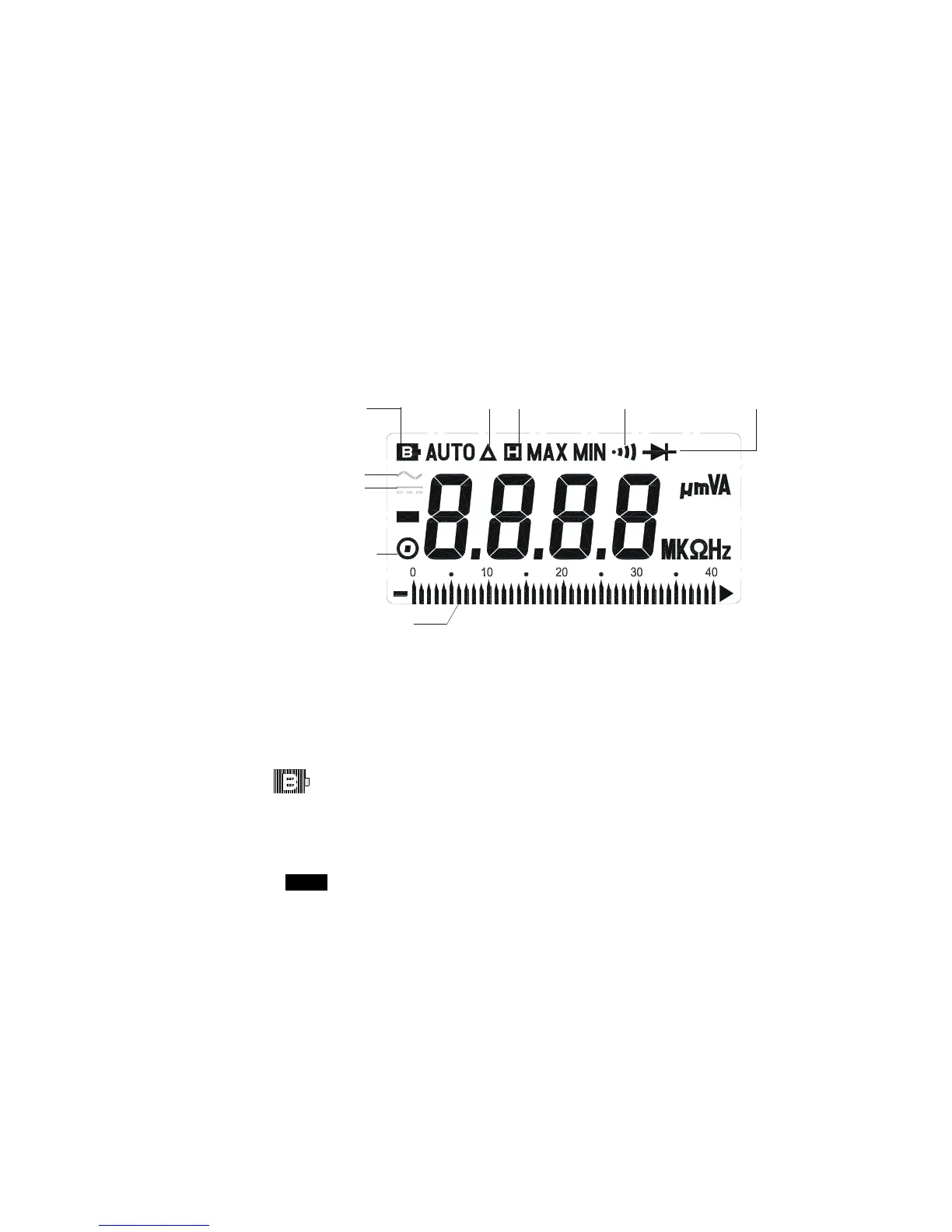
Display Symbol Definition:
Sampling Rate:
Digital: 2 times/sec
Analog: 20times/sec for Bargraph indication.
Over Range Indication: LCD will show “OL”.`
Low Battery Indication:
The is displayed when the battery voltage drop below the
proper operating range.
Battery type: 1.5V.SIZE AAA Batter
Battery Life: 500hrs typical (alkaline Battery)
Polarity: ”
” Indicates negative input.
Auto Power Off Time: 30 minutes
Operating Temperature and Humidity:
0℃to 40℃(32℉to 104℉) below80%RH
Storage Temperature and Humidity:
-10℃to 60℃(14℉to 140℉) below70%RH
Low Battery Relative Reading Data Hold Continuity Beeper
Diode
AC Symbol
Manual Range
Bargraph Indication
DC Symbol


 To Next Page