7
∝ Tilt stand
2-2 Operating Instruction
2-2-1 Ranging
The meter defaults to autorange mode when you turn on the Meter.
Manual ranging is available in V~, V , ohms , A~ , A ,
frequency.
To return to autorange, press for 1 second or turn the rotary
switch.
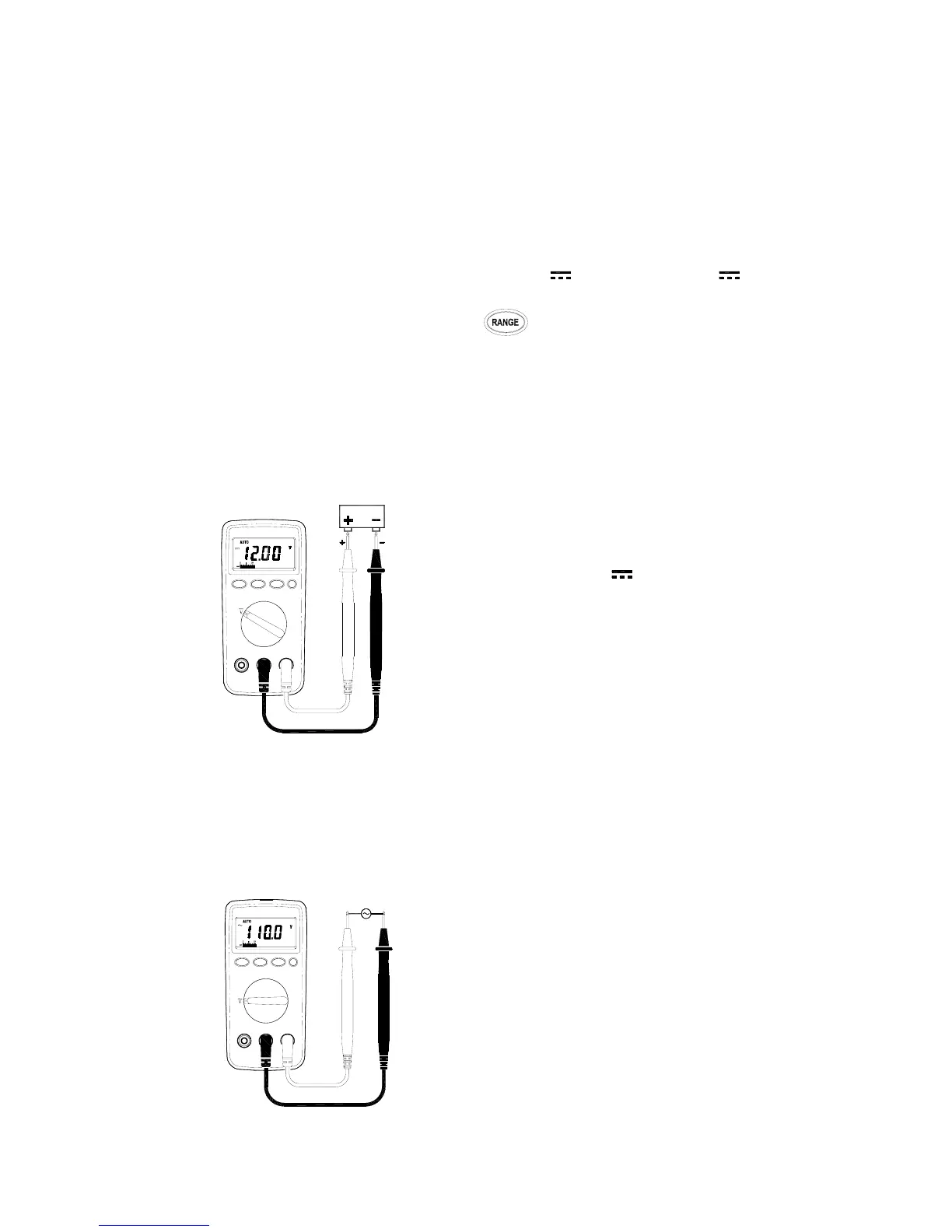
2-2-2 DC Voltage Measurements
WARNING!
Maximum Input Voltage is 1000V DC, 750V AC. Do not attempt
to Take any voltage measurement that may exceed toavoid
Electrical shock hazard and/or damage to this instrument
⊇ Connect red test lead to “ V ” jack and
black test lead to “ COM ” jack.
⊄ Set Range Switch to V range.
⊂ Connect the test leads IN PARALLEL to
the circuit being measured.
⊆ Read the Voltage value on LCD.
2-2-3 AC Voltage Measurements
WARNING!
Maximum Input Voltage is 1000V DC, 750V AC. Do not attempt
to Take any voltage measurement that may exceed to avoid
Electrical shock hazard and/or damage to this instrument.
⊇ Connect red test lead to “ V ”jack and black
test lead to “COM ”jack.
⊄ Set Range Switch to V
~
range.
⊂ Connect the test leads IN PARALLEL to the
circuit being measured.
⊆ Read the Voltage value on LCD.


 To Next Page