5
1
2
3
6
7
8
4
5
9
V
A
VA
uA
mAHz
MIN
MAX
V
Hz
mA
uA
IEC 1010
POLLUTION DEGREE 2
F 0.5A 250V
F 10A 250V
WARNING
600V CAT II
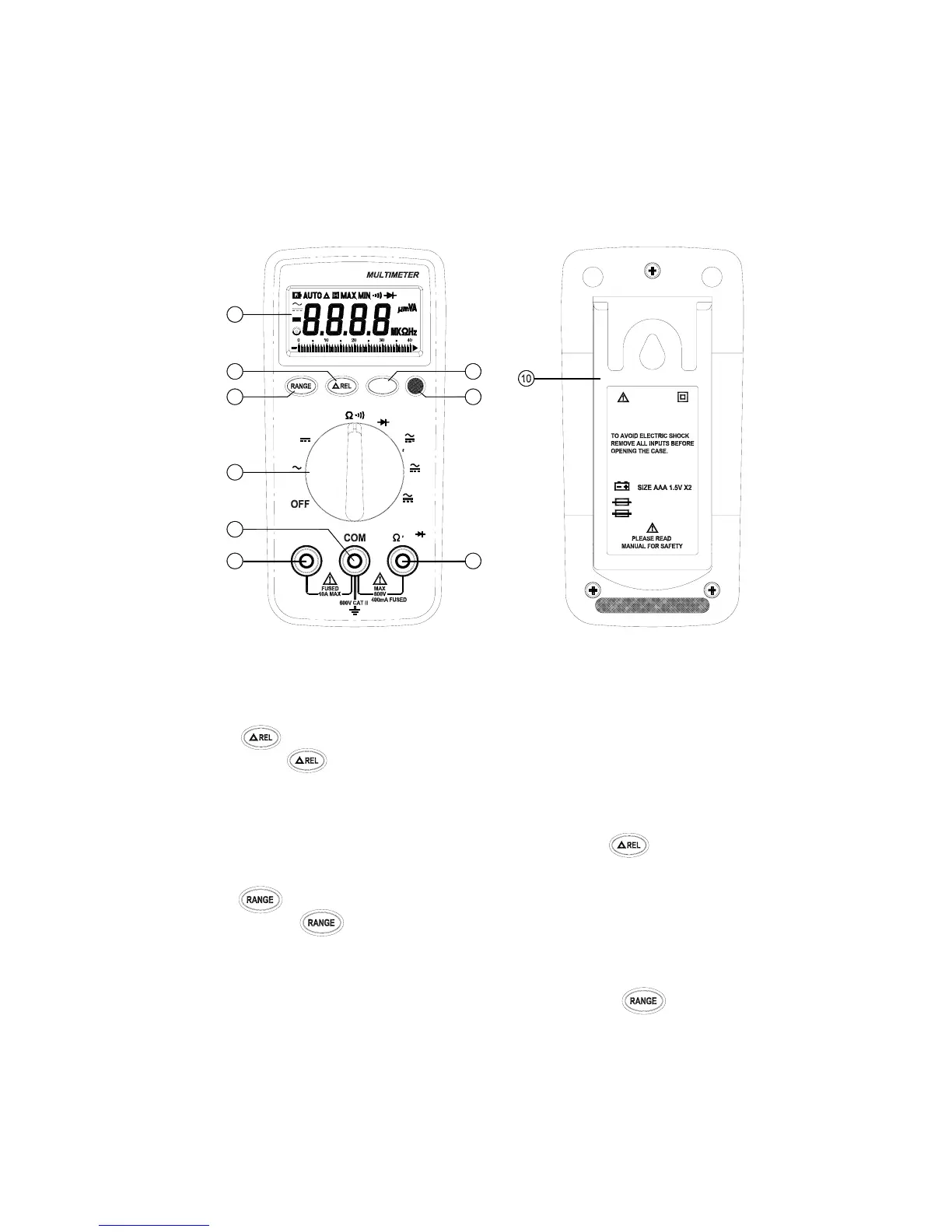
2.PARTS & CONTROLS
2-1 Name of Parts and Position:
← LCD Display:
Measured values, unit, function and decimal points symbols are
displayed.
↑ Relative Button:
Press button to enter the relative mode. The Display is zeroed ,
and the reading is stored as reference value for subsequent
measurements. Press it again, the “△” annunciator blinking and stored
relative value will display . Press and hold down button for 1
second to exit the relative mode.
→ Auto-range & Manual Range Button:
․ Press to select the Manual Range mode and the ⊙
annunciator turn on and The meter remains in the same range it
was .
․In the Manual Range mode, each time you press button , the
range ( and the input range annunciate ) increases , and a new


 To Next Page