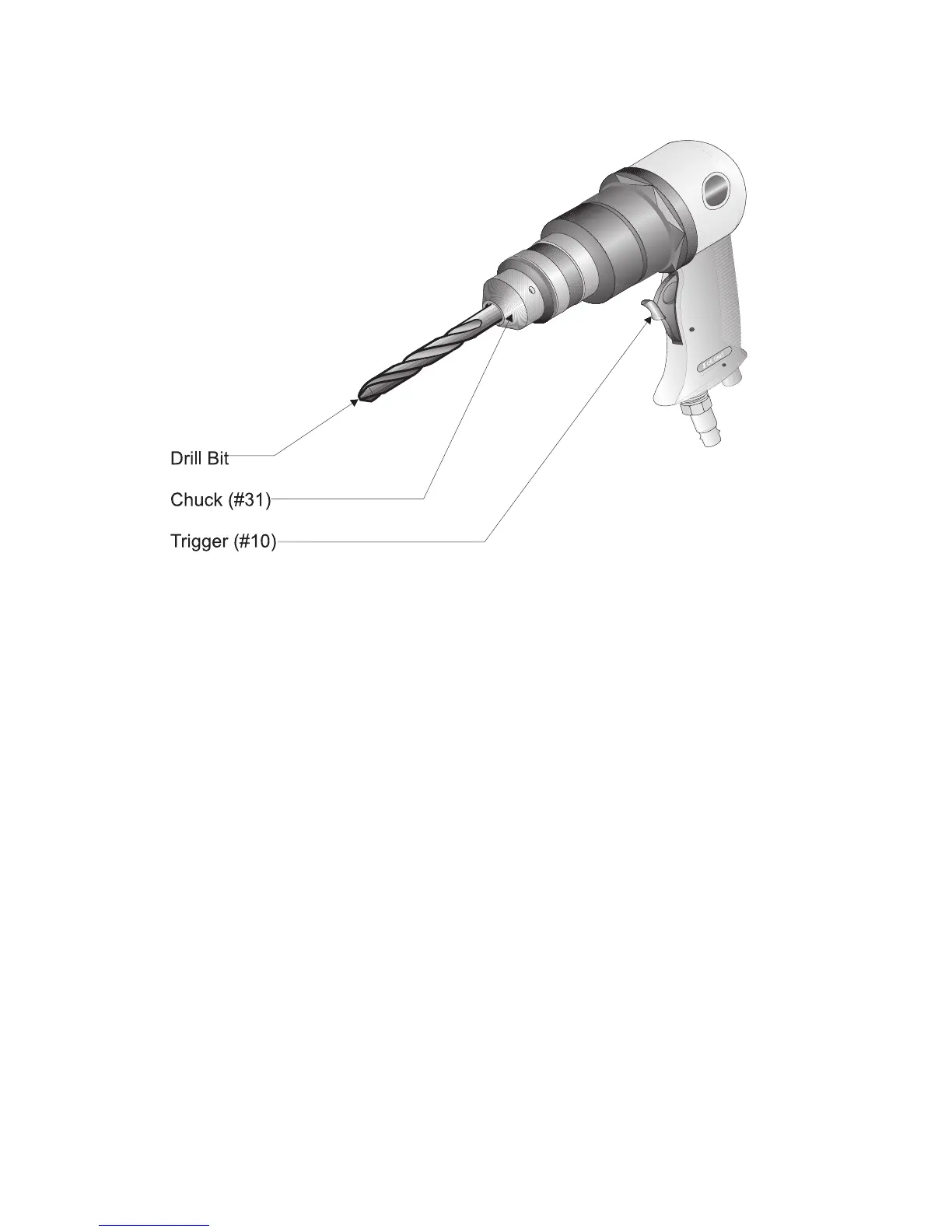
Step 7: To begin drilling, press the TRIGGER (#10) as shown in Figure 5.
Figure 5 — Drilling Operations
Step 8: Your Sander/Drill has a variable speed for drilling. To vary the speed of the drilling
action, vary the pressure on the TRIGGER.
Step 9: Drill only as deep as necessary. Do not drill deeper than necessary into walls or other
areas where you cannot identify any possible hazards behind the drilling surface.
Step 10: When you have drilled the hole, remove the drill bit from the hole while the Sander/Drill
is still spinning. This is to prevent the drill getting caught in the hole and causing
damage.
Sanding
Step 1: Identify the area you will be sanding. Make sure you are using the appropriate grit
sandpaper for the material you will be working with.
Step 2: It is recommended that you start the Sander/Drill before placing the sandpaper disc
onto the work surface. This will reduce deep scratching in the surface.
Step 3: To operate the Sander/Drill, grip the BODY (#1) with your palm and place pressure on
the TRIGGER (#10) to begin sanding.
Step 4: You can vary the speed of the Sander/Drill to suit different sanding applications by
varying the pressure placed on the TRIGGER.
Page #8 -- SKU: 35245



 To Next Page