29
7:3 SETTING UP THE CONTROLS
It is recommended that you familiarise yourself with
the functions of the Control. These are detailed in
the User Instructions,
Section 1:6 and the Heater
Control, Section 4:2.
There are two options that should be set to suit the
user and it also recommended that the Fault Logs
are cleared.
1. The display is factory set for Fahrenheit, it
can be altered to show Centigrade.
2. If the Heater is also providing Space Heat
ing/DHW, the factory setting of Pool priority
may want to be changed to Heating priority.
Priority means, whichever is chosen has to
be upto temperature before it heats the other.
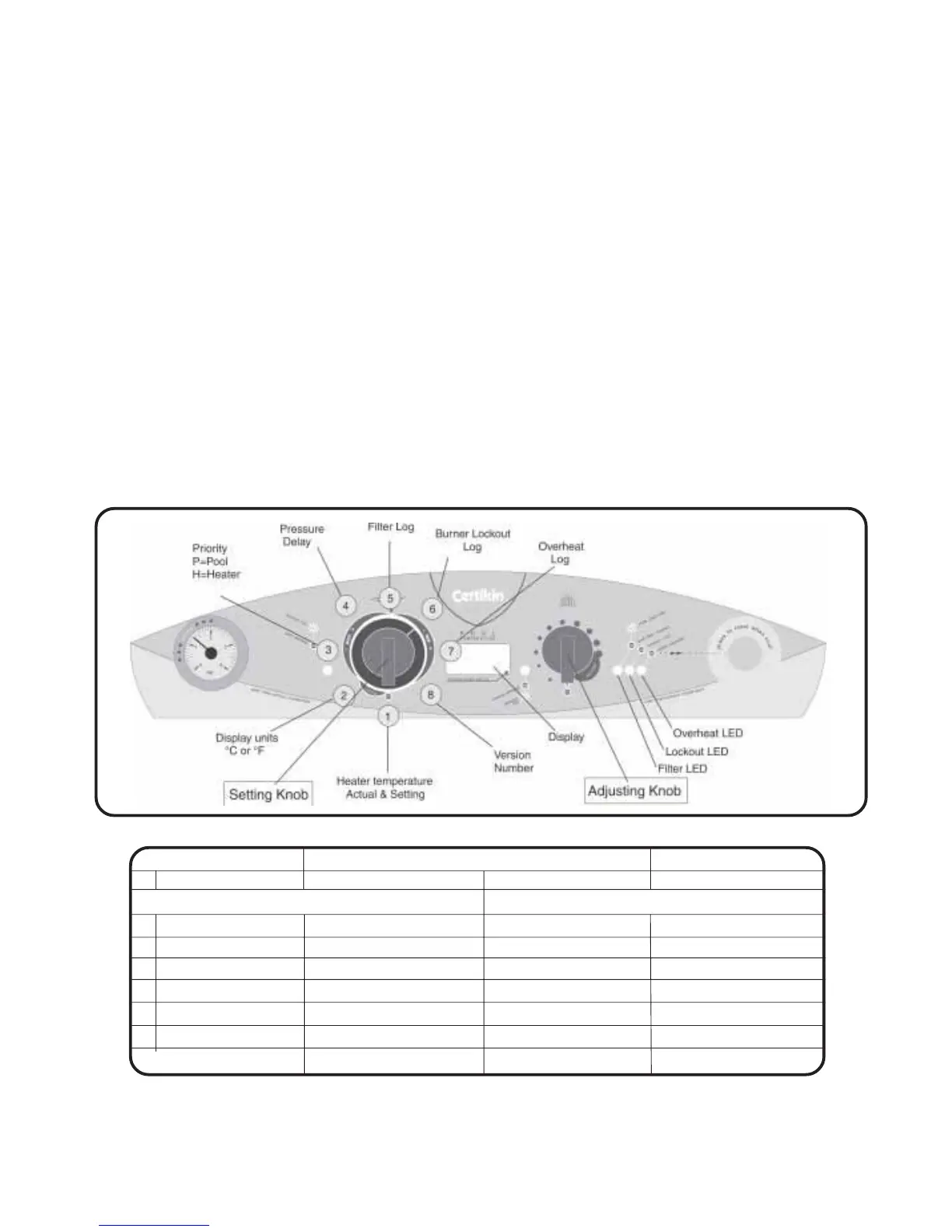
These settings can be altered, and other data
viewed in ‘Setup Mode’
Setting Heating Knob On or Off Fascia Indicator
1 Heater temperature * Actual temperature Set temperature e.g 20 & 70
Factory setting Alternative
2 Display Units °F = Fahrenheit °C = Centigrade °F or °C
3 Priority P = Pool H = Heating P or H
4 Filter memory Off On On or Off
5 Filter Pressure log # Number of Operations Resets to zero Yellow Filter LED On
6 Burner Lockout log # Number of Operations Resets to zero Red Lockout LED On
7 Boiler Overheat log # Number of Operations Resets to zero Red Overheat LED On
8 Version Number _ _ e.g. 010
*
In this position with the Pool Temperature Control off, the Heater can be run for test purposes, if there is a Space Heating
demand, by turning On the Heating Temperature Control Knob.
#
Reset the log by turning the Heating Temperature Control Knob On or Off.
Table 7:3.1 Control Display in Setup Mode.
Procedure to enter Setup Mode
To enter Setup Mode turn both Temperature Control
Knobs to OFF.
The following must be carried out within 5 seconds.
1. Turn on the Mains supply to the Heater.
2. Turn the Pool Temperature Control Knob ON.
3. Turn the Heating Temperature Control Knob ON.
4. Turn the Pool Temperature Control Knob OFF.
5. Turn The Heating Temperature Control Knob
OFF.
The Control is now in ‘Setup Mode’ and displaying
the Heater temperature. Additional data is displayed
as the Pool Temperature Knob is rotated.
See Fig.
7:3a & Table 7:3.1
Settings that can be altered are changed by turning
the Heating Temperature Control Knob On or Off.
To leave ‘Setup Mode’ and retain the new settings,
turn off the Mains supply for a few seconds at any
time.
Note: At power-up the Display is also used to show fault
conditions. If an unexpected display is shown please
check the Fault Finding Section 10:2.
Fig 7:3a
28-02-06



 To Next Page