Reference – SIP Quick Start to Register a Single Phone
The Cetis, Inc SIP sets are SIP-only endpoints powered only by POE/802.3af and will acquire an
IP address when met by a DHCP server. Begin by plugging your POE Ethernet cable into the WAN
port. To retrieve an IP address, press * * 4(I) 7(P) #. The phone’s IP address will be displayed on
the LCD or spoken by audio through the speaker. Pointing your web browser to that IP address.
You will be presented with a login screen.
Login = admin Password = admin
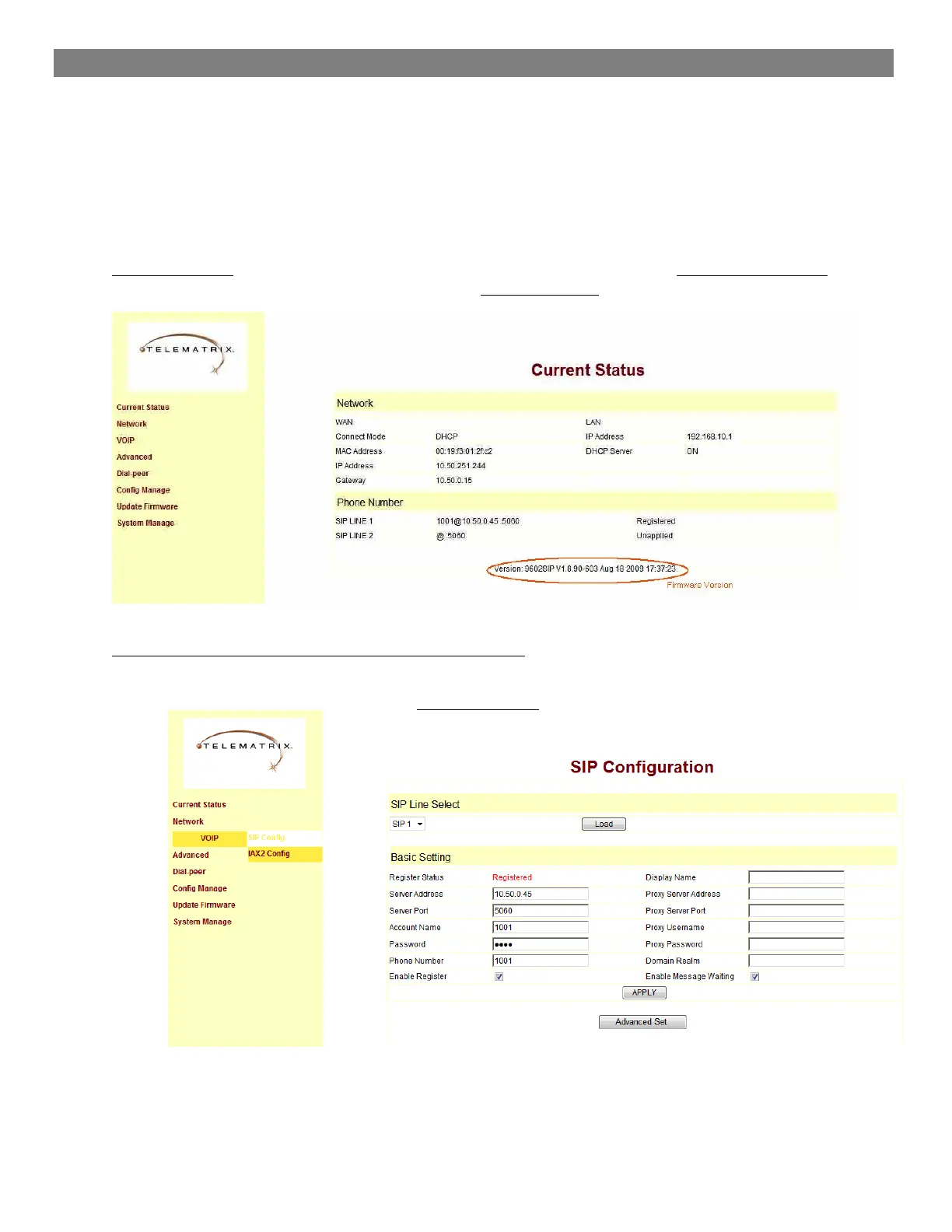
This is the Default Current Status Page
The scope of this document is to provide the basic screenshots necessary to quickly configure the guest
phone for basic registration and show the user where to program voicemail retrieval keys and speed dials.
Our example SIP phone is programmed as extension 1001. The firmware version of the phone is circled in
red.
Program your connection under the VoIP -> SIP Configuration Screen
Server address of the IP/PBX, extension number/account name, phone number and display name, enable
register and enable message waiting indication are all programmed here.


 To Next Page