Chapter 2
16
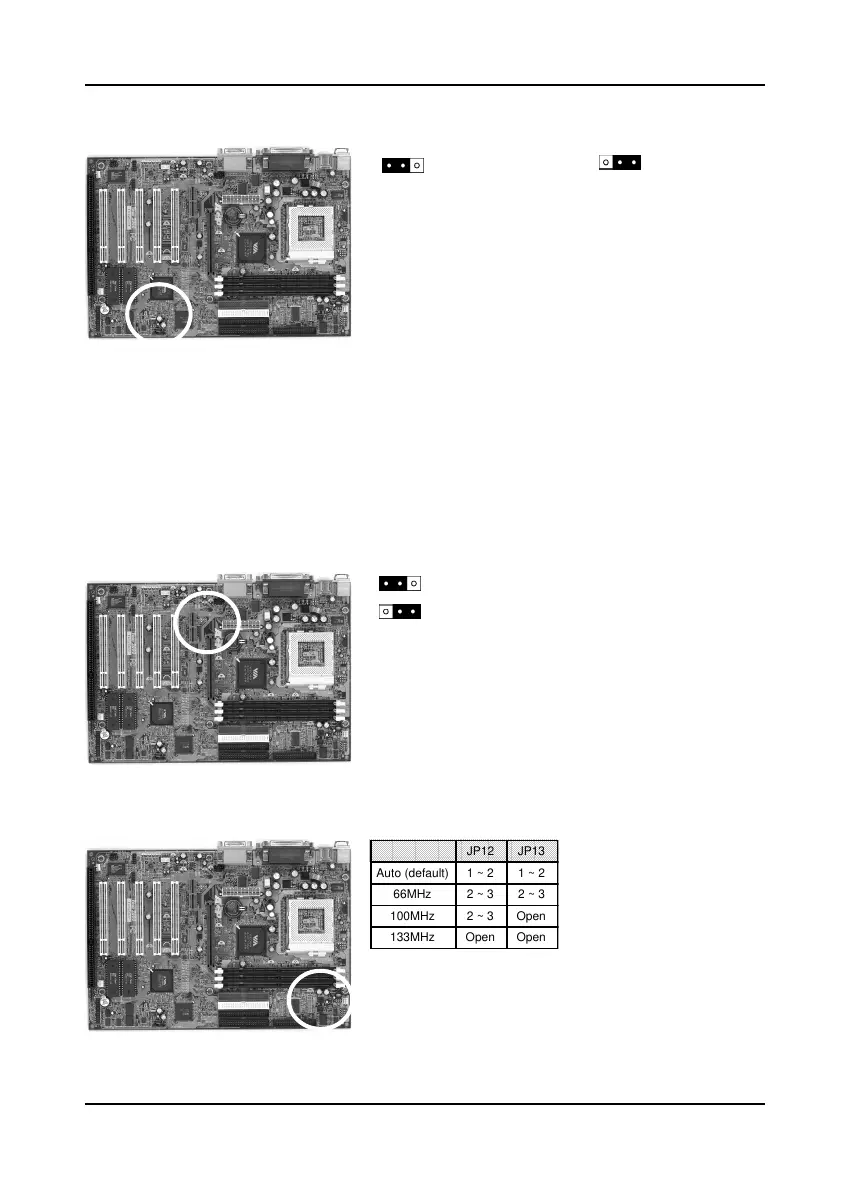
Clear CMOS Data (JP6)
To clear the contents of the CMOS, please follow
the steps below.
1. Disconnect the system power supply from the
power source.
2. Set the jumper cap at location 2~3 for 5 seconds,
then set it back to the default position.
3. Connect the system's power and then start the
system.
4. Enter BIOS's CMOS Setup Utility and choose
Load Setup Defaults. Type Y and press enter.
5. Set the system configuration in the Standard
CMOS Setup menu.
Optional Primary Audio CODEC Select (JP7)
Short pin 1-2 to enable onboard AC`97 CODEC.
Short pin 2-3 to enable AMR (Soft Audio/Modem
riser).
CPU Bus Frequency (JP12/JP13)
This jumper allows the CPU bus frequency to be
determined either by the CPU or the user. Set both
jumper cups to pin 1-2 (default) if you are not sure
what frequency your CPU support.
Normal (default)
1
Clear CMOS data
AMR (Soft-Audio/Modem riser)
Onboard CODEC (Default)
JP12 JP13
Auto (default) 1 ~ 2 1 ~ 2
66MHz 2 ~ 3 2 ~ 3
100MHz 2 ~ 3 Open
133MHz Open Open



 To Next Page