1RGTCVKQP
5OCTV %QPVTQN 2CPGN
EQPVKPWGF
.KIJV (GCVWTG
6JG NKIJVU YKNN VWTP QP YJGP UQOGQPG GPVGTU VJTQWIJ VJG QRGP ICTCIG FQQT CPF VJG UCHGV[ TGXGTUKPI UGPUQT KPHTCTGF
DGCO KU DTQMGP +H WUKPI VJG ICTCIG FQQT QRGPGT NKIJV CU C YQTM NKIJV VWTP VJG NKIJV QP WUKPI VJG NKIJV DWVVQP QP VJG YCNN
EQPVTQN QT VJG NKIJV YKNN VWTP QHH KH [QW CTG DG[QPF VJG TCPIG QH VJG UGPUQT
.1%-
6JG .1%- HGCVWTG KU FGUKIPGF VQ RTGXGPV CEVKXCVKQP QH VJG ICTCIG FQQT QRGPGT HTQOTGOQVGEQPVTQNU YJKNGUVKNN CNNQYKPI
CEVKXCVKQP HTQO VJG FQQT EQPVTQN CPF MG[NGUU GPVT[ 6JKU HGCVWTG KU WUGHWN HQT CFFGF RGCEG QH OKPF YJGP VJG JQOG KU
GORV[ KG XCECVKQP
9JGP VJG .QEM HGCVWTG KU QP [QWT TGOQVG EQPVTQNU JCXG DGGP FKUCDNGF CPF C OGUUCIG YKNN FKURNC[ QP VJG FQQT EQPVTQN
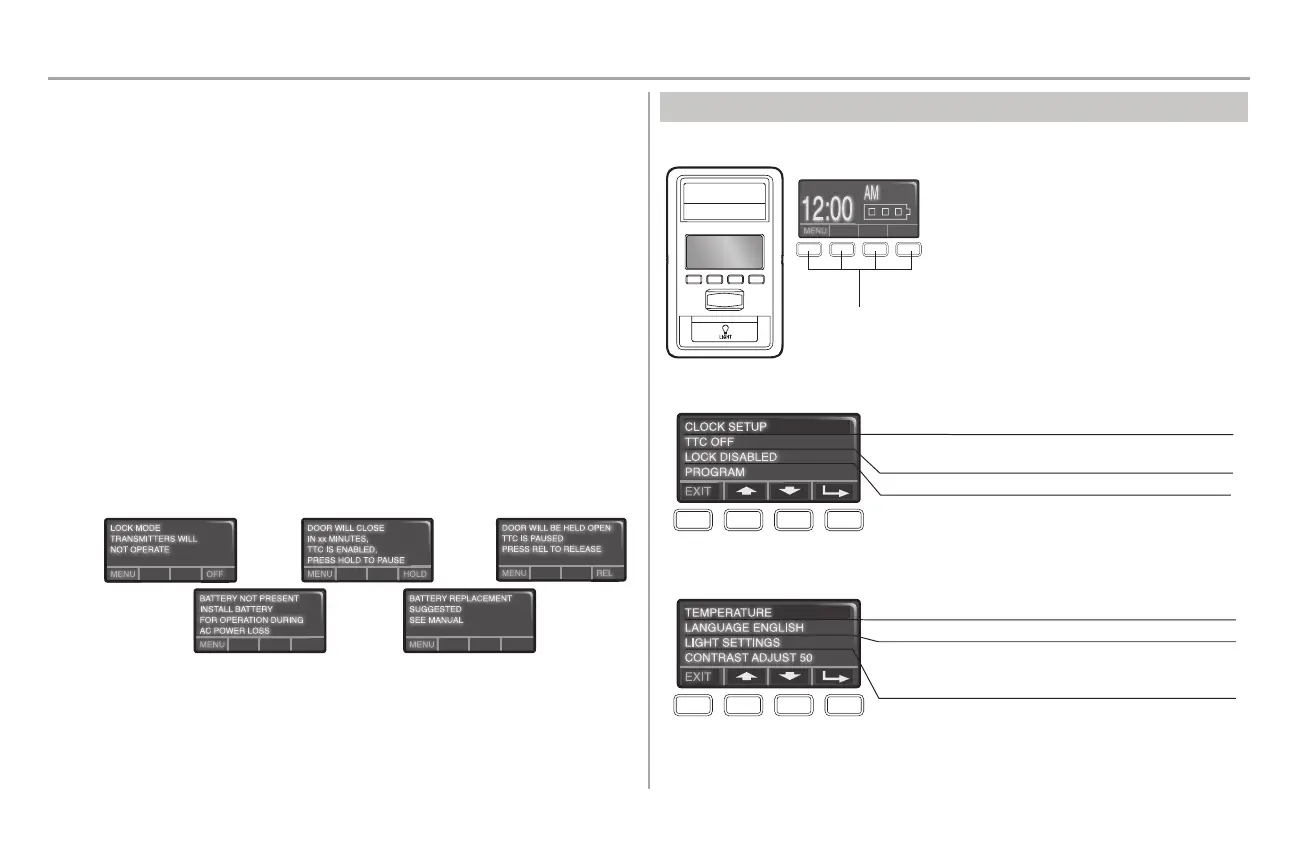
(KIWTG
6+/'461%.15' 66%
&1 016 GPCDNG66% KH QRGTCVKPI CQPGRKGEG FQQT 66% ECP DG UGV VQ CWVQOCVKECNN[ ENQUG [QWT ICTCIG FQQT HTQO
VJG HWNN[ QRGP RQUKVKQP CHVGT C URGEKHKGF RGTKQF QH VKOG OKPWVG KPVGTXCNU QT C EWUVQO UGVVKPI WR VQ OKPWVGU
6JG UETGGP QP VJG FQQT EQPVTQN ECP FKURNC[ VJG UVCVWU QH VJG 66% 1PEG VJG 66% JCU DGGP UGV CPF VJG FQQT KU QRGP
VJG UGNGEVGF ENQUG KPVGTXCN YKNN DG FKURNC[GF QP VJG UETGGP CPF VQIING DGVYGGP VJG VKOG CPF 66% OGUUCIG 9JGP VJG
66% KU QP C OGUUCIG YKNN FKURNC[ QP VJG FQQT EQPVTQN UETGGP (KIWTG
6Q VGORQTCTKN[ UWURGPF VJG 66% HGCVWTG RTGUU CPF TGNGCUG VJG *1.& DWVVQP 2TGUU 4'. DWVVQP VQ TGUWOG PQTOCN
66% QRGTCVKQP (KIWTG
$#66'4; $#%-72
+H [QWT ICTCIG FQQT QRGPGT JCU C DCVVGT[ DCEMWR QPG QH VYQ OGUUCIGU YKNN FKURNC[ QP VJG FQQT EQPVTQN KH VJGTG KU C
RTQDNGO YKVJ VJG DCVVGT[ (KIWTGU CPF
Figure 2 Figure 3Figure 1
Figure 4 Figure 5
5/#46 %10641. 2#0'. /'07
6JG HGCVWTGU QP VJG FQQT EQPVTQN ECP DG RTQITCOOGF VJTQWIJ C UGTKGU QH OGPWU QP VJG UETGGP CPF VJG PCXKICVKQP
DWVVQPU
Navigation Buttons
Screen
Use the navigation buttons to make selections and program features.
The screen will display the time, temperature, and
current battery charge (if applicable) until the menu
button is pressed, and then it will display the menu
options. If there is a problem with the garage door
opener the screen will display the Diagnostic Code.
('#674'5 /'07
2TGUU VJG PCXKICVKQP DWVVQP DGNQY p/'07q VQ XKGY VJG (GCVWTGU OGPW
Set the time, choose 12 or 24 hour clock and show/hide clock.
Set the Timer-to-Close feature off/on and set the time interval
before door closes.
Enable/disable lock.
Add remote controls, MyQ
®
devices, an extra remote button
to control your garage door opener lights, or a keyless entry.
5'66+0)5 /'07
2TGUU VJG PCXKICVKQP DWVVQP DGNQY VJG FQYP CTTQY VKNN [QW UGG 6'/2'4#674' VQ XKGY VJG 5GVVKPIU OGPW
Display the temperature in Fahrenheit or Celsius and
show/hide the temperature.
Select a language.
Set duration for garage door opener light to stay on after
operation, selectable range of 1-1/2 to 4-1/2 minutes. Turn the
Motion sensor off/on, and turn the entry light feature off/on.
Adjust the contrast of the screen.



 To Next Page