31
Installation
STEP 15 Align the Safety Reversing Sensors
IMPORTANT: The safety reversing sensors MUST be connected and aligned correctly before the garage
door opener will move in the down direction.
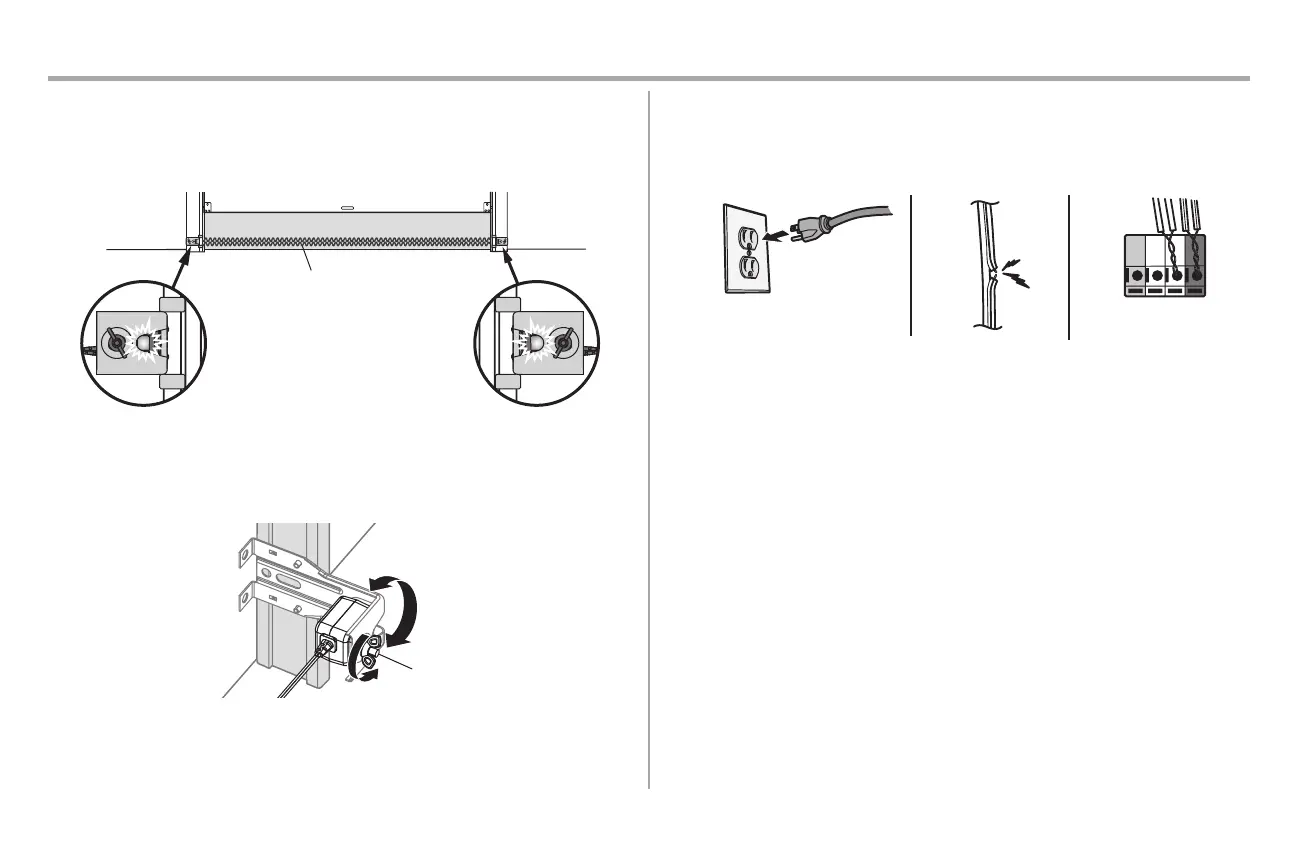
When the garaged door opener has power, check the safety reversing sensors. If the sensors are aligned and
wired correctly, both LEDs will glow steadily.
Light Beam Protection Area
Receiving sensor - green LEDSending sensor - amber LED
To align the safety reversing sensors:
1. Loosen the wing nuts.
2. Adjust the sensors up or down until both LEDs glow steady indicating alignment.
3. Tighten the wing nut to secure the sensor.
SAFETY SENSOR TROUBLESHOOTING
If either of the sensor LEDs are off, there is no power to the sensor:
1. Check that you have power to the garage door opener.
2. Check the sensor wire is not shorted or broken.
3. Check that the sensors is wired correctly; white wires to white terminal and white/black wires to grey
terminal.
If the green receiving sensor LED is blinking, the sensors are obstructed or misaligned:
1. Check for obstructions in the sensor light beam.
2. Align the sensors.
3. If the receiving sensor (green LED) faces direct sunlight, switch the receiving sensor with the
sending sensor and repeat STEP 12 Install the Protector System® page 26 to assure proper
operation.
STEP 16 Ensure the Door Control is Wired Correctly
If the door control has been installed and wired correctly, the command LED on the Motion-Detecting Control
Panel will blink.







 To Next Page