29
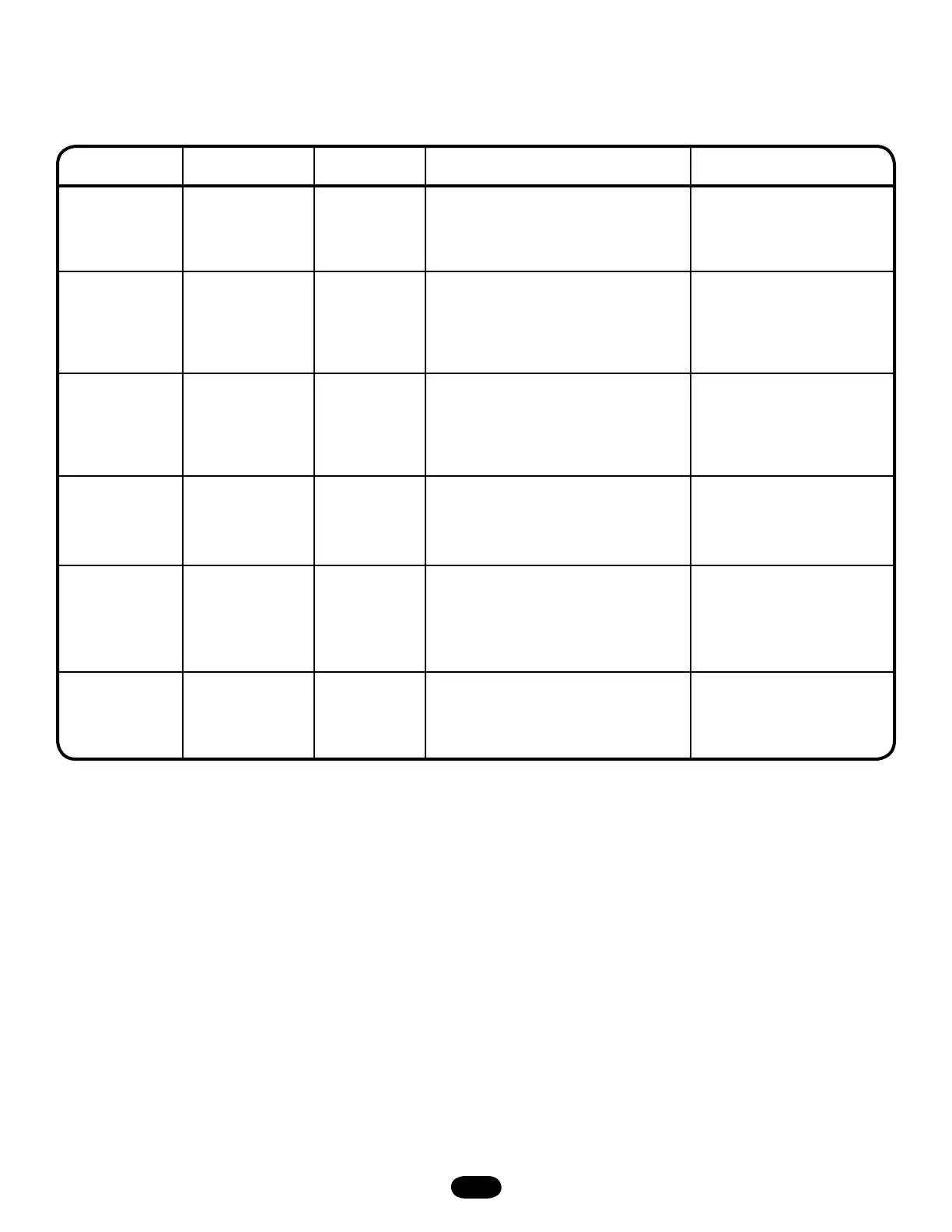
TROUBLESHOOTING RADIO FUNCTIONALITY
The error codes will display at the radio LED.
NOTE: Radio receiver is compatible with 315 MHz remotes.
ERROR CODE SYMPTOM DISPLAY POSSIBLE PROBLEM CORRECTION
R1 No response from
the remote.
Quick Flash Unlearned remote - A user tries to use a
remote, but the RADIO LED only flashes
briefly and there is no response from the
operator.
Try re-learning the remote
(page 18).
R2 No response from
the remote.
No LED
activity
Cannot recognize remote - A weak signal
caused by a discharged battery or outside
interference with the radio - OR - the radio
being learned is not compatible with the
operator.
Replace battery - OR -
eliminate interference - OR -
obtain a qualified remote.
R3 The remote
cannot be learned.
Radio LED
turns off after
30 seconds
Cannot recognize remote - A weak signal
caused by a discharged battery or outside
interference interfering with the learn
process - OR - the radio being learned is
not compatible with the operator.
Replace battery - OR -
eliminate interference - OR -
obtain a qualified remote.
R4 The remote
cannot be learned.
2 Blinks No free records - A user enters RADIO
function learning mode but there is no
space left to add another remote.
Erase all learned remotes and
re-learn the desired remote.
R5 The remote
cannot be learned.
3 Blinks Duplicate remote - A user enters RADIO
function learning and selects the function
to be learned. When the remote button is
pressed for learning, a search reveals that
remote is already learned.
This remote already has a
function associated with it. To
change the function, erase all
learned remotes and re-learn
the desired remote.
R6 Cannot close via
constant pressure
in C2, D1 or E2
modes.
IR LED flashes No safety device present - A safety device
is required to close via constant pressure.
Obtain direct connect eyes or a
CPS3 device - OR - change to
a mode that does not require
constant pressure.




 To Next Page