28
Troubleshooting
Additional Troubleshooting (Continued)
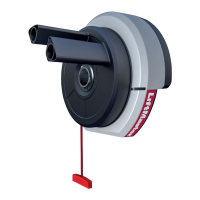
The door operator won't operate due to power failure:
• Disable any door locks. Use the emergency release handle to disconnect the door. The door can be opened and closed manually.
When power is restored, pull manual release a second time.
• When in battery backup mode, battery power will last for 30 hours or up to 20 cycles over a 24 hour period.
Door loses limits:
• Collar not tightened securely. Tighten collar and reprogram limits (see Adjustment Step 1).
The door operator moves when the door is in operation:
• Some minor movement is normal for this product. If it is excessive the collar will wear prematurely.
• Check to make sure the torsion bar is not moving left/right excessively.
• Check to make sure the torsion bar is not visibly moving up and down as it rotates.
• Check that the door operator is mounted at a right angle to the Jackshaft. If not, move the position of the mounting bracket.
Automatic door lock connector will not fit the door operator plug:
Older model 24V door locks are incompatible. Use automatic door lock model 841LM, see Accessories page 30.
The door operator is beeping:
• Indicates unattended closure. The operator has been activated by the myQ App or the Garage and Gate Monitor.
• A solid orange LED with beep, sounding approximately every 2 seconds, indicates the door operator is operating on battery power.
• A flashing orange LED with beep, sounding every 30 seconds, indicates the battery is low.
• A solid red LED with beep, sounding every 30 seconds, indicates the 12V battery will no longer hold a charge and needs to be
replaced.



 To Next Page